If your Overlay Plan is flipped horizontally or vertically (compared to your Base Plan), you can use the Flip tools to correct this.
Flipping a Plan is not the same as a rotating a plan 180 degrees; Flipping is...well flipping the image horizontally or vertically along its center like flipping a pancake.
After we add the Overlay below we see that is Flipped vertically from the Base Plan (sort of like a mirror image) - very simple to fix!
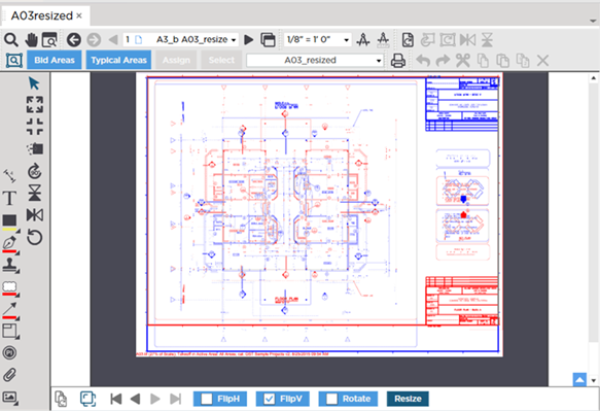
- Click the
 button to flip the Overlay vertically along its central horizontal axis (our issue above)
 - Click the
 button to flip the Overlay horizontally along its central vertical axis
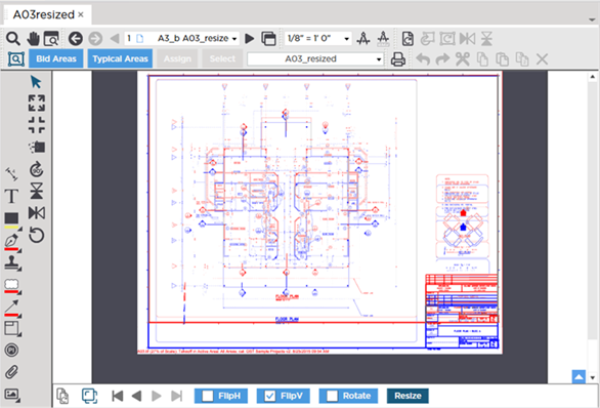
After flipping the Overlay and Base Plans are now oriented the same however the Overlay may still need to be:
- Resized (see next article)
- Aligned (covered later in this section)
If you get to a point where you are have difficulty adjusting your Overlay, click the Reset Overlay button ( ) and start over.
 Overlay Tools - Rotating an Overlay Overlay Tools - Rotating an Overlay | Overlay Tools - Resizing an Overlay  |
Related Articles
