
The Live Link Add-in has been discontinued by ConstructConnect effective 6/1/2023 and can no longer be downloaded or installed. If you are already using Live Link it will continue to function for some time although we no longer provide support for this feature.
After you connect your Bid to Excel, the Takeoff Items and Results are populated in the Live Link panel on the left side of Excel.
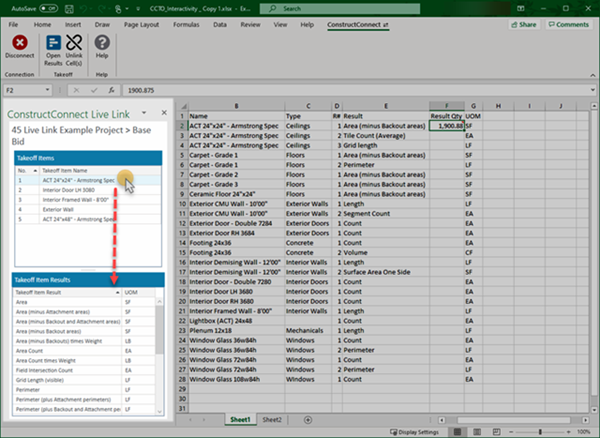
- The upper half of the Live Link panel includes all the Takeoff Items in your Bid.
- The lower half of the Live Link panel populates when you select a Takeoff Item and displays all its Results.
ConstructConnect Takeoff Results vs. Live Link
Very likely the Takeoff Item Results will not be the same order as you see in CC Takeoff. When you create Takeoff Items you select some of the list of possible Results to show on the Takeoff Items Pane in CC Takeoff but when you view the Results list in Excel you see all possible results shown in alphabetically order.
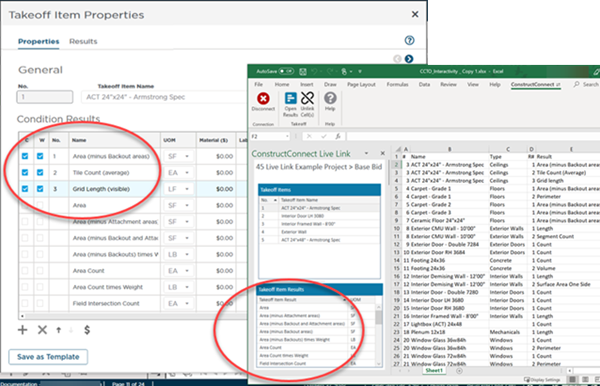
This allows you to create a Live Link for any Result you want for a Takeoff Item without having to enable that Result in Takeoff first.
Next up creating the Live Links that connect the cells in your workbook to specific Takeoff Item Results.
Related Articles