
Creating New Bid
- Cover Sheet
- Load Images
- Auto Add Images
- Insert New Image Page
- Duplicate Image
Image Tab
- Layout / Navigation
- Keyboard shortcuts
- Control key & mouse wheel – Zoom
- Alt key – Pan
- Space bar – Toggle back and forth from Select tool to Takeoff tool
- Setting / Calculating Scale
Performing Takeoff Using Conditions
- Linear Takeoff
- Continuous mode
- Area Takeoff
- Snap Angle
- Count Takeoff
Efficiency Tools
- Copy/paste takeoff
- Duplicating conditions
- Multi-Condition Takeoff
- Reassigning takeoff objects
- Bid Areas
- Takeoff and Worksheet Tabs
- Right-click to group
- Printing and exporting
Review and Maintain Work Pipeline
- Color scheme for due dates
Database Maintenance and Management
- Creating Databases
- Backup settings
- Open Databases
- Size – limited to 40,000KB and lower
- Compact/Repair
- Synchronizing Databases
Settings
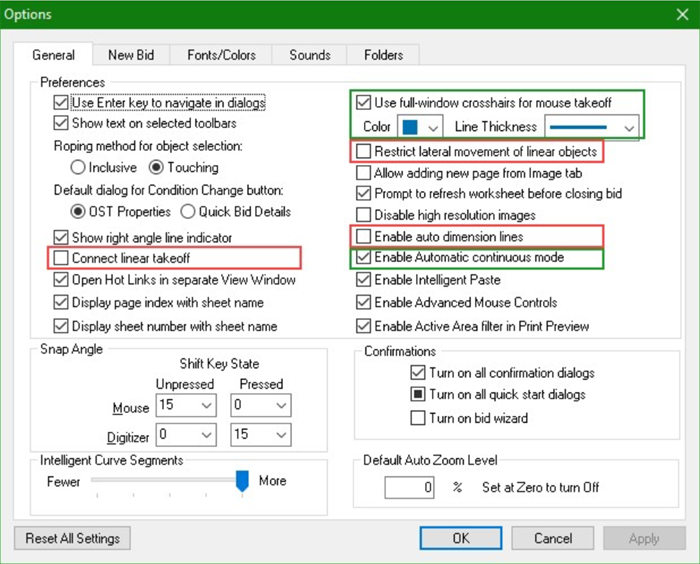
- Click Tools > Options
General tab
- Uncheck “Connect linear takeoff”
- (Optional) Check “Use full-window crosshairs for mouse takeoff”
- Uncheck “Restrict lateral movement of linear objects”
- Uncheck “Enable auto dimension lines”
- Check “Enable Automatic continuous mode”
Additional Resources
- User Guide – press F1 for shortcut to targeted help
- Training Videos
- How Do I?
- Request Support
- Request a Feature
Q&A
Helpful Links
On-Screen Takeoff Training Part 2
https://go.oncehub.com/OnScreenTakeoffCustom
¿Necesita entrenamiento en español?
https://go.oncehub.com/SpanishOnScreenTakeoffCustom
Link to Training Survey
https://www.surveymonkey.com/r/PG6LY8W
American Society of Professional Estimators (ASPE)
https://www.aspenational.org/
Related Articles