Issue
When doing some operations in On-Screen Takeoff in an interactive bid, it takes an extraordinary long time for the programs to finish updating.
Examples
These operations may cause this issue:
- Copying or cutting and pasting >500 takeoff objects at one time
- Changing the takeoff within a Typical Group for which Markers have been placed on >10 Pages or >50 Markers have been placed
- Placing a large number of Typical Group Markers on a Page in rapid succession
- Reassigning multiple takeoff objects from one Condition to another
- Using the Duplicate and Reassign function when a large number of takeoff objects are affected
Other operations that affect a large number of individual takeoff objects may also take the programs a while to finish updating.
Discussion
On-Screen Takeoff doesn't "batch" updates such as those indicated above. It sends each update to Quick Bid, waits for Quick Bid to finish its thing, then sends over another update. If you are affecting hundreds or thousands of takeoff objects, that can take a long time (when we say "long time", we're taking more than 30 seconds, not an eternity).
Resolution
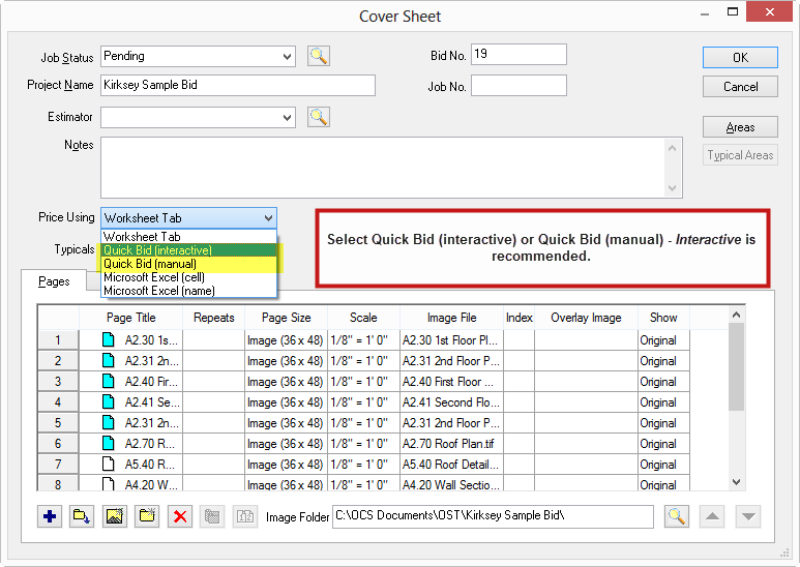
This is actually quite simple to work-around. Simply set your On-Screen Takeoff bid to Quick Bid - Manual Mode, make your changes, and then set it back to "Interactive Mode". When you do this, On-Screen Takeoff does batch the changes and doesn't wait for Quick Bid to confirm every single change. Quick Bid receives all the updates, makes the changes on its side, and then confirms back to On-Screen Takeoff that all is well, all at once.
We recommend you typically keep your bid in "Interactive Mode", these few operations are the exception, not the rule.
Related Articles
