
The Rectangle tool ( ) allows you to draw four connected segments at right-angles to each other with two-clicks. (That is the long way of saying it lets you draw a box.)
To draw a "box" of connected segments:
- Click the button
- Click on any corner from which you want to start the rectangle
- Hold down the mouse button and drag to the opposite corner (in our example we started in the upper-left and dragged to the lower-right)
- Release the mouse button when you have the size rectangle you need
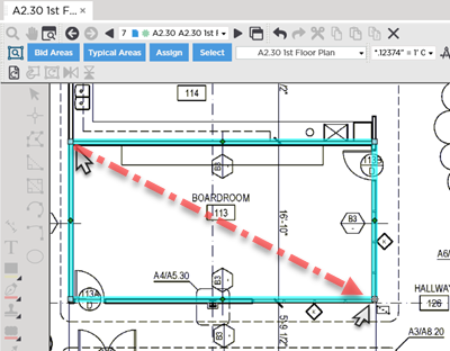
The program does not show the dotted line connecting the two points (like the Right-Angle Segments Tool does explained in the previous article). We added the dotted line to indicate the direction we dragged the mouse. The rectangle is created as you drag the cursor from one corner to the other.
Once completed these four segments are independent - you can move delete or reassign each segment individually as needed.
Before drawing any takeoff you must set and verify Scale see Related Articles.
 Drawing Two Segments at Right Angles Drawing Two Segments at Right Angles | Drawing Curved Linears - Rounded Arc Segment Tool  |
Related Articles
