
Linear objects can be resized using the adjustment controls at either end of a selected object.
Example
When we are zoomed out the piece of takeoff in the screenshot below looks like it matches the Plan note the Results.
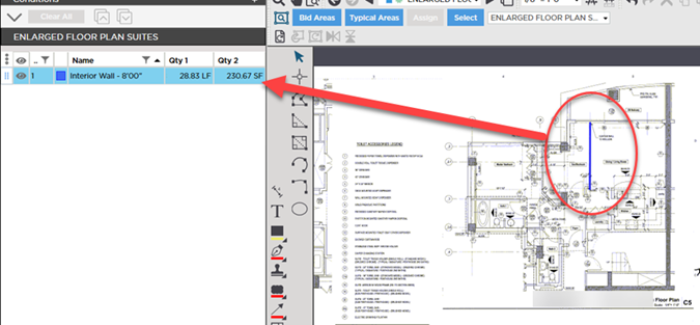
When we zoom in we can see that it is in fact a little longer than the object on the Plan.
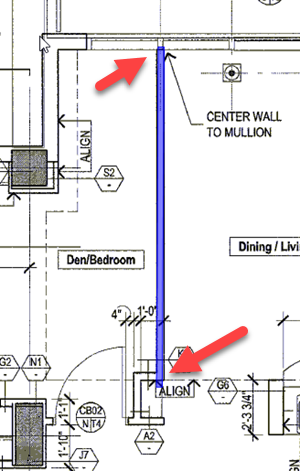
It is true that a minor difference in length doesn't matter so much for small linear takeoff objects but when multiplied throughout a Bid that could affect your cumulative totals significantly. Imagine if you are using Typical Groups or Typical Areas - you could be multiplying a "minor" error to the point it materially affects your takeoff Results.
To resize this linear object
- Click once on the object to select it - notice the resize handles on each end
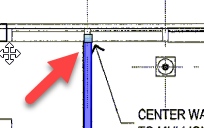
- Click once on the first grab handle and drag it to the correct point
- Repeat for the other end
While you are resizing the cursor becomes the "Resize" cursor  .
.
After you resize your linear object to match the Plan notice the change to your Results.
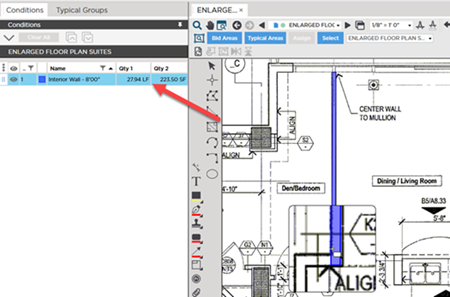
Again a single object probably will not have a substantial effect on your Bid's takeoff results but all those small variances can add up especially if the object is part of a Typical Group or assigned to a Typical Area.
 Resizing and Adjusting Takeoff and Annotations Objects Resizing and Adjusting Takeoff and Annotations Objects | Splitting a Linear Takeoff Object into Multiple Segments  |
Related Articles
