
You can separate a Linear segment into multiple segments using the Splitter tool.
In the example below we took off the wall as a single continuous line, but realized we needed four separate linear segments.
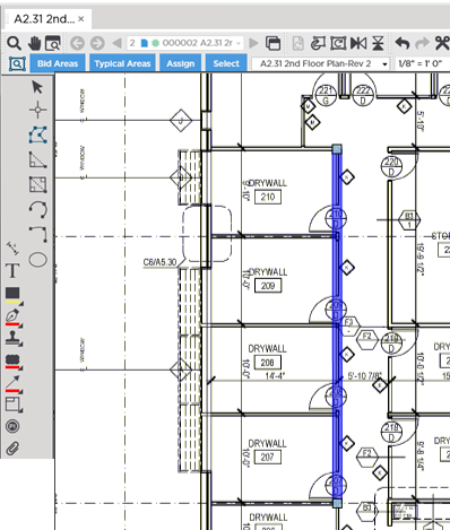
We could delete the object and start over it but that wastes time. Instead we use the Splitter tool command to separate the single linear object into separate segments.
To split a Linear takeoff object:
- Click the
 button on the Takeoff Tools toolbar
 - Select the object you want to "split"
- Press Ctrl + S on your keyboard - the cursor changes shape to a pair of scissors
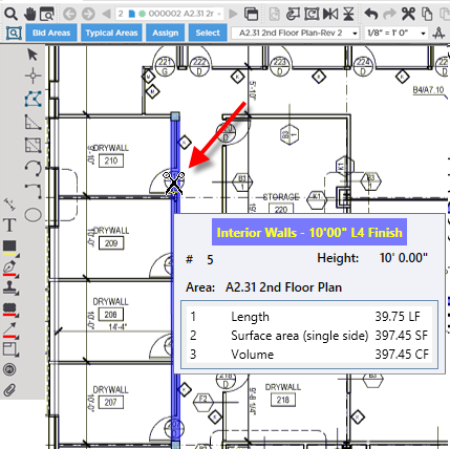
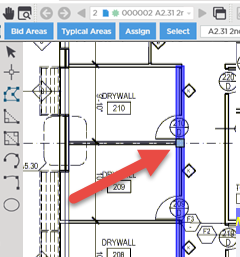
- While holding down Ctrl + S click where you want to break the segment into two segments
- Repeat for other segments
The newly separated segments can be moved edited or deleted independently.
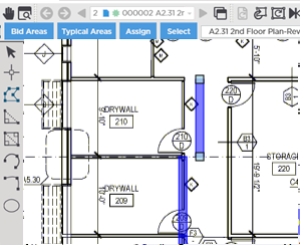
Once separated before you do anything else you cannot stitch the segments back together using Ctrl Z (or click the  button). If you lose the ability to "undo" splitting just delete one of the segments and then lengthen the remaining segment see previous article for details on resizing a Linear takeoff object.
 Resizing Linear Takeoff Resizing Linear Takeoff | Resizing Area Objects  |
Related Articles
