
The Image Legend is an important informational element that can be viewed and printed on your plans. It shows every Takeoff Item used on a particular page and the Item's results (per page).
Selections made here are applied to all new bids going forward, existing bids are not affected. To change these settings on an existing bid, select the Image Legend icon on the main Takeoff toolbar - the same options are available there.
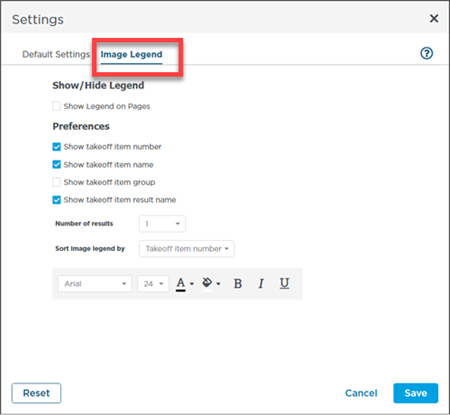
| Option | What it does/How it is used... |
|---|---|
| Show Legend on Pages | Show/hide the Image Legend. Default: Unchecked |
| Show Takeoff Item number | When checked shows each Takeoff Item's number in the Image Legend. Default: Checked |
| Show Takeoff Item name | When checked shows each Takeoff Item's name in the Image Legend. Default: Checked |
| Show Takeoff Item Group | When checked shows each Takeoff Item's Group in the Image Legend. Default: Unchecked |
| Show Takeoff Item result name | When checked shows each Takeoff Item's result name in the Image Legend. Default: Checked |
| Number of results | Choose how many takeoff item results are shown in the Image Legend. Default: 1 |
| Sort Image Legend by | Select how the Image Legend is sorted (by Takeoff Item name number or Group). Default: Number |
| Text appearance | Adjust the font font size text color background color and use of bold italics or underline. Default: Arial 24-pt font black text white background |
That's it! You've reached the end of the ConstructConnect Takeoff User Guide, Congratulations!
 Settings: Snap Angle, Crosshairs, Roping Method, Add-in, and Takeoff Object Details Settings: Snap Angle, Crosshairs, Roping Method, Add-in, and Takeoff Object Details |
Related Articles
