
When you add costs to the Equip, Subs, or Other Tabs (by inserting an Equipment or Other Assembly or adding a row), the costs are allocated (assigned), by default, to the "Unassigned" Bid Area. That's OK, but if you want to allocate those expenses to various Bid Areas, Quick Bid provides options for assigning to one or multiple Bid Areas.

Assigning Subs, Equip, and Other Costs to Bid Areas
To assign the entire amount to a single area,
- Click the Lookup button in the Area column
- To spread the cost over multiple Areas, click the "Multi" checkbox, the Multi-Area dialog opens (Equip Multi-Area is shown below, the Subs and Others dialogs are functionally the same).
- Enter values for each Bid Area to allocate costs however you choose
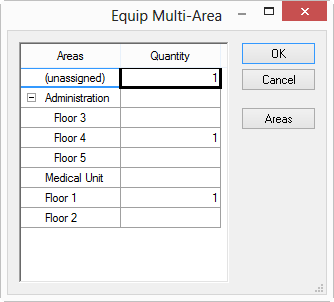
Once the Multi-Area dialog box is filled out, the Qty column no longer accepts direct entry but shows "Multi" - clicking on "Multi" opens the Multi-Area dialog again.
Anything not assigned to a specific Bid Area remains as "Unassigned".
 Making Adjustments to Equipment, Other, and Subs Expenses and the Overall Selling Price Making Adjustments to Equipment, Other, and Subs Expenses and the Overall Selling Price | Setting the Selling Price for a Section  |
Related Articles