
If you have On-Screen Takeoff installed on your computer, you already have the components of Digital Production Control (DPC). For instructions on installing the product, see OST 3.98 - 01.01 System Requirements and Installation Instructions.
You must activate Takeoff and DPC-Project Manager licenses or a DPC-Foreman license to use the Digital Production Control.
Licensing Digital Production Control
If you need assistance with licensing your software, please contact Support
Do you have a License Key or a Server Code?
There are two ways for your company to distribute the product licenses it owns:
- A License Key looks like this: "DPC+a0fe3-d4848-3840b-6a6c8-fe068" (25 characters, separated by hyphens, with a Product Prefix). License Keys can be single-seat (one Key per person) or multi-count (one Key for multiple people). Each Product you own would have a separate License Key issued (if you own 10 On-Screen Takeoff, 10 Quick Bid, and 10 Digital Production Control PM licenses, you may be issued three keys, or thirty, depending on how you choose to setup your licenses).
- A Server Code looks like this: "DPM@98A8PGZA493Z" (shorter, no spaces or hyphens, with a Product prefix and an "@" symbol). A Server Code is a cloud-based license manager for a single product. All your licenses for a single product would be setup under one Server Code - so if you own three products, your company would be issued three Server Codes so you can control who is able to license which Products.
When Digital Production Control is not authorized, a message in the bottom right corner of the program shows "FREE PlanViewer". After activating a license, this area shows which licenses have been applied (OST, DPC_FM, DPC_PM, or any combination thereof).
The screenshots below show On-Screen Takeoff, however activating Digital Production Control Project Manager and Foreman licenses follow the same steps.
Feature Sets
There are two feature sets available for Digital Production Control:
- DPM - Digital Production Control Project Manager, this license permits full control over a DPC project. A Project Manager is able to send/receive DPM Bid Packages, add/modify takeoff, add/modify Change Orders, and modify production (Digital Production Control labor pricing). This license must be used in conjunction with a full On-Screen Takeoff (tko) and Quick Bid (est) license and you must have Quick Bid installed on your computer.
- DPC - Foreman, this is a field license that allows the user to set percent complete, input time, and send DPC Changes. They are also able to receive a DPM Bid Package from the Project Manager but they cannot create complete bid packages. They are not able to modify takeoff or pricing so the DPC Foreman does not need a takeoff (tko) license nor do they need Quick Bid or an estimating license. The DPC Foreman license has limited functionality but operates entirely on its own.
Activating Your License
Anytime you open the product when it doesn't have a license, you will be greeted by the Welcome prompt (also called the Licensing Assistant):
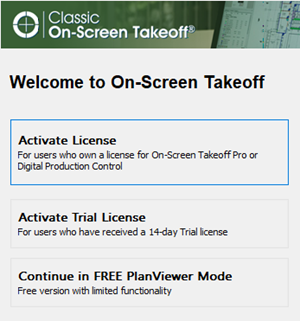
- Select Activate License, or,
- If the program is already open, click File > Check Authorization to open the License Activation dialog box.
See On-Screen Takeoff, Quick Bid, and Digital Production Control: Activating a License for detailed instructions.
Common Reasons for Authorization Failure
- Incorrect License Key or Server Code (we recommend you copy/paste - rather than trying to type these in - if possible)
- Incorrect or unresolved Server Name - try the Server's IP address
- Missing Port information after Server Name/IP address - you must enter it like this: ServerName:7070 (that's <server name> colon <port #>)
- No Internet connection (always required to activate License Keys or Server Codes)
- Firewall blocking network communication (see Related articles for more information on configuring your firewall)
- Attempting to activate a License Key for a different product (you cannot activate a Quick Bid license through On-Screen Takeoff and vice versa)
- Attempting to activate an old "Activation Key" for versions released prior to 12/31/2017 - check MyOnCenter.com for your up-to-date keys
If you have any problems activating your software, review Licensing Issues. If you still are unable to license your software, please contact Support. Have your customer information and License Key or Server Code handy.
Next, we'll look at the DPC Fast Track to get you started as quickly as possible.
 Before You Dive In Before You Dive In | DPC Quick Fast Track and Quick Start Guides  |
Related Articles