

ConstructConnect’s content team is responsible for researching and ensuring that the project information in Project Intelligence is accurate. Occasionally, however, information becomes out of date, such as when companies move, a project addendum is newly added, or a general contractor changes a bid date. In these and other instances, the Report a Data Issue button is particularly useful as a means of hearing directly from our customers.
The Report a Data Issue is located at the top of the Project Details Page for a subscription project (shown below).

When you click on the button, a flyout window appears on the right side of the screen. Here, you can select a reason for providing your feedback; a brief description of why you think the information shown is incorrect; and a phone number to have a member of our content team contact you with any updates or to address your questions as needed (optional). Click the Submit button when you are finished.
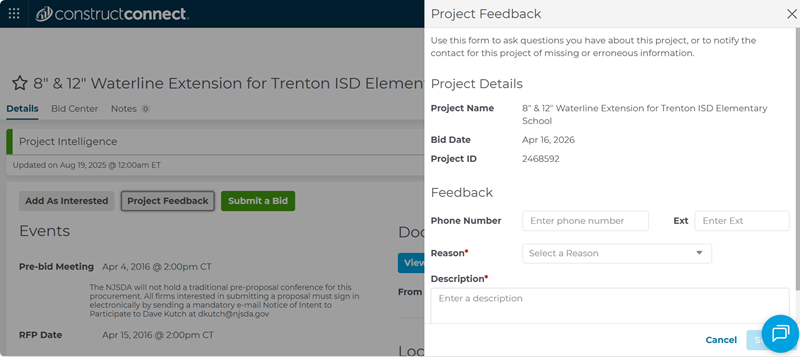
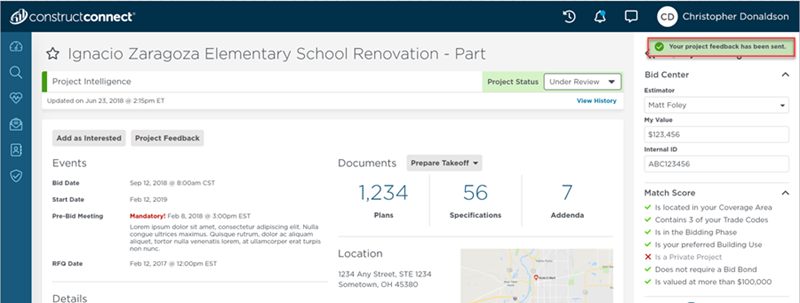
Your feedback will then be delivered to the content team. A message will display, indicating that your project feedback has been sent to our team for review and further research or follow-up, if needed.
If for some reason the submission fails, you will see a failure message that says “Your request to provide project feedback was not successful, please try again.”
Watch this video to see how the Project Feedback button works.
Related Articles
