
To take advantage of these Takeoff Boost™ improvements, you must be using On-Screen Takeoff v.4.0.0.288.
See the On-Screen Takeoff Product Information and Download Page for more information.
Improvements
Out of Scope Area Detection
When running Net Area or Ceilings takeoff, Boost now identifies hatched areas and creates a separate condition for them. Active work areas remain in their own conditions as usual. This happens automatically with no additional setup required.
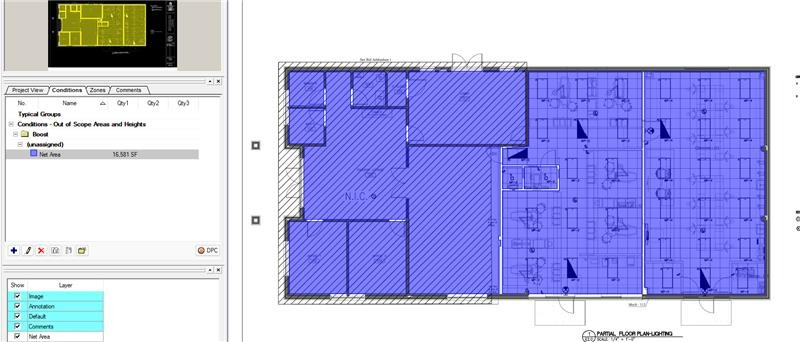 |  |
| Prior to this update, Takeoff Boost took off out of scope areas with the same Condition as in-scope areas | After this update, out of scope areas use a unique Condition that can be deleted easily if not needed. |
Out of scope area detection is not supported on finish plans at this time.
Why Out of Scope Area Detection Matters
On renovation and addition projects, the floor plan shows the entire building, but work is only being done in part of it. Areas where no work is being done (typically existing structures) are usually hatched out on the plan to indicate they are out of scope.
Previously, Boost didn't differentiate between these hatched areas and active work areas. Everything was included in the same conditions, forcing estimators to manually sort through and delete each out of scope area. On a large renovation plan, that could mean dozens of areas to find and remove.
Now, Boost identifies hatch patterns on the plan and automatically separates out of scope areas into their own condition. The takeoff is still performed on those areas, but they're grouped together in a separate condition, making it easy to select and delete them all at once.
Double Wall Detection
In construction, "Double walls" refer to a method where two parallel stud walls are built next to each other, forming a wide wall cavity that can be filled with insulation. This construction technique is known for its ability to provide better insulation and soundproofing compared to single wall construction. Example: two walls that are made of different materials that are next to each other.
 |  |
| Prior to this update, Takeoff Boost took off one wall in the highlighted section | After this update, both wall types are identified and taken off. |
Why Double Wall Detection Matters
This saves the estimator time.
Improved takeoff results. Less time to complete takeoffs. Time back in your schedule.
Related Articles