
To take advantage of these Takeoff Boost™ improvements, you must be using On-Screen Takeoff v.4.0.0.288 or newer.
See the On-Screen Takeoff Product Information and Download Page for more information.
Improvements
Takeoff Boost now supports default wall heights, automatically applying a user-specified height to all wall conditions when running Walls or Painting takeoff. Painters using reflected ceiling plans (RCPs) get an added bonus: Boost reads height callouts from the plan and uses the detected height, only falling back to the default for rooms where a height isn't found.
Default Wall Height
A new Default Wall Height option appears in the Takeoff Boost dialog under Linears Options. Check the box, enter your desired height, and Boost applies it to all wall conditions. The height is applied both as a field on the condition and in the condition name (e.g., "Wall Type A, 8' High").
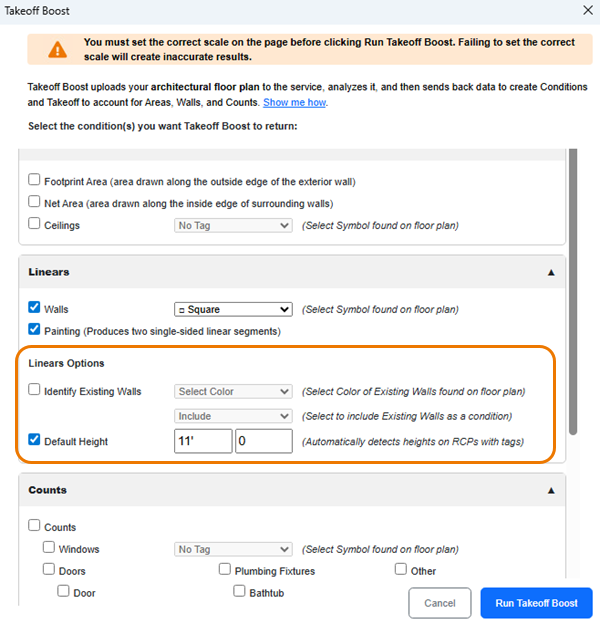
This option is available when using either the Walls or Painting linear takeoff options.
Why Default Wall Heights Matter
When estimators run Boost for walls, every wall condition comes back without a height. That means manually entering the wall height on each condition after the takeoff runs. For a plan with dozens of wall types, that's a lot of repetitive data entry.
Now, estimators can check the Default Wall Height option and enter their desired height (e.g., 8') before running Boost. The height gets applied to every wall condition automatically and shows up in the condition name itself, so you can see it at a glance without opening each condition.
This has been one of the most requested features from contractors using Boost for wall takeoff.
Automatic Height Detection (Painting on RCPs)
When using the Painting option on a reflected ceiling plan with Default Wall Height enabled, Boost reads height callouts from the plan. Detected heights override the default, giving painters accurate per-room heights automatically.
For example, if a painter sets a default height of 8' and a room on the RCP shows 10', Boost will use the 10' height for that room. The 8' default only applies to rooms where Boost can't find a labeled height.
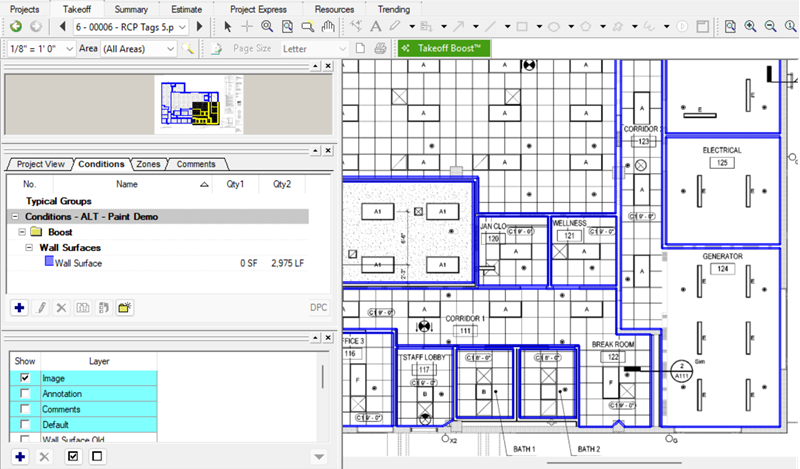 | 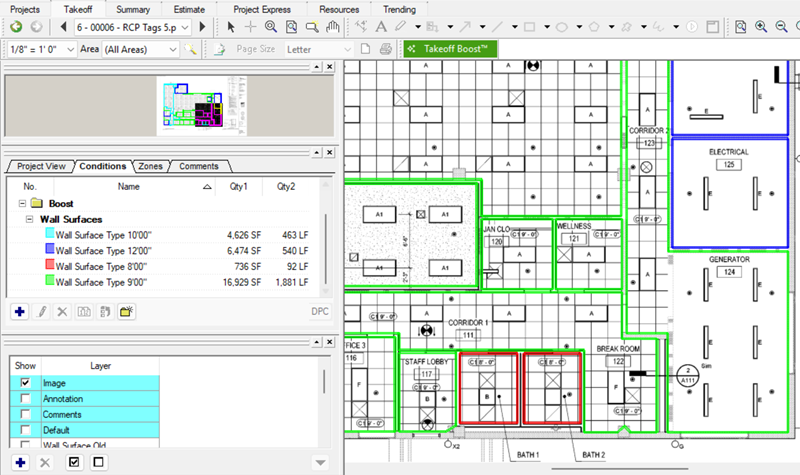 |
| Prior to this update, Takeoff Boost did not assign a height to wall takeoff and all walls on the RCP were returned as a single Condition. | After this update, heights are detected and individual Conditions are created for each different wall height. |
Why Automatic Height Detection Is a Game-Changer for Painters
For painters doing wall takeoff on reflected ceiling plans, Boost now goes a step further. RCPs often include room heights labeled directly on the plan. When using the Painting option on an RCP with a default height set:
- Takeoff Boost detects room heights from the plan and uses them automatically
- Where heights aren't detected, Boost uses the default height specified
This means painters get accurate heights broken out by room without any manual work. The automatic detection only applies when using the Painting option on a reflected ceiling plan. For drywallers using the Walls option on a floor plan, only the default height is applied (no automatic detection).
If you are a painting contractor and perform your wall takeoff somewhere other than the RCP (e.g., the finish plan), we encourage you to try doing performing your takeoff on the Reflected Ceiling Plan instead. The automatic height detection is a significant time-saver and gives you height breakouts not found on the finish or floor plans.
Related Articles