
Issue
When you double-click the shortcut on the desktop  or click the
  button in the ConstructConnect Live Link Ribbon Bar in Excel nothing happens.
Discussion
Check your Internet settings.
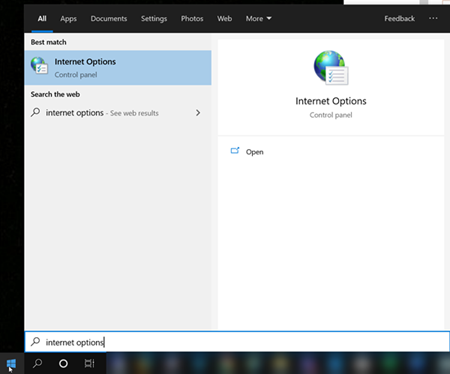
Click the Windows start button and type "Internet Options".
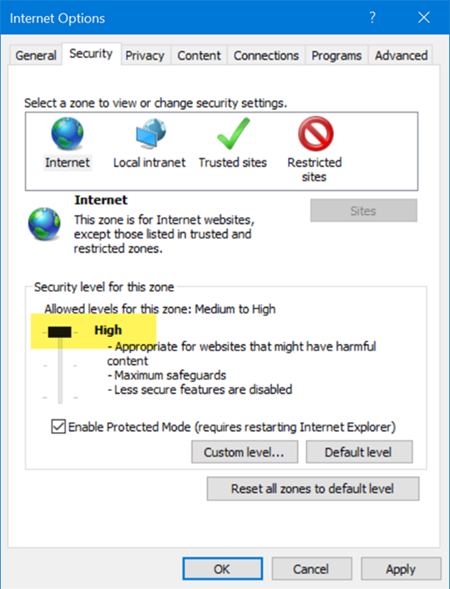
On the Security tab if your Internet Security Level is set to "high" ConstructConnect may not launch and the Projects and Bids List may not open from Excel when using Live Link.
Resolution
There are two resolutions:
Short-term
First lower your Security settings to Medium-High or lower even if only while using ConstructConnect Takeoff.
Long Term
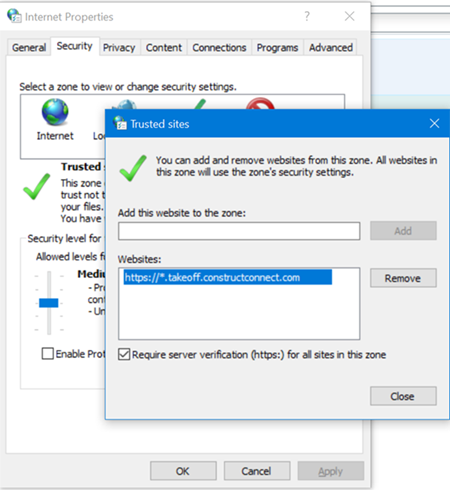
- Click on the Trusted Sites icon
- Then add "https://*.takeoff.constructconnect.com" as a "Trusted Site"
If you are unable to make these changes your IT department or Network Administrator may have locked-down your computer for security reasons. Please contact them for assistance.
Related Articles