Issue
After using Copy/Paste on takeoff once, the options become greyed out.
Discussion
A bug exists between On-Screen Takeoff and the Windows Clipboard that prevents On-Screen Takeoff from accessing it when it is already populated with data.
This issue seems to affect users operating in an Citrix environment more often than standalone installations, and seems to affect version 3.98.04.05 and newer.
Resolution
The work-around is to clear the Windows Clipboard manually.
To delete clipboard history (clear the Clipboard), you'll use Window's Settings utility.
- Open Settings
- Click on System
- Click on Clipboard
- Set "Clipboard History" to "Off"
- In the "Clear clipboard data" section, click the Clear button
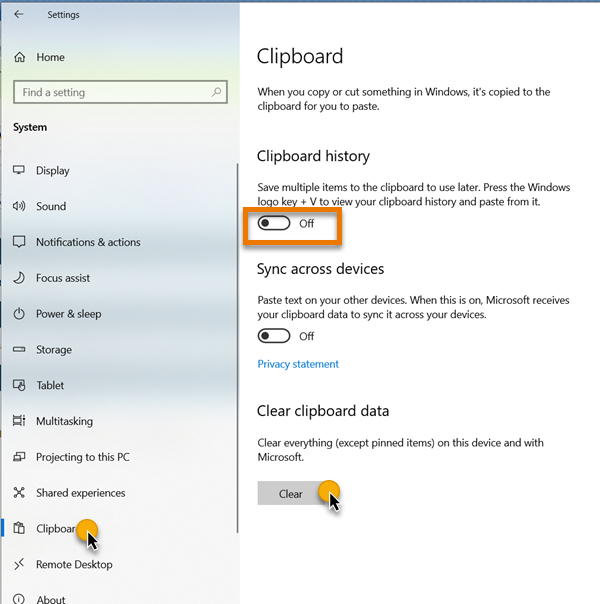
Keep this utility open because you may have to clear the Clipboard's content each time you use Copy/Paste.
Related Articles
