Problem
You've noticed one or more of the following issues with a bid or database:
- Crashes during export (ost, osp, or dpm packages)
- Navigating between Tabs causes On-Screen Takeoff® to crash
- Selecting a specific Project causes On-Screen Takeoff to crash
- Other random, odd behavior
Discussion
There may be corrupt/incorrect "FontName" entries in one or more tables in the database.
Resolution
This solution requires you to edit your database directly. If you do not feel confident in doing this or do not have the necessary tools available, please contact your IT Department or SQL Administrator. Improper changes to your database can render it unusable, and you may not be able to recover your data.
Be sure to backup your database before attempting to open or edit it!
Using the appropriate tool (Microsoft Access or Microsoft SQL Management Studio), open the database and review the following tables:
- BidTakeoff
- BidLegend
- BidConditions
- BidText
- BidDimension
Look for any FontName entry that contains non-alpha characters such as shown below:
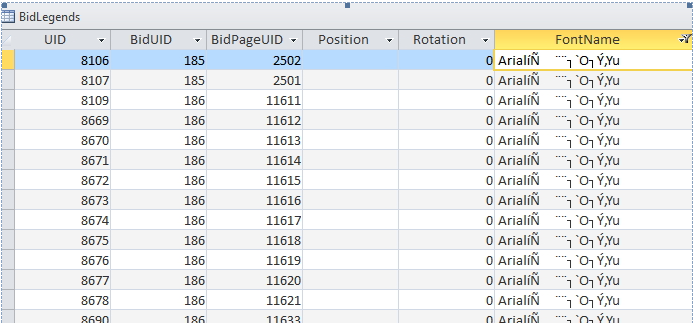
Edit these records and change the font name to "Arial" (you can use CTRL+H on a column (Field) and update them all at once).
Related Articles
