The “Enable Manual Activations” checkbox in the license manager has been hidden so that it is no longer available to the user. Manual Activation may still be enabled through U-T-H Settings.
To enable manual activation:Enable U-T-H (Under the Hood)
-
Select U-T-H from the main menu, right click on “Settings” and select “Properties”
See Related Article for instructions on enabling UTH functions.
-
In the Properties Form, click the “Advanced” button
-
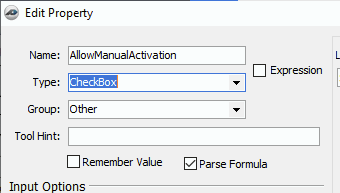
In the “Other” section, near the bottom (before “Sales Tax 1” and “Sales Tax 2”), look for a property named “AllowManualActivation“
-
If this property exists, check the checkbox to set its value to “True”
-
If this property does not exist, create a new property called “AllowManualActivation“, with a Type of “Checkbox” and a Group of “Other”
-
Save the new property and then check the checkbox to set its value to “True”

-
Manual activation should now be enabled
Related Articles
