Issue
When you click on the Markups Tab, Quick Bid either shuts down unexpectedly or freezes or the Markups Tab does not display correctly.
Discussion
There is a specific file installed, named "mschrt20.ocx", dated 5/22/2000, Quick Bid requires to build the Markups Tab graph. This file may have been updated to a newer version that Quick Bid does not support. This happens when some program (other than Quick Bid) does not install its own, newer copy of that file but overwrites the existing file with a newer copy (some installers are not built properly - a shared file should never be overwritten by a newer version).
Resolution
You can simply re-install Quick Bid, that should correct the problem.
Now, a caveat. If whatever software you installed that overwrote the original file is as dependent on "their" version of that file as Quick Bid is on its, either of these solutions may cause the other program to stop functioning. On Center does not keep an inventory of such programs so you will have to do a little investigative work on your end to figure out what was installed after Quick Bid and could be affected by these changes.
Issue
Markups Don't Match and C++ Error Generated When Deleting Conditions
AND/OR
When you try to delete a Condition from the Conditions Tab, Quick Bid generates an error and/or crashes
AND/OR
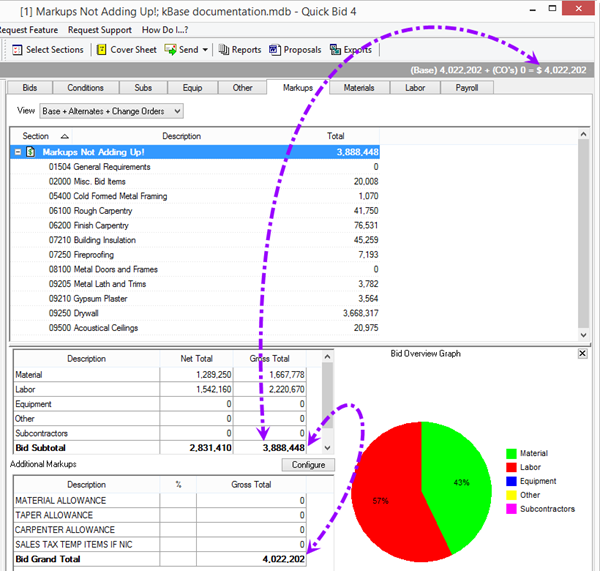
Your Bid Total's do not match when viewing the Markups Tab:
Discussion
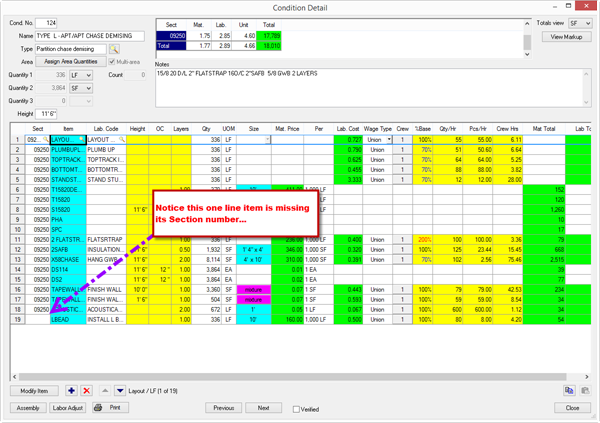
This behavior occurs when one or more Conditions include line Items that are missing the Section Number:
Resolution
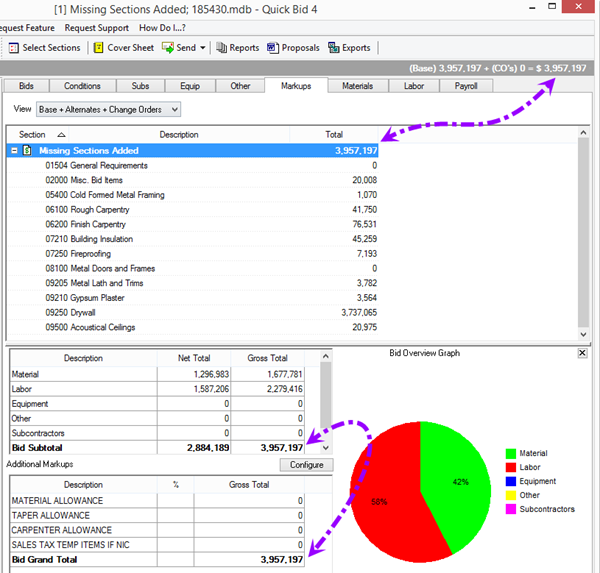
Review every Condition to ensure that every Item include a Section number, then check the Markups Tab (or try to delete a Condition).
Related Articles
