

What is Takeoff BOOST and Who has Access to it?
What is Takeoff BOOST?
Takeoff BOOST is a suite of AI-Powered tool that automate takeoff and project setup. Depending on what version of On-Screen Takeoff you are using Takeoff BOOST includes:
- Auto Takeoff: AI-assisted Auto Takeoff for On-Screen Takeoff that can get your bid off to a great start by eliminating up to 95% of the time it takes to draw manual takeoff. Takeoff Boost can increase your team’s productivity and efficiency and gets you 80% done in minutes. Takeoff Boost’s Auto Takeoff feature uses AI technology to return area, linear, and item counts with the click of a button. (This feature was previously named “Takeoff Boost”, it is now named “Auto Takeoff” as “Takeoff Boost encompasses all AI-Powered tools.)
- Auto Count: An extension of Takeoff Boost’s AI-Powered takeoff skills and allows you to count literally anything on your plans. (Not available in versions that use License Keys or Server Codes to activate a license.)
- Auto Link: Creates links to details between Pages automatically using either embedded link information or AI-Powered analysis. What used to take hours, if not days, to get done manually now takes seconds. (Not available in versions that use License Keys or Server Codes to activate a license.)
- Auto Name: AI-powered Auto Name updates your Sheet Numbers and Names automatically, no user input needed. (Versions that use License Keys or Server Codes to activate a license use an older version of Auto Name that requires you to indicate where the Sheet No. and Name exist on the plans).
Do I have Access to Takeoff BOOST?
- All subscription’s (you log into On-Screen Takeoff with your e-mail address and a password) include full access to Auto Count, Auto Name, and Auto Link.
- If you use a License Key or a Server Code to “activate” On-Screen Takeoff, you can use the version of Auto Name where you indicate where the Sheet No, and Name are on the plans, and depending on your maintenance tier, you can access Auto Takeoff (named Takeoff Boost in the older versions of On-Screen Takeoff).
Do I have Access to Takeoff BOOST’s Auto Takeoff?
- If your company is on Premium Maintenance or an Core or Professional subscription - you have full access to Auto Takeoff.
- If your company is on Advanced Maintenance or an Essential or Plus subscription you can run Auto Takeoff a limited number times (you can always upgrade to unlock unlimited access to Auto Takeoff).
- If your company is on Standard Maintenance or a Trial of On-Screen Takeoff, you can request a trial of Takeoff BOOST and run it for a limited number of days.
How do I Get Takeoff BOOST?
You’re going to love Takeoff BOOST, but first, you need to get your hands on it, right!
Don’t worry, we’ll walk you through the process.
- First, make sure you are using the most current version of On-Screen Takeoff,
- If you use a License Key or Server Code to activate your software, get it here: On-Screen Takeoff® 4.0 (license keys/server codes) Product Information and Download.
- If you log into On-Screen Takeoff with your email address and a password, get it here: On-Screen Takeoff® (login with email address) Product Information and Download.
- Follow the installation instructions on that page to download and install the application.
- Next, open On-Screen Takeoff and activate your takeoff license or log in. (If you are not sure what your License Key or Server Code is, contact your manager or system administration - they should have it. If you are the manager or system administrator, you can access your licenses in the Customer Portal.
- Create a new Project or open an existing Project by clicking on the Takeoff Tab.
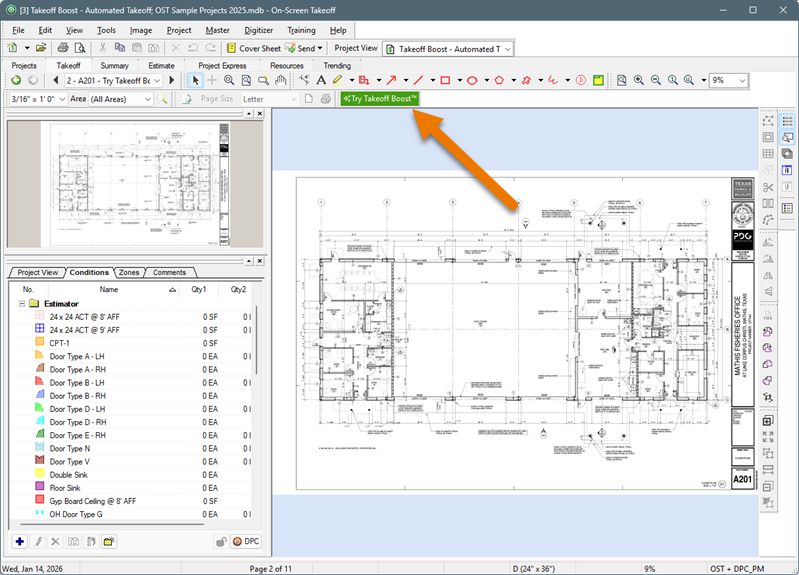
- Enter your email address
- Click the Start Takeoff Boost Lite button (Advanced Maintenance) or Start Takeoff Boost button (Standard Maintenance and Trials)
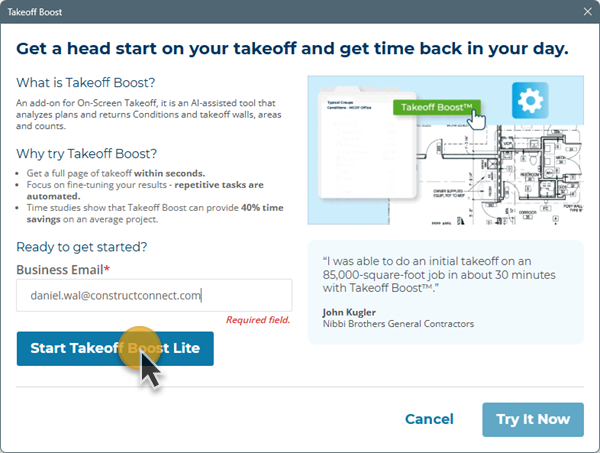
Takeoff Boost Lite activation Step 1
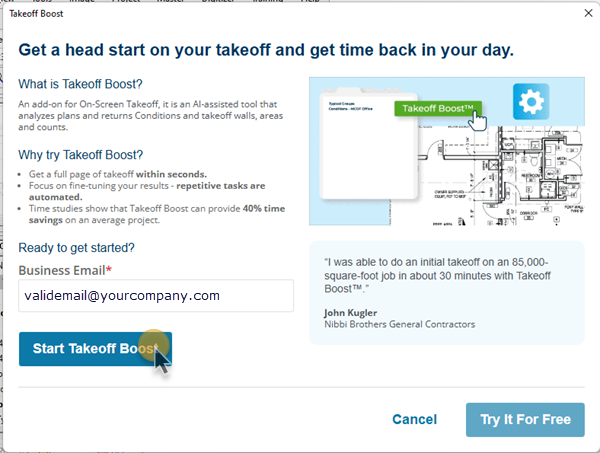
Takeoff Boost activation Step 1 (for Standard Maintenance and Trials)
- Then, click the Try It Now button
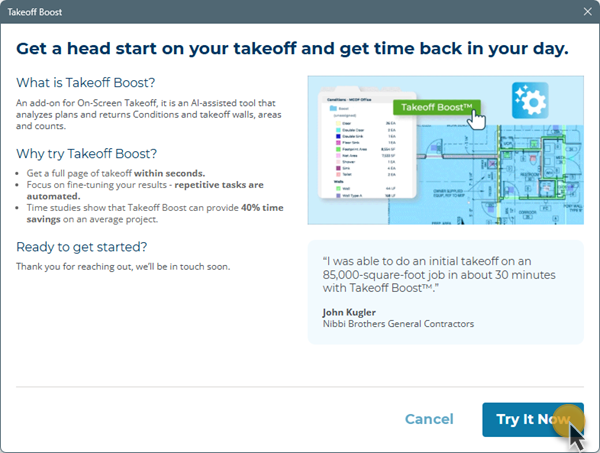
After a moment or two, you'll see the confirmation screen.
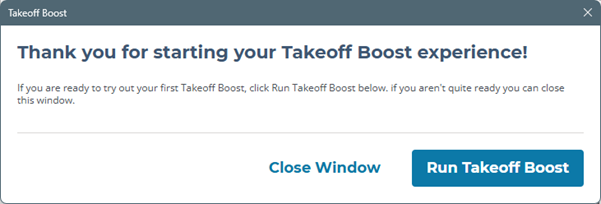
- Click Run Takeoff Boost to continue
For detailed instructions on using Takeoff Boost, see: On-Screen Takeoff - 06.02.01 - Takeoff Boost™ - Overview and Requirements.
