

A Punch List is generally considered a "To Do" list for a construction manager indicating work items that must be addressed before the project can be considered completed. ConstructConnect Takeoff's Punch List allows you to create Punch Items and place them on your plans to track where these remaining work items are and their current status.
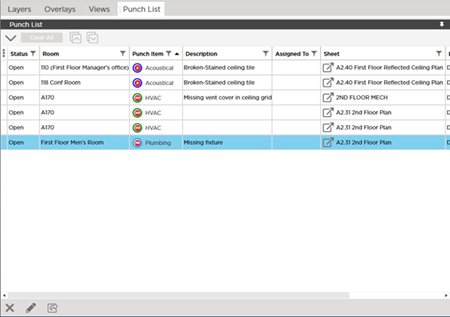
As you can see there are quite a few columns to show - we have already made this Pane about twice as wide as usually and there are more. The easiest thing to do is undock the Punch List list then you can resize the undocked list so you can see all the columns. See Related Articles for details about undocking panes.
We also cover creating and managing Punch List Items including filtering and exporting the list in Related Articles.
Punch List Toolbar and Shortcuts

| Keystroke | Button Equivalent | What it does/Description... |
|---|---|---|
| Delete or Del |  | Deletes the selected Punch List Item(s). This permanently deletes the Punch List Item(s) and all history and attachments (photos) from the current Bid for all users. This action cannot be 'undone'. |
| Enter |  | Opens the Punch List Item details for the selected item. |
| Ctrl + G | Opens the Sheet on which the Punch List Items exists and puts that Punch Item in focus. | |
 | Exports the Punch List as filtered to an Excel file. |
 The Views Pane The Views Pane | Opening the Cover Sheet from the Takeoff Tab  |
Related Articles
