

The Typical Group panel is where you add, modify, and delete Typical Groups. A Typical Group is an assortment of takeoff objects that occur together repeatedly in your project. Typical Groups can be anything such as the takeoff associated with specific room or suite type a unit or apartment type or even common restrooms or elevator lobbies that occur on multiple floors or locations within a project. We cover Typical Groups in Related Articles.
As explained in Related Articles, the main difference between Typical Areas and Typical Groups is that you see all the takeoff when using Typical Groups. Typical Areas is simply a multiplier allocating results to different Bid Areas - you won't see the takeoff except the one place where it is drawn and assigned to the Typical Area.
Typical Groups allow you to draw the original takeoff once and then draw a box around that takeoff to define what the Group includes (we call that box a Typical Group Frame). Once you have "defined" the Typical Group you go through the Pages of your project and place a Typical Group Marker everywhere this group occurs rather than manually drawing the same takeoff repeatedly. You can choose to show a representation of the Typical Group takeoff at each Marker (for printing...) or just show the Marker to keep you plans clean.
After your initial pass doing takeoff for your bid if you need to make a change to the takeoff within a Typical Group you go back to the Typical Group Frame and change the takeoff once. The program updates the takeoff at every Typical Group Marker anywhere in the bid.
Typical Groups are an enormous time-saver when you have to account for the same takeoff numerous times throughout your bid.
Typical Groups can be used separately or in conjunction with Typical Areas, see Related Articles for details.
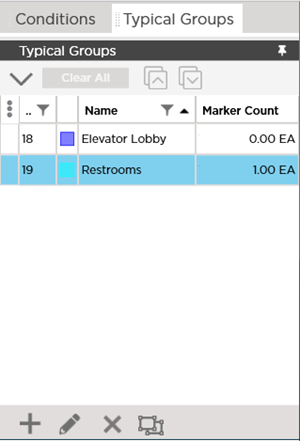
The Typical Groups Pane shows you all the Typical Groups created in this bid and how many Counters for each Typical Group exist on the active/current Page.
To see cumulative totals for the number of Typical Groups placed on every Page in the bid or to see the grand totals of all takeoff extended out for all Markers placed in the bid, check out the Summary Tab (see Related Articles).
 Takeoff Items Pane Context Menus Takeoff Items Pane Context Menus | Typical Groups Pane Toolbar, Context Menu, and Keyboard Shortcuts  |
Related Articles
