

When you add or edit a Plan Set the image files are converted to TIFs for use in the application (and sharing to other Takeoff users) and those TIFs and the original files must be uploaded to the Takeoff Cloud servers. The person adding the Plan Set can see the plans before they are uploaded because he or she has the original converted TIFs on his or her computer. Other users accessing the Project cannot see the Plans until the upload completes.
The program uploads new Plans/Plan Sets and updates in the background so you can use the program right away. You can check the status of the upload by looking at the bottom of the Projects and Bids List.
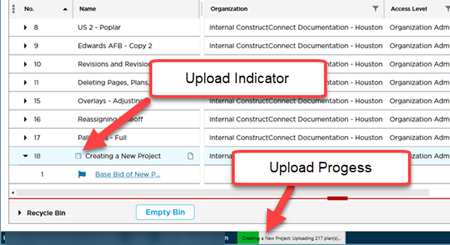
Uploading Plans can take several minutes depending on the number of Plans being uploaded your internet connection speed the complexity/dimensions of the plans and the original files' size. During this time you can access this Project/Bid although program responsiveness may be a little slower than normal as the program uploads your Plans in the background. Also while the program is uploading Plans they may not be viewable on the Takeoff Tab.
Anytime you make changes to the Plan Organizer Plans may be uploaded to the Cloud - it all depends on what you do to the Plan Set/Page/Plans.
If the program closes for any reason during the upload progress it does not resume the upload automatically - review the next article for details.
 Deactivating Plan Sets Deactivating Plan Sets | Resuming Interrupted Plan Uploads  |
Related Articles
