

We cover each of the ways that you can cause a Page to be removed in this and the articles that follow. We encourage you to review these articles carefully, because it is not possible to recover a Page that is deleted from the Plan Organizer, even if you didn't intend to delete it.
We do not do this often but we are starting this article with a Warning.
When you cause a Page (Sheet) to be removed from a project you are not just affecting the bid from which you opened the Plan Organizer or just your bids. All bids in a project share Plan Sets and when a Page is removed from the project everything on that Page (such as takeoff file attachments and annotations) in every bid in the project is deleted permanently. This may affect bids you never worked on but were being taken off or estimated by another user.
You are always prompted if your actions are going to remove a Page from a project if you are not absolutely certain that you are the only person using this project and that there is nothing on this Page in any bid in this project do not confirm your action. Find out who is working in this project and ensure that they (and you of course) have not drawn any takeoff annotation or created any Named Views Punch Items or Typical Groups on this Page. If you are unsure if a Page is used leave it in the Plan Organizer.
What is a Unique Plan?
For our example we consider the project's Plan Organizer screenshot below.
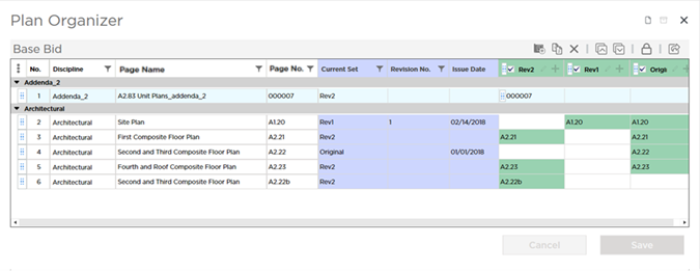
As you can see we have added three Plan Sets (Original Addendum 1 and Addendum 2).
- The Original Set created Pages A1.20 A2.21 A2.22 and A2.23.
- The 2nd Set (Addendum 1) was an update to A1.20 so it did not create any additional Pages.
- The 3rd Set (Addendum 2) was an update to A2.21 and A2.23 and created Pages 000007 and A2.22b. A2.22b is really an update to Page 4 (A2.22) but the estimator made a mistake and did not match it correctly when he or she created the Plan Set we touched on what happens when you revision match after saving a Plan Set in a previous article but we cover it in more detail in the articles that follow.
There are a total of 6 Pages in our Plan Organizer built from a total of 9 Plans.
In our example there are three Pages with "Unique Plans" meaning there is only one Plan or drawing associated with the Page.
- Page 1 (Page/Sheet No. 000007) exists because it was created from a plan in Addendum 2 - it does not exist in Addendum 1 or the Original Set. Addendum 2 is the only Plan Set in which a plan exists for this Page
- Page 4 (Page/SheetNo. A2.22) exists because it was created from a plan in the Original Set. Again the Original Set is the only Plan Set that contains a Plan associated with this Page.
- Page 6 (Page/Sheet No. A2.22b) exists because it was not matched to Page 4 (Page/Sheet ;No.A2.22) when the Plan Set "Addendum 2" was added. It should be a Revision of Page/SheetNo. A2.22 but as it stands it is a separate Page with a Unique Plan.
- All other Pages have at least 2 Plans associated with them. For example - Page 2 (Page/Sheet No. A1.20) - if we deleted Addendum 1 we would still have at least one Plan associated with that Page so deleting the Plan would not cause the Page to be removed.
What Happens When You Delete a Unique Plan
In the Plan Organizer click the small  button to edit Plan Set "Rev2" which created Page 1 Page/Sheet No. 000007.
Select that Plan (Page/Sheet No. 000007) and click the  button in the toolbar.
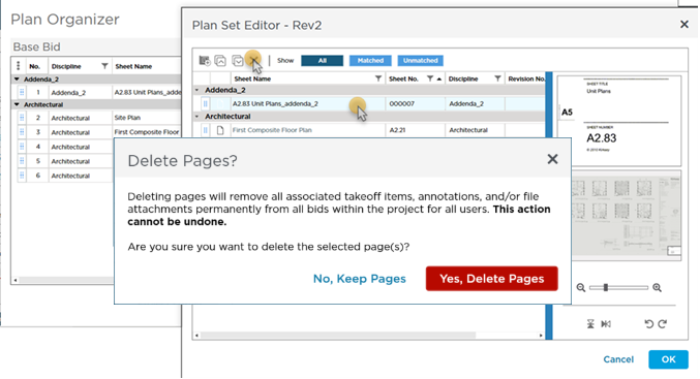
Because deleting this Unique Plan (the only Plan that exists for Page/Sheet No. 000007) will remove the Page it created from the project you are required to confirm the action.
If you proceed:
- The Page that was created by the Plan (Page 1 right now) is removed from the project (which means removed from every bid in the project).
- Any takeoff or annotations you have drawn are deleted
- Any Named Views or Punch Items that exist on this Page are deleted (Punch List history and photos are deleted as well)
- All File Attachments on this Page are deleted
If you are certain you want to delete the Page created by this Plan click Delete Pages.
Even after confirming this action you have one last chance to change your mind. The Page(s) is not removed until you click Save in the Plan Organizer window.
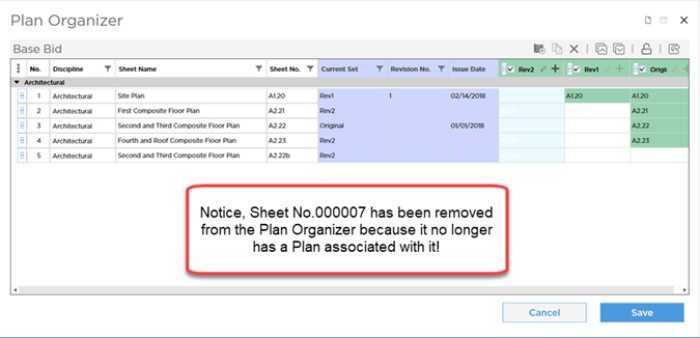
When you click Save, the Page and everything on it is removed from this project. There is no recovering this Page or anything that was stored on it.
Final Warning
Anything that exists on Pages you remove in any bid in the project is deleted permanently and irretrievably. If you are not absolutely certain that neither you nor any other user has used this Page click Cancel and then:.
- Return to the Projects and Bids List and see if there are any other bids in this project (other than yours) if there are contact whoever created or is working on those bids to ensure that deleting the Page will not cause problems.
- If there are no other bids open your bid and navigate to the Page that you are going to cause to be deleted. Make sure there is nothing on it. If there is move it to another Page.
- Return to the Plan Organizer and proceed with deleting the Plan.
 Intentionally Deleting Pages From the Plan Organizer Intentionally Deleting Pages From the Plan Organizer | Unintentionally Deleting a Page by Deleting a Plan Set  |
Related Articles
