

In the previous article, we explained how you can rotate one or more objects around a common central axis. Sometimes however you may want to rotate several objects around their own individual axes - we call this "spinning".
You know how we are always suggesting you re-use something you've already done rather than re-creating the wheel? Well sometimes you try but what you need is not pointed in the same direction as what you have. ConstructConnect Takeoff makes rotating and spinning takeoff a snap.
Let us say you have a group of takeoff objects and you'd like to rotate each of them on their individual center points. We call that "Spinning" takeoff and it is pretty easy. We will use an example of Count objects even though their orientation doesn't really matter it is easier to see what we are talking about.
So we've taken off three triangle-shaped Count objects (by the way, these Counts are just and example, Spinning works with Areas, Linears, Counts, and even Attachments).
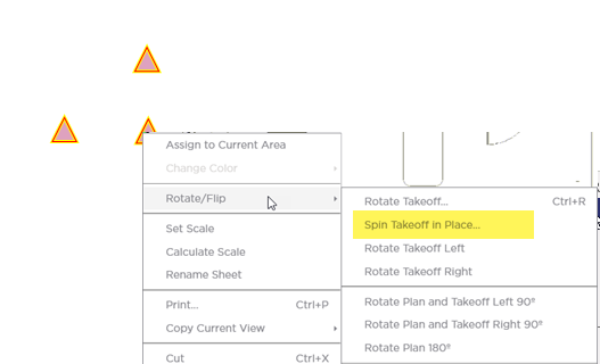
Select "Spin Takeoff in Place..." and the rotate handle displays.
Now grab the handle and start 'spinning' the takeoff...
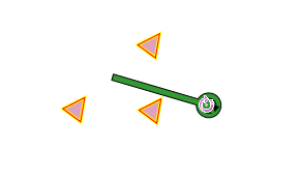
Notice that each object is spinning on its individual center point (axis).
Notice how we can spin Attachments independently/separately from their Parent object (as long as they will still fit and aren't too close to the edge they can be rotated or spun).
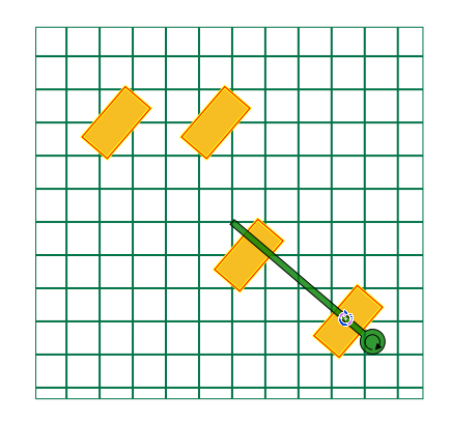
Now one last example - for this one we are spinning a room of Linear and Area takeoff.
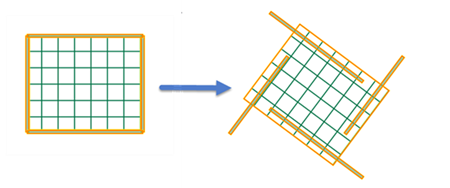
Remember spin rotates each piece of takeoff around its individual axis. In the example above this produces undesirable results. To rotate the linear and area objects around the same central axis we'd use the Rotate takeoff command covered in previous article. Be sure you understand the difference between Rotating and Spinning takeoff.
 Rotating Takeoff Objects Around a Common Centerpoint Rotating Takeoff Objects Around a Common Centerpoint | Flipping Takeoff Objects Vertically and Horizontally  |
Related Articles
