

Everything inside a Typical Group is "repeated" or multiplied out every time a Typical Group Marker is placed. Because of this you have to be careful about what you include inside your Typical Group Frame.
For example in our high-rise condo example there are common walls between the suites. Although it may seem to make sense to include these when defining our Typical Groups doing so will greatly increase the takeoff results.
Common Wall Drawn Inside a Typical Group
In our example we created Typical Groups to account for the suites used throughout our projects.
If we were a framer or drywall instead of a flooring contractor we may have taken off the suites like this:
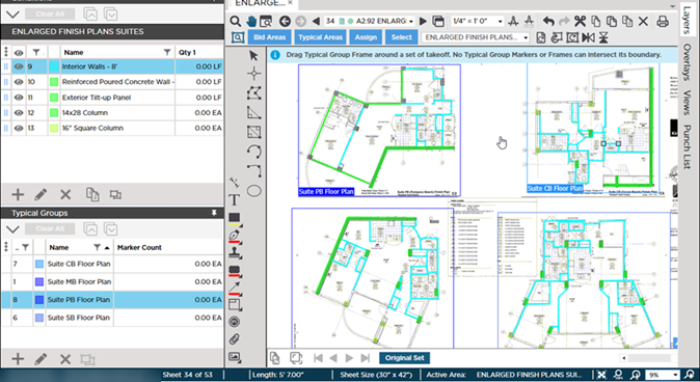
This seems OK, however when we use those Typical Groups we see that we have double-counted common walls and the same objects shown in multiple detail views...
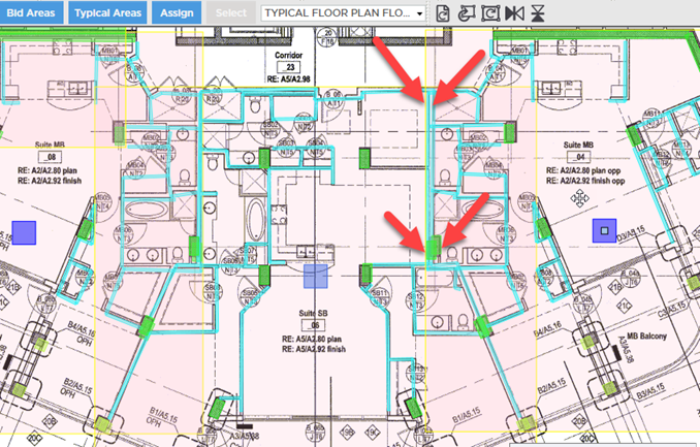
How you decide to solution this is up to you. What you must keep in mind is what is unique to a Typical Group and what needs to be considered "common" or shared. Objects that are shared need to be taken off (drawn) separately. You could still assign those individual objects to the Typical Area to create a cumulative total but you would not want to put them in a Typical Group Frame.
Speaking of Typical Areas it is now time to see how they work.
 How Layers Affect Typical Groups and Typical Markers How Layers Affect Typical Groups and Typical Markers | Typical Areas Overview and Examples  |
Related Articles
