

After aligning your grid to the plan (previous article) the program can show you partial tiles - those tiles around the perimeter and around any Backouts or Attachments that are not full tiles. We cover Backouts and Attachments in the articles that follow - for now it is just important to know that the program can calculate which tiles require cutting and the % of each tile visible.
Calculating and Displaying Partial Tiles
"Showing Partial Tiles" affects all gridded takeoff on any active (open) Pages in the open bid.
Calculating and showing partial tiles requires significant calculation (and system resources). We recommend you leave this option off while drawing takeoff. When you are done drawing the gridded area on the current page enable "Show Partial Tiles". Disable the option after you review the partial tiles information and before performing additional or editing any gridded takeoff.
The option is turned off when you close the bid just in case you forget to disable it.
To display partial tiles details for all gridded takeoff on the current Page:
- Right-click anywhere within the Takeoff Window
- Select "Display Grid Tiles less than 100%"
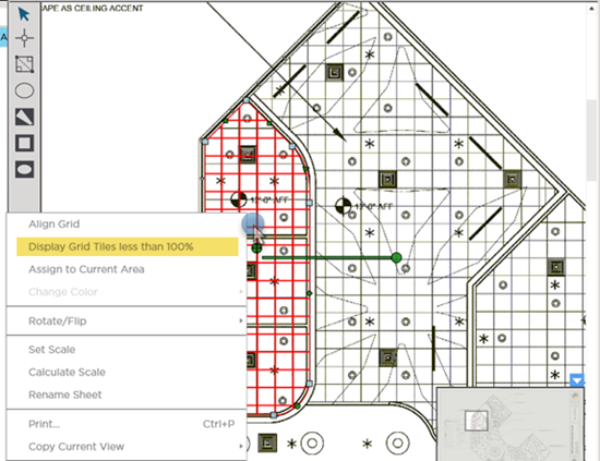
The program highlights all partial tiles in red and shows you the % of the tile used.
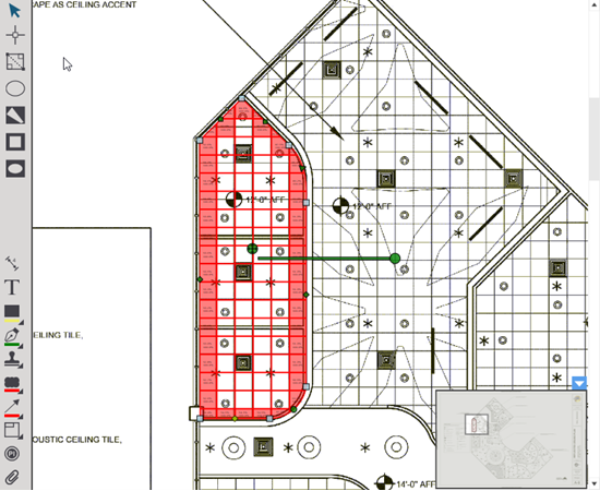
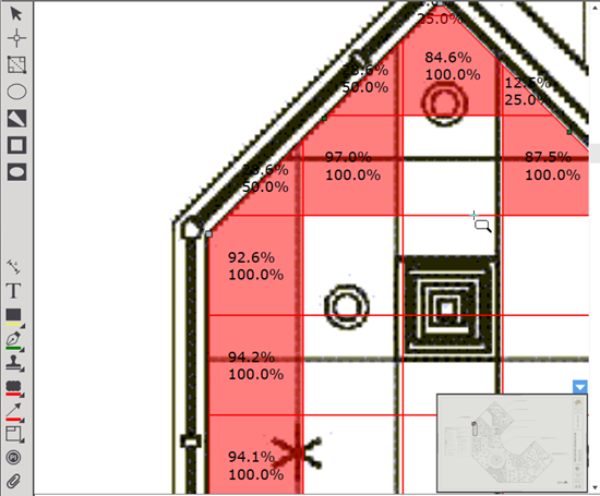
Zoom in to see more details.
The top number is the calculated amount of the tile that is included within the perimeter of the takeoff object.
The number below (either 25% 0.5 or 100%) indicates how much this partial tile contributes to the "Tile Count Rounded" calculated Result.
 Drawing Gridded Area Takeoff and Aligning it to Your Plan Drawing Gridded Area Takeoff and Aligning it to Your Plan | Drawing Backouts in an Area Takeoff  |
Related Articles
