

Use the Elliptical tool  to takeoff circular and oval objects.
To draw an Elliptical Area takeoff object:
- Select the Elliptical Area Takeoff tool .
- Click in the spot where you want to begin takeoff. For an elliptical takeoff object the corners are where the horizontal and vertical boundaries of the object intersect. For example in our screenshot below you can see our starting point was the intersection of the upper and leftmost boundaries and our endpoint is the lower-right corner where the rightmost and bottom boundaries intersect.
- While holding down the mouse button draw a diagonal line to the opposite corner to create the size ellipse needed.
- Release the mouse button and your takeoff is created.
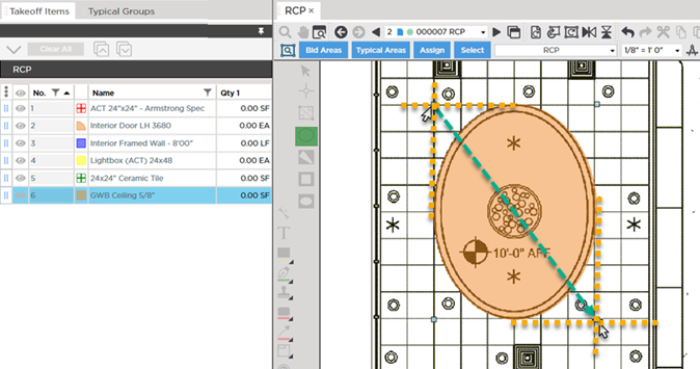
If you would prefer not to see the pattern of the area while you are drawing you can change that setting in the Takeoff Item's Properties - just uncheck "Display Pattern While Drawing".
Before drawing any takeoff you must set and verify; Scale see Related Articles.
 Drawing Rectangular Area Takeoff Drawing Rectangular Area Takeoff | Drawing Gridded Area Takeoff and Aligning it to Your Plan  |
Related Articles
