

You can delete a Custom Layer from a bid so long as long as you (or another use) have not assigned any Takeoff Items to it.
If any Takeoff Item is assigned to a Custom Layer in the current bid the delete button is disabled.
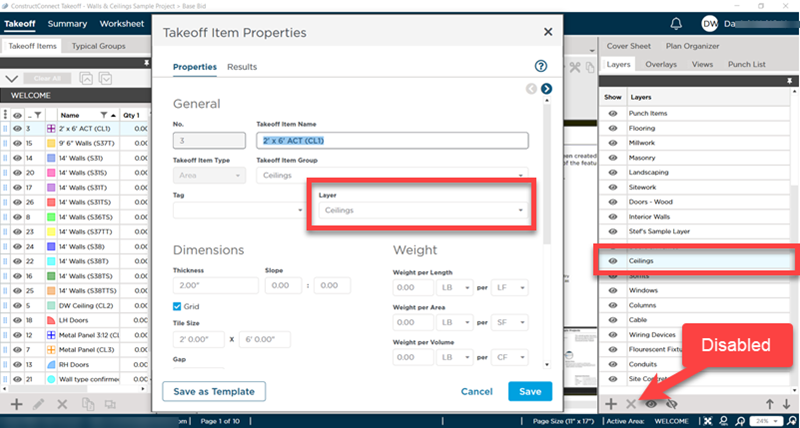
Even Custom Layers that are added to the Bid because they are a Master Default Layer can be deleted from a bid as long as you are not using the Custom Layer. Many customers setup Default Layers which get added to all new bids and then delete out what they do not need for a particular bid. See Related Articles for more information on setting up Master Default Layers.
Deleting a Layer that is "In Use"
To delete a Layer that is in use:
- In the Takeoff Items pane (by default in the left-side dockbar) add the Layers column to the Takeoff Item list
- Sort by Layers and then
- Select all Takeoff Items that are assigned to the Layer you want to delete
- Right-click and use the Set Layer... option to change the Layer to which they are assigned
- Once no Takeoff Item is assigned to a Custom Layer that Custom Layer can be deleted
See Related Articles for more information about the Takeoff Items pane.
 Adding a Custom Layer to a Bid Adding a Custom Layer to a Bid | Adding a New Takeoff Item to a Bid  |
Related Articles
