

Question
Can I measure surface area of round pipes with On-Screen Takeoff® (or any Takeoff product) for example, to determine the surface area needed for insulation?
Answer
Yes!
Start by determining the diameter (size) of the pipe - in our example we will use a 5" pipe.
You will need to calculate the circumference of the pipe by multiplying its diameter by Pi (3.1416 is close enough) - in our example we get 15.708 (5 x 3.1416 = 15.708)
Create a Linear Condition (OST is shown below, but the concept is the same for any Takeoff application).
In the Condition Properties window enter ¼ of the circumference, 3.927 (15.708/4 = 3.927), as the Height and Thickness (Width).
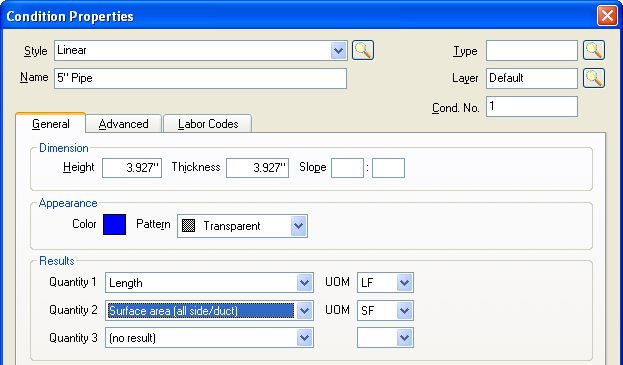
Set the first Quantity to Length, so you get the total RUN value.
Set the second Quantity to Surface area (all side/duct) - This calculates Height x Width x Length, which is the same as Circumference x Length.
Related Articles
