
You can delete a project which deletes the project and all bids within that project or you can delete individual bids.
If you are not the Project Owner on a project you cannot move the project or any bids to the Recycle Bin - only a Project Owner can do that. See Related Articles for more information on roles and access.
Click on the project or bid you want to delete and click the Delete button  on the toolbar or right-click on a project or bid and select "Delete".
Deleted projects and bids are moved to the Recycle Bin they are not removed immediately from your Projects and Bids List.
If you are not a Project Owner for a project, you do not see it in your Recycle Bin when a Project Owner deletes it.
Recycle Bin
You access the Recycle Bin toward the bottom of the Projects and Bids List. You can either expand the "Recycle Bin" folder by clicking the sideway-facing triangle or drag the red delineator up.
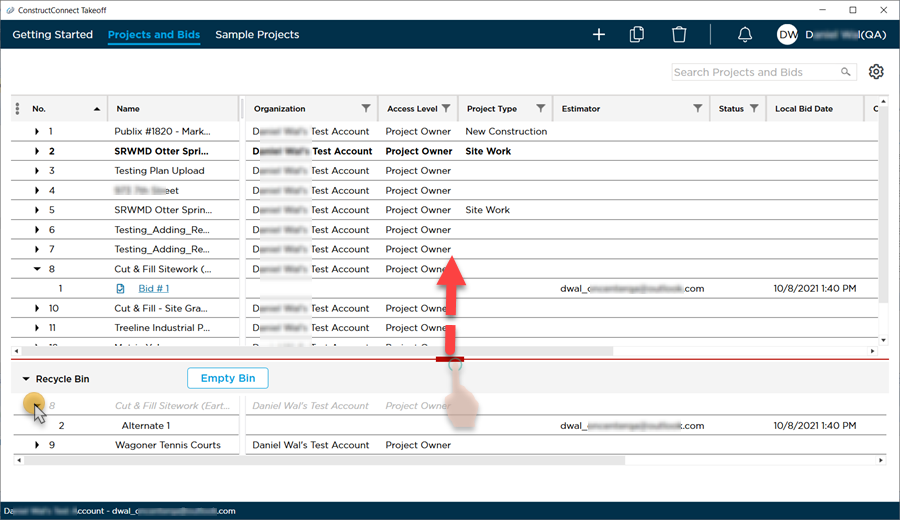
If the Project is shown in dimmed (grey) Italics that means that one or more but not all bids from that project are deleted. (Deleted means "marked" as deleted - once a bid or project is permanently deleted from the Recycle Bin there is no getting it back.)
- In our example above for Project No. 8 Cut & Fill Sitework... only one of its bids (Bid #2 Alternate 1) has been deleted - the other bid "Bid #1 Bid #1" has not been deleted.
- Project No. 9 Wagoner Tennis Courts has been deleted along with all bids within it there is nothing left of that project in the main section of the Projects and Bids List.
Next up restoring projects and bids you do not want to delete and then permanently deleting projects and bids from your Recycle Bin.
 Duplicating Projects and Bids Duplicating Projects and Bids | Restoring Projects and Bids from the Recycle Bin  |
Related Articles
