

If you have not emptied the Recycle Bin or permanently deleted a project or bid from the Recycle Bin it is possible to Restore a project or bid (which is the purpose of a Recycle Bin after all).
- First expand the Recycle Bin - click the sideway-facing triangle next to the Recycle Bin label (drag the line that separates the Projects and Bids List from the Recycle Bin up to see more).
- Select the project or bid you want to restore
- Right-click and select Restore
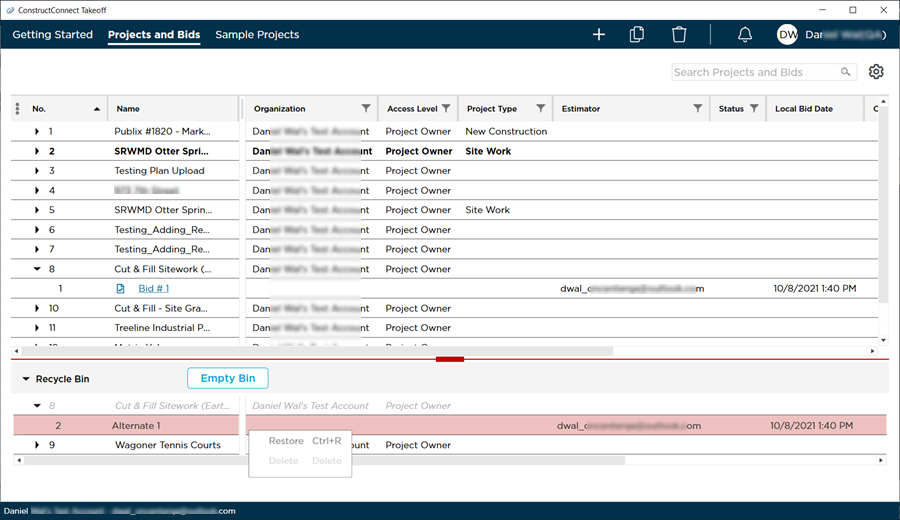
- When you delete a project all bids within that project are deleted also. You see the project and the bids in the Recycle Bin but you cannot restore just a bid from that project - you must restore the project which restores all the bids. However...
- Restoring a project only restores the project to how it existed when it was deleted. For example if you delete all the bids in a project then delete the project itself you see the project and all the bids in the Recycle Bin just as you would if you had deleted the project without deleting the bids first. Now if you restore the project first that puts the project back but none of the bids are restored because they were deleted before the project.
If you restored a project it is put back in the Projects and Bids List just like it was before you deleted it.
If you restored a bid it is put back under its original project.
 Deleting Takeoff Projects and Bids Deleting Takeoff Projects and Bids | Permanently Deleting Projects or Bids and Emptying the Recycle Bin  |
Related Articles
