
In the previous article we explained that when you add a Plan Set it is uploaded to the Cloud Servers in the background. This way you can use the program while the images are uploading. If this upload process is interrupted you must "resume" the process manually to upload the files necessary to view plans.
Resuming Uploads
If something happens and an upload is interrupted the files for Plan Sets you have recently added may not be uploaded to our Cloud servers.
There are a few things that can interrupt an upload-in-progress:
- The computer shuts down unexpectedly
- Your internet connection drops
- You close the program
- The program crashes
If the upload is interrupted for whatever reason the "Resume Upload" notification icon displays next to the project the next time you start the program.
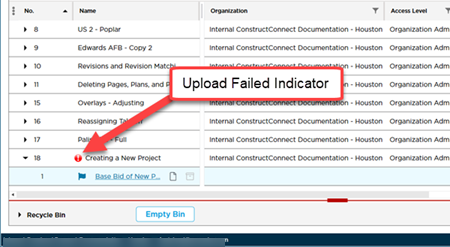
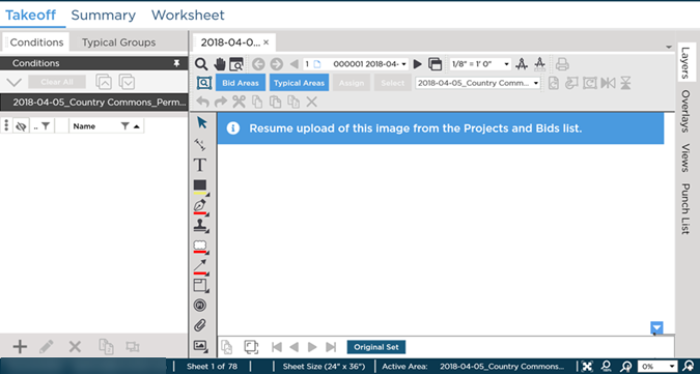
Only the user who adds a Plan Set sees this "Resume Upload" indicator he or she also sees a "Resume" notification banner on the Takeoff Tab.
Other users with whom you have shared this project cannot view a Plan until it is uploaded from your machine. When they open the Takeoff Tab for a project they see a blank screen that looks like this:
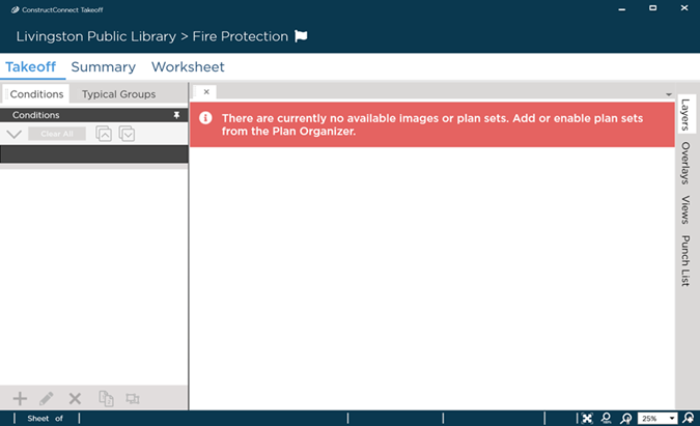
After interrupting the plan upload even the user who added the Plan Set cannot see the Plans on the Takeoff Tab - the upload must be resumed so the Plans are available from the Cloud.
 Uploading Plans Uploading Plans | Exporting the Plan Organizer Grid to Excel  |
Related Articles
