

ConstructConnect Takeoff Estimating is in beta testing as of the writing of this article and may not be available to all users.
Estimating really begins when you create your Condition (or edit one that Auto Takeoff creates). You add an “Assembly” to your Condition that contains everything (the Items) required to build the Condition: all the materials, and all the labor.
These Assemblies, and the Items that they include, are all stored in a Catalog, which we’ll cover in a few articles. For now, just to get you acquainted with estimating, we’ll use ConstructConnect’s “Starter” catalog.
We are editing a Wall Condition that Auto Takeoff created, the process is the same for creating a new Condition, though.
Adding an Assembly to a Condition
You’ll need an existing or new Condition to continue.
In the Add Condition or Edit Condition dialog box,
- Select which Catalog you want to use (leave it as “Starter catalog” for now)
- There are a couple ways of locating the Assembly you want to add:
- Type in a name or keyword in the Search box
- Select the appropriate Trade from the drop-down and browse the available Assemblies
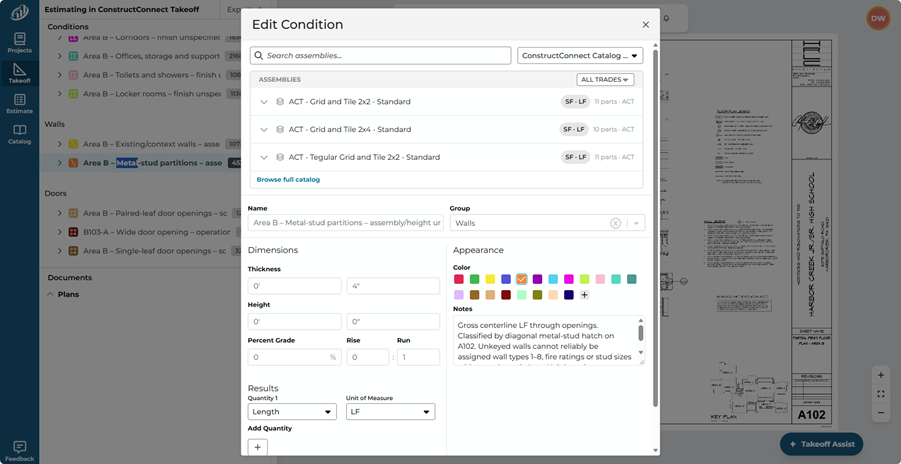
After you select an Assembly, your Condition Name will change along with some other details.
For our example, we added an Assembly that accounts for building out an Interior Partition.
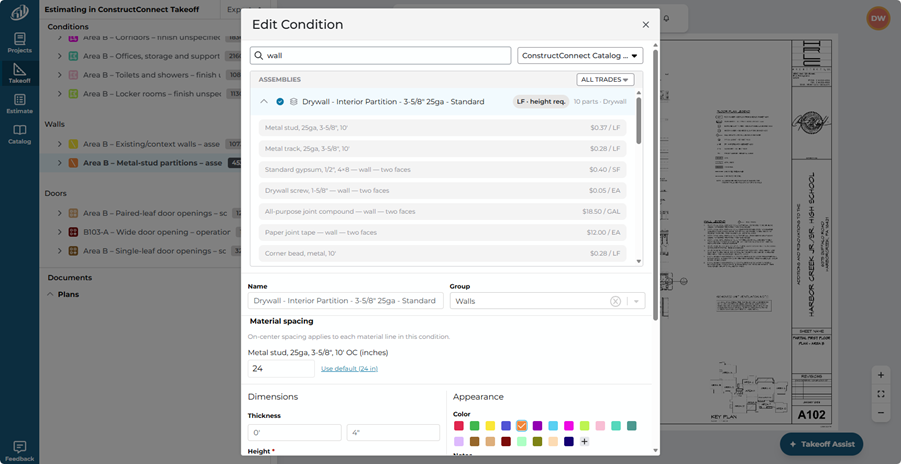
In our example notice, a new field displays for “Material Spacing” because you’ll need to tell the app if you are spacing your studs at 16” or 24” - this affects material and labor calculations.
 Print to PDF Print to PDF | Reviewing Your Estimate and Pricing  |
