

Drawing (or placing/dropping) Count takeoffs allows you to determine the total number of objects such as footings columns and plumbing fixtures in your project.
When you select a Count Takeoff Item the Count Takeoff Tool becomes active (there is only one tool - there are no options for taking off Counts).
- Click the
 button
 - Click everywhere on your Plan where you want to place a Count object (if you make a mistake just press Ctrl + Z on your keyboard to undo the action)
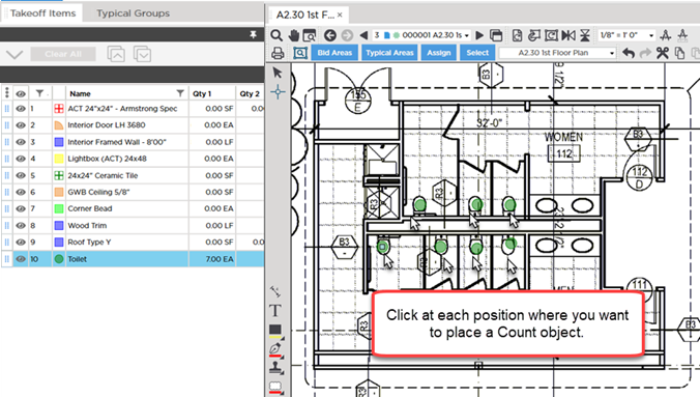
There is only one way to takeoff a Count you place object on your Plan one at a time.
Unlike Attachments (next article) there are no restrictions on where you can place a Count. Also unlike Linear Area and Attachment takeoff Count takeoff does not have to be "to scale" - you can adjust the visual settings for the Count takeoff objects in the Takeoff Item Properties window to make them easier to see on the Plan. All the Dimensions for calculating the linear surface and volume Results for a Count are contained within the Count Takeoff Item - the only other value required is the number of Counts placed on each Page.
Even though Counts do not rely on Scale to calculate proper Results you probably take off surrounding Linear Area and Attachment objects so it is best practice to ensure the Scale is correct before you draw anything. It's also just a good habit to get into so set and verify your Page Scale before drawing any takeoff; see Related Articles.
 Use Sloped Area Takeoff to Measure Roofs, Ceilings, etc. Use Sloped Area Takeoff to Measure Roofs, Ceilings, etc. | Drawing Attachments Takeoff Overview  |
Related Articles
