

What is ConstructConnect Takeoff?
ConstructConnect Takeoff is our web-based takeoff solution that gives you access to the latest development and features. You upload your plans, they are automatically named, scaled, and organized for you by Takeoff BOOST™ so that you are ready to work as soon as you open the project. ConstructConnect Takeoff Professional users can use Takeoff BOOST’s Auto Takeoff that generates a page full of takeoff and Conditions in minutes. ConstructConnect takeoff is the future of takeoff and estimating and where the innovation really happens. See the Coming Soon section of the current release for a look into our plans.
This article keeps you informed of new features, changes/improvements, bug fixes, and even a peek at what we’re working on for upcoming releases.
Below are the rolling Release Notes. The Current Version is always at the top and Previous Versions are at the bottom in a collapsed section.
Be sure to check out Takeoff BOOST™’s Release Notes for the latest in improvements to ConstructConnect’s AI-Powered tools.
Current Version
Takeoff Assist, Auto Takeoff Trade Support, and Estimating (released: 20261019)
As we continue to improve ConstructConnect Takeoff each week, we are making amazing new Beta features available to all users.
ConstructConnect Takeoff is getting faster, smarter, and more powerful from first plan review to final estimate. Takeoff Assist now extends into Estimating for interiors trades using ConstructConnect Catalog items and assemblies. New natural-language annotations let you highlight areas and add notes directly on plans, while Auto Takeoff expands to Mechanical, Painting, Plumbing, and Roofing with a redesigned workflow and Quick or Thorough passes. Takeoff Assist helps estimators get a strong first pass in minutes and so they can spend more time validating scope and pricing.
The rest of the release removes friction across the job: search projects instantly, upload plans and specs into the right places, export in QuoteSoft Duct format, and work with civil scales. Behind-the-scenes performance improvements and targeted fixes help protect canvas edits, improve Conditions behavior, and keep exports accurate.
Table of Contents
What's New
- Estimating in Takeoff Assist for interiors trades (beta): Takeoff Assist can now help with estimating, not just takeoff, for the interiors trades. It works from the ConstructConnect Catalog, so the items and assemblies it suggests come from the same catalog you see in the Catalog page.
- Four additional Trades configured in Auto Takeoff: Mechanical, Painting, Plumbing, and Roofing are all available in the Auto Takeoff dialog.
Configuring Auto Takeoff options adjusts the prompt that is sent to Takeoff Assist, where all the “reasoning” is performed. Because Takeoff Assist reviews your plan set to understand the takeoff and results you request, it takes a little more time than a standard linear, area, or count takeoff, which can still be performed manually.
Mechanical takeoff items include Controls, Equipment, Grilles, Registers, and Diffusers, Insulation, Piping, Refrigerant Piping, and Sheet Metal.
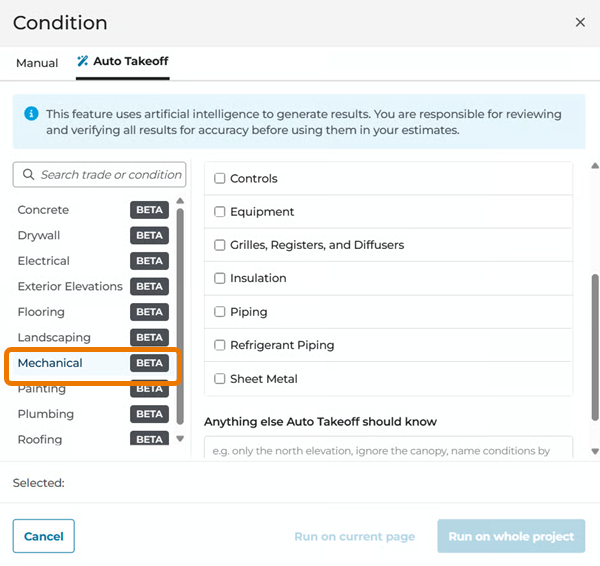
Mechanical options in Auto Takeoff
Painting options include Surface finishes, Trim and doors, and Ceiling.
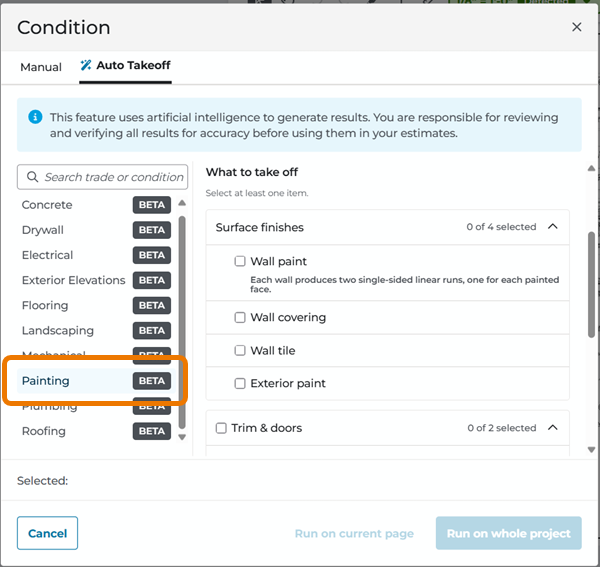
Painting options in Auto Takeoff
Plumbing takeoff items are Controls, Equipment, Fixtures, Gas and Vacuum Systems, Insulation, Piping, and Pool and Fountain Systems.
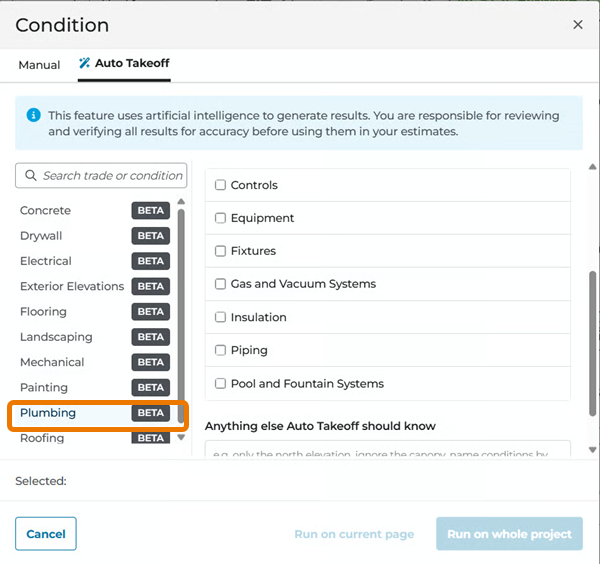
Plumbing takeoff options in Auto Takeoff
Roofing options are grouped into Surfaces, Ridges, hips & valleys, Edges & flashing, Drainage, and Roof openings & accessories.
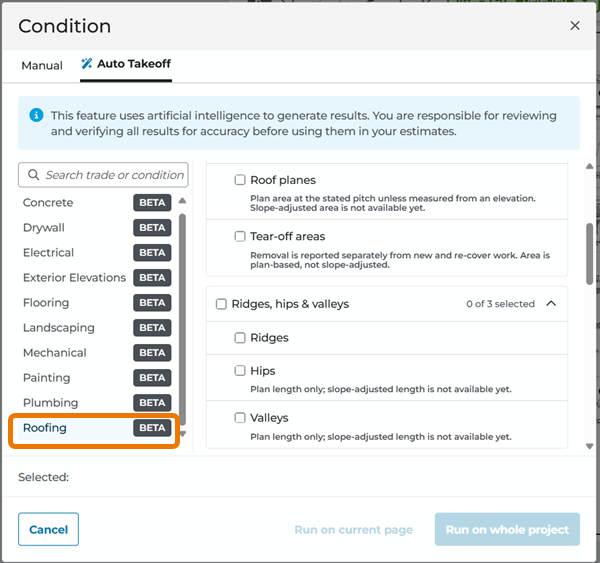
Roofing options in Auto Takeoff
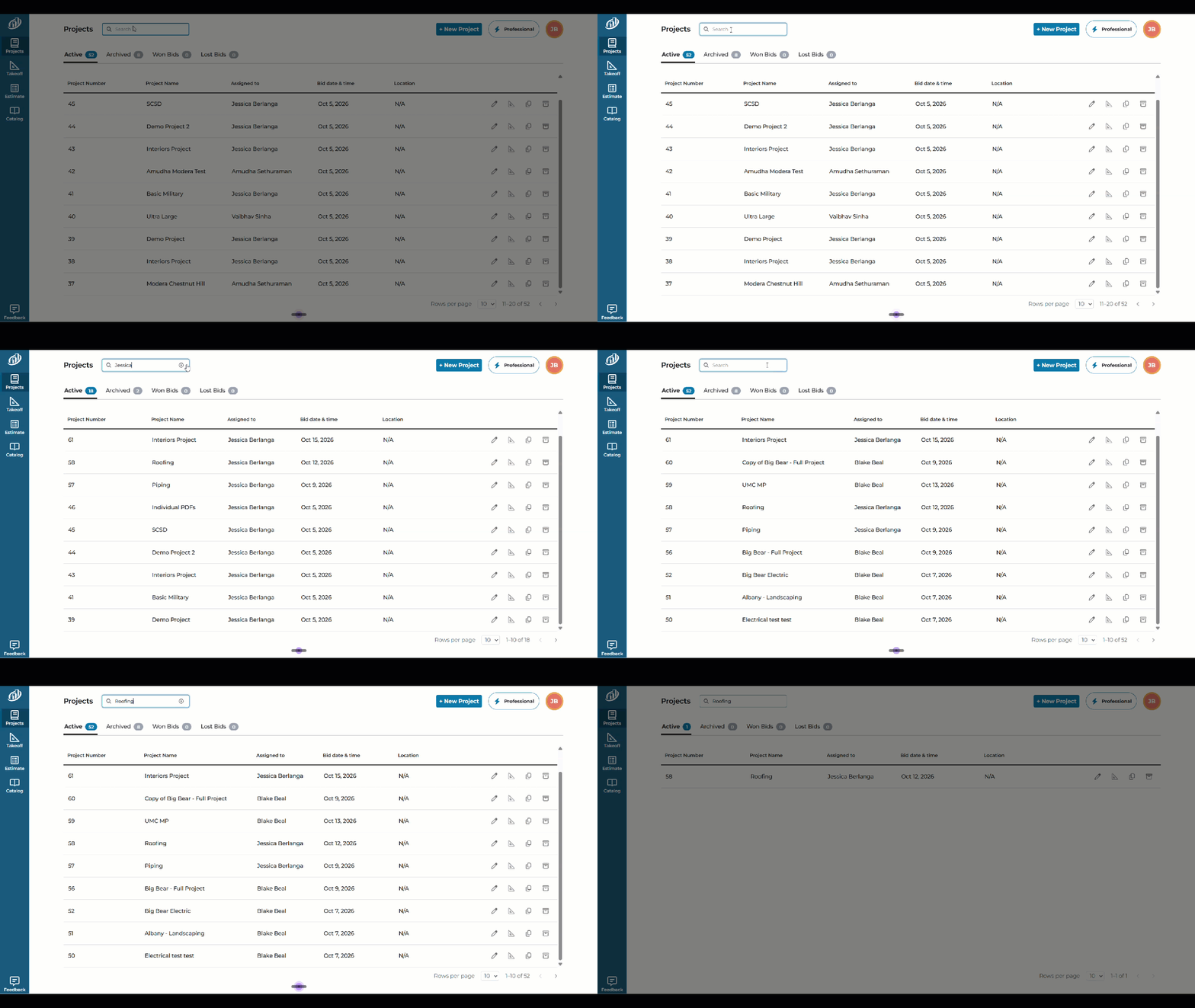
- Project list search: search projects by name, number, or assignee. Results appear when you pause typing, which keeps search fast.
Type in the Search box above the project list to find a project by name, number, or assignee.
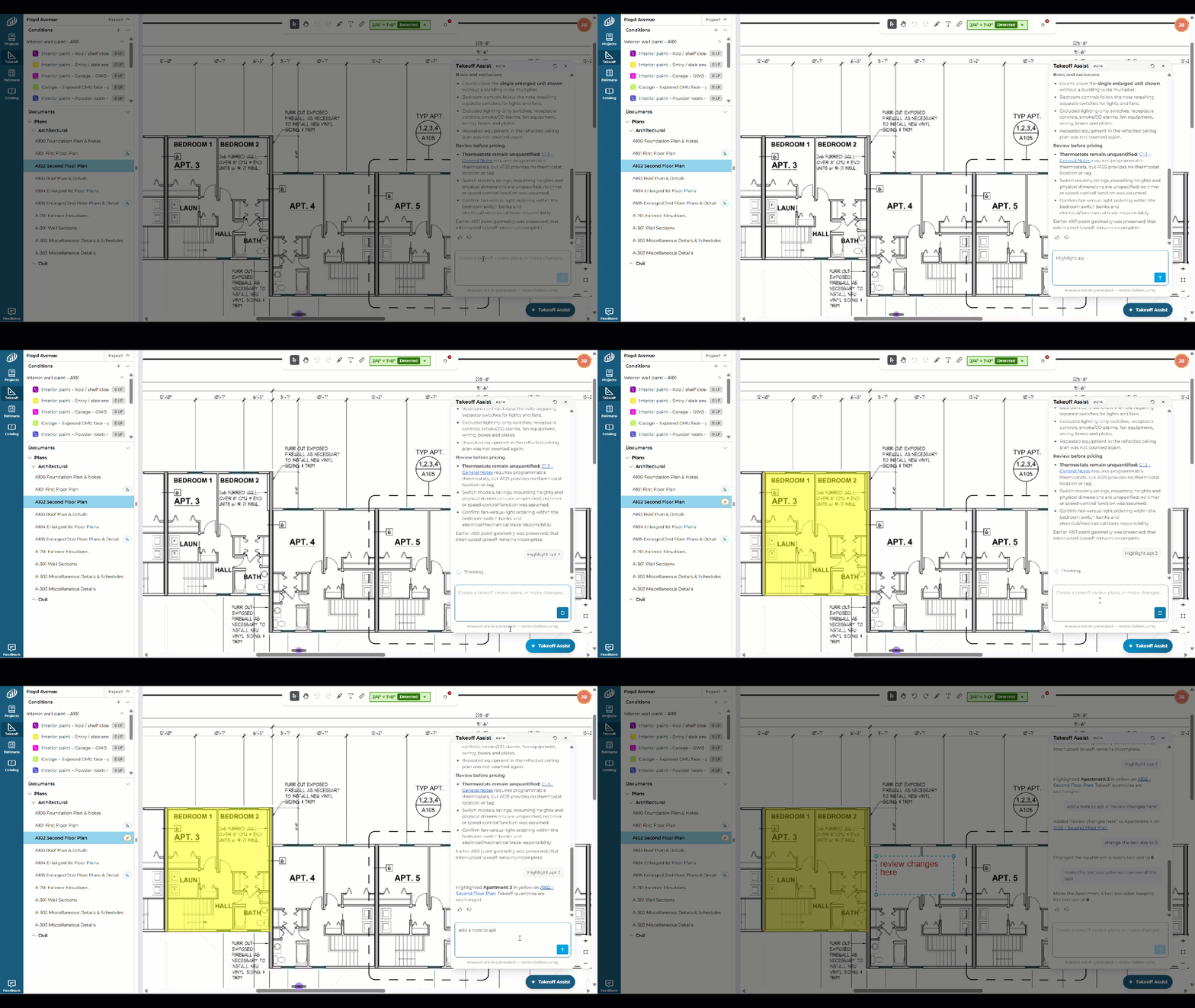
- Takeoff Assist annotations (beta): Takeoff Assist can now create annotations on your plans. Ask it to highlight an area or add a note, and it marks the plan for you. You can keep asking to change the result, such as the text size or the size of the text box.
In the example below, "Highlight apt 3" highlights Apartment 3 in yellow, and "add a note to apt 4 'review changes here'" places a note on Apartment 4.
- QuoteSoft Duct export: you can now export takeoff data in QuoteSoft Duct format.
- Civil scales: the scale list now includes civil scales, from 1 inch = 10 ft through 1 inch = 100 ft.
Changes/Improvements
- Auto Takeoff dialog redesign: the Auto Takeoff dialog has a new layout, and every trade, including Drywall, now uses it. Trades are listed alphabetically, with a search box to find a trade or condition. Linear, Area, and Count are no longer listed as Auto Takeoff types. Every trade now offers the same choice of a Quick pass for simpler takeoffs or a Thorough pass for complex ones, and you can run on the current page or the whole project.
- Takeoff Assist (beta): the "New chat" button is now "Clear chat conversation", and the duplicate thumbs up and thumbs down feedback message after AI responses is gone.
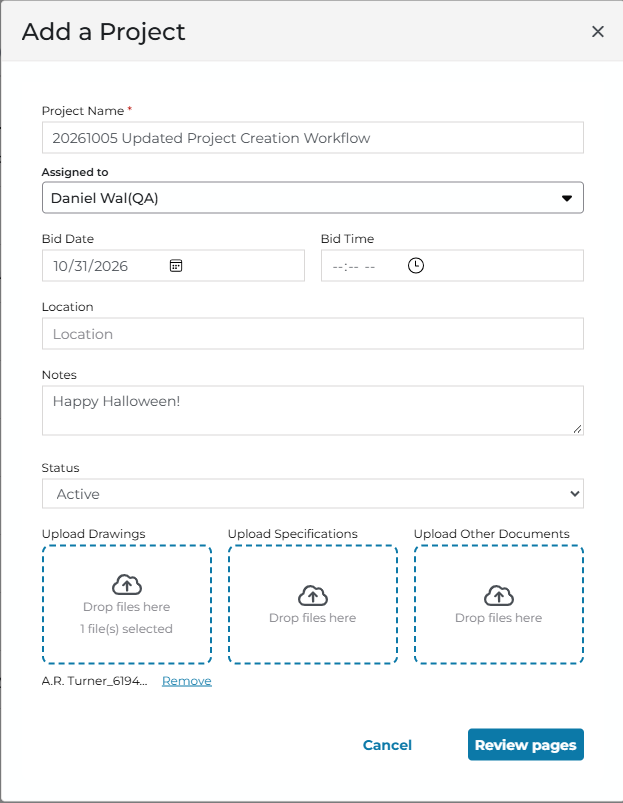
- Restored Previous Add Project window: when you create a project, you can now drop plans, specs, and other documents into separate areas, so each file goes to the right place from the start. (This reverts the change made in the previous release and retains a consistent layout, document type guidance, and correct Starter limits. Once dropped into the Project, you get to see thumbnails of each Page so you can choose which ones you want to add to your project - this can save you a lot of time processing files.
- Exports: PlanSwift® and On-Screen Takeoff export options are no longer available to Starter users.
- Project list search speed: the search box waits for you to pause typing before it searches, which makes it faster.
- Creating conditions: creating a condition no longer times out when many people are working at the same time.
- We made behind-the-scenes changes so ConstructConnect Takeoff stays fast and stable when many people are using it at the same time. You may notice fewer slowdowns or dropped connections during busy periods. No action is needed from you.
Bug Fixes
- Shapes lost after a connection drop: if your connection dropped while you were drawing, the shapes you added could disappear when you reloaded the page. Shapes drawn during a drop are now kept. (TE-15941)
- Project list showing a code in Assigned To: the Assigned To column showed a long code instead of a person's name. It now shows the name. (TE-15935)
- Conditions panel needing extra clicks: the Conditions panel in the left menu sometimes took several clicks to open or close. It now responds on the first click. (TE-15553)
- Wrong concrete volumes in On-Screen Takeoff: concrete takeoffs exported to On-Screen Takeoff showed incorrect volume quantities after a recent change. Volumes now export correctly. (TE-15207)
- Trial expired message shown to licensed users: some users with an active license saw a message saying their trial had expired. The message now appears only when it applies. (TE-15075)
- Condition window opening by accident: double-clicking the arrow next to a Condition, to expand or collapse it, also opened the Condition window. It no longer does. (TE-12458)
Known Issues
- N/A
Availability and Tiers Affected
-
Mechanical in Auto Takeoff: beta
-
Painting in Auto Takeoff: beta
-
Plumbing in Auto Takeoff: beta
-
Roofing in Auto Takeoff: beta
-
Takeoff Assist annotations and improvements: beta. Takeoff Assist continues to be in beta
-
All other new items, improvements, and fixes: public release
Tiers Affected
- Estimating in Takeoff Assist and QuoteSoft Duct export: ConstructConnect Takeoff Pro only.
- Exports hidden for Starter: ConstructConnect Takeoff Starter.
Coming Soon
We are constantly making improvements to ConstructConnect Takeoff to make it the most powerful takeoff and estimating solution available.
- A planned improvement to document loading will eliminate the need for you to classify documents as Plans or Specs - we’ll do it automatically.
- Planned enhancements to Estimating include being able to add Markups, Waste, and other costs to your estimate:
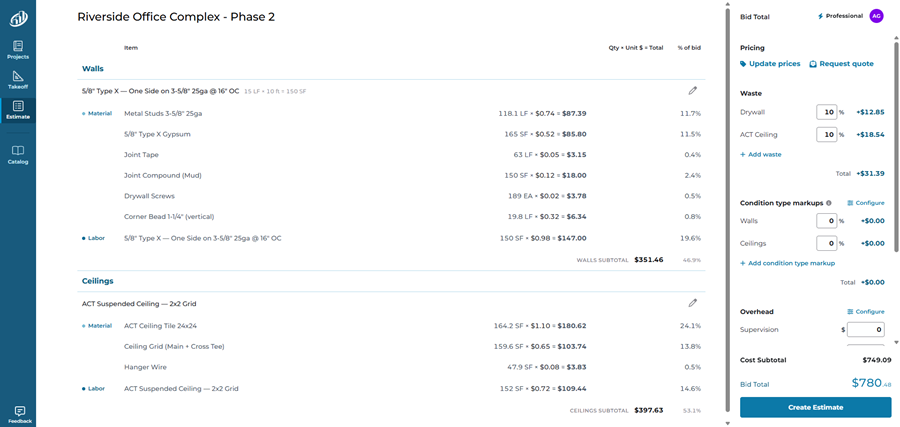
ConstructConnect Takeoff Estimating tab showing breakdown of Condition costs
Previous Releases
Takeoff Assist, Auto Takeoff Trade Support, and Estimating (released: 20261012 (and earlier))
Leverage Takeoff Assist to pull project information from your plans, perform analysis, even do project-wide takeoff using natural language interaction. Get your hands on expanded Trade support in Auto Takeoff including Exterior Elevations, Concrete, Flooring, Landscaping, Drywall, Electrical takeoff. Light Estimating (beta). Benefit from document upload and document ordering improvements. This update also fixes address counts, exports to PlanSwift and On-Screen Takeoff, Takeoff Assist, and page order in ConstructConnect Starter.
New Features
All the features below are in Beta testing phase of release. All customers have access to them to use - please report any concerns using the Feedback button in the bottom-left corner.
Takeoff Assist
Every new project starts the same way: a stack of plans, specifications, and unanswered questions.
Takeoff Assist changes the starting point.
With natural-language AI built into ConstructConnect Takeoff, estimators can ask about the project in plain English, uncover the scope that matters, and create a reviewable takeoff across the pages that matter—all without starting from scratch.
For example, to get an overview of the scope of a Project, just ask Takeoff Assist, “Tell me about this project” (or something similar).

Put Takeoff Assist to work and ask it to take off the demolition work:
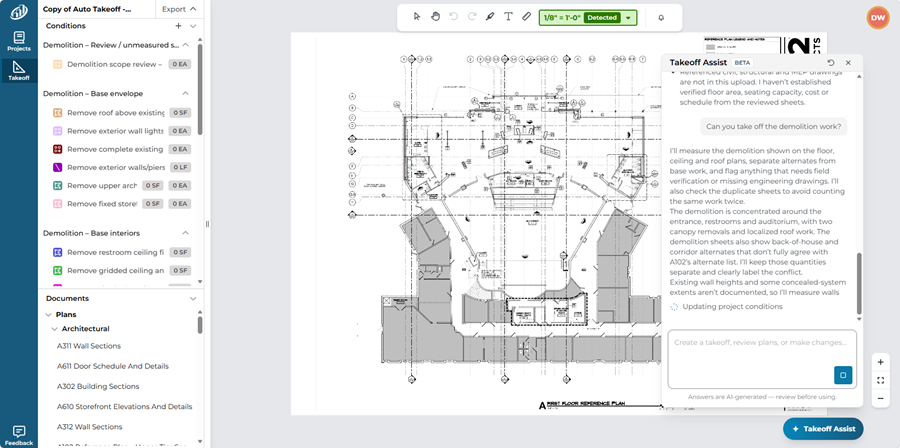
Expanded Trades Support for Takeoff BOOST™’s Auto Takeoff
Auto Takeoff already supports Linears, Areas, Counts, and Concrete volume, now we are expanding it to support:
- Exterior Elevations - account for finishes, windows, molding, edging, coping runs, etc.
- Concrete - in addition to the previous footings and slabs, Auto Takeoff now identifies a dozen concrete components including pads, sidewalks, curbs, joints, piers and columns, reinforcing, and more.
- Flooring - flooring contractors can use Auto Takeoff to measure floor finishes (base on the Finish Schedule), underlayments, wall base, waterproofing, and more.
- Landscaping - grow your business faster by letting Auto Takeoff crush your landscaping takeoff, includes trees (broken out as they are identified on the plans!), scrubs, sod, mulch, planting beds, a much more.
- Drywall - takeoff partitions (by type, of course), shaft walls, board by face, and other wall-building Conditions.
- Electrical - electrical contractors benefit from Auto Takeoff’s ability to find receptacles, fixtures, branch circuits and almost a dozen other trade-specific objects.
You can run Auto Takeoff on the current Page or the entire Project. Get through your initial pass of takeoff, for your trade, in minutes!
Quick and Thorough Passes get you the results you need, fast!
ConstructConnect Takeoff Condition Window, Auto Takeoff options showing the expanded Trades support
Slope support
Take off sloped features from a flat plan view and get true quantities. Linear conditions get two new properties, percent grade and rise over run. Enter the percent grade, or enter the rise and run instead, and the other updates to match. Length and the quantities that depend on it (linear feet, square feet, and cubic yards) are corrected from the flat plan length to the true length along the slope. Thickness and height are measured perpendicular to the line. A run of 0 is not accepted. Slope works on linear conditions only.
Percent grade, rise, and run appear in the Dimensions section of a linear condition.

The Condition dialog set up for a sloped Linear with a 4:12 rise:run.
Estimating
Why waste your time and run the risks of mistakes using different solutions for your takeoff and estimating?
We are working hard to bring you estimating in your browser as a seamless addition to ConstructConnect Takeoff. Access a catalog of items and assemblies as you draw your takeoff, or add material and labor costs to completed takeoff. Work the way you want, where you want, when you want. We are starting our Beta Program in the coming weeks.
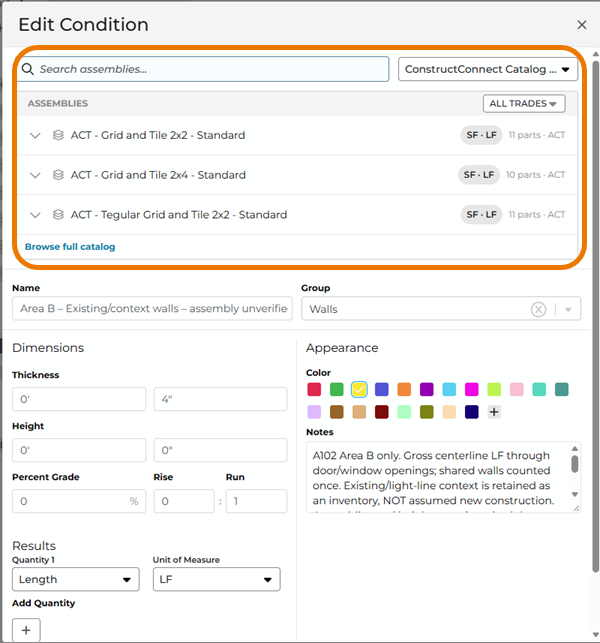
Start by dropping an Assembly right into your Condition:
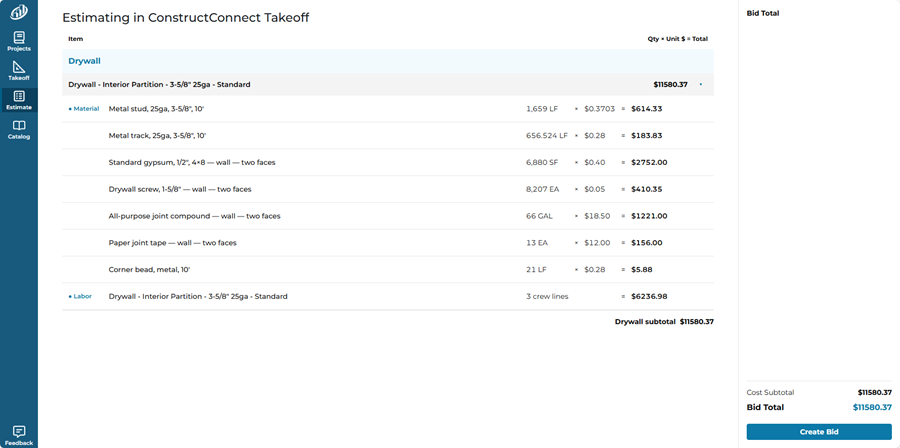
ConstructConnect Takeoff Estimating tab showing breakdown of Condition costs
Browse our starter catalog of Items and Assemblies and build your own.
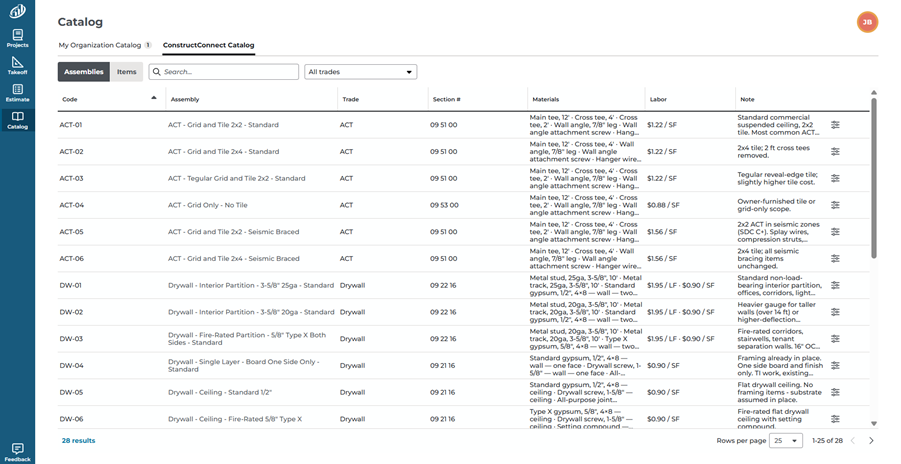
ConstructConnect Takeoff’s Catalog Tab showing the ConstructConnect (built-in) Catalog of Items and Assemblies.
Changes/Improvements
- Takeoff Assist: documents opened from a Takeoff Assist link are now highlighted in the left-hand document menu, so it is easier to find the source document.
Selecting a document link in Takeoff Assist opens the document and highlights it in the left-hand menu.

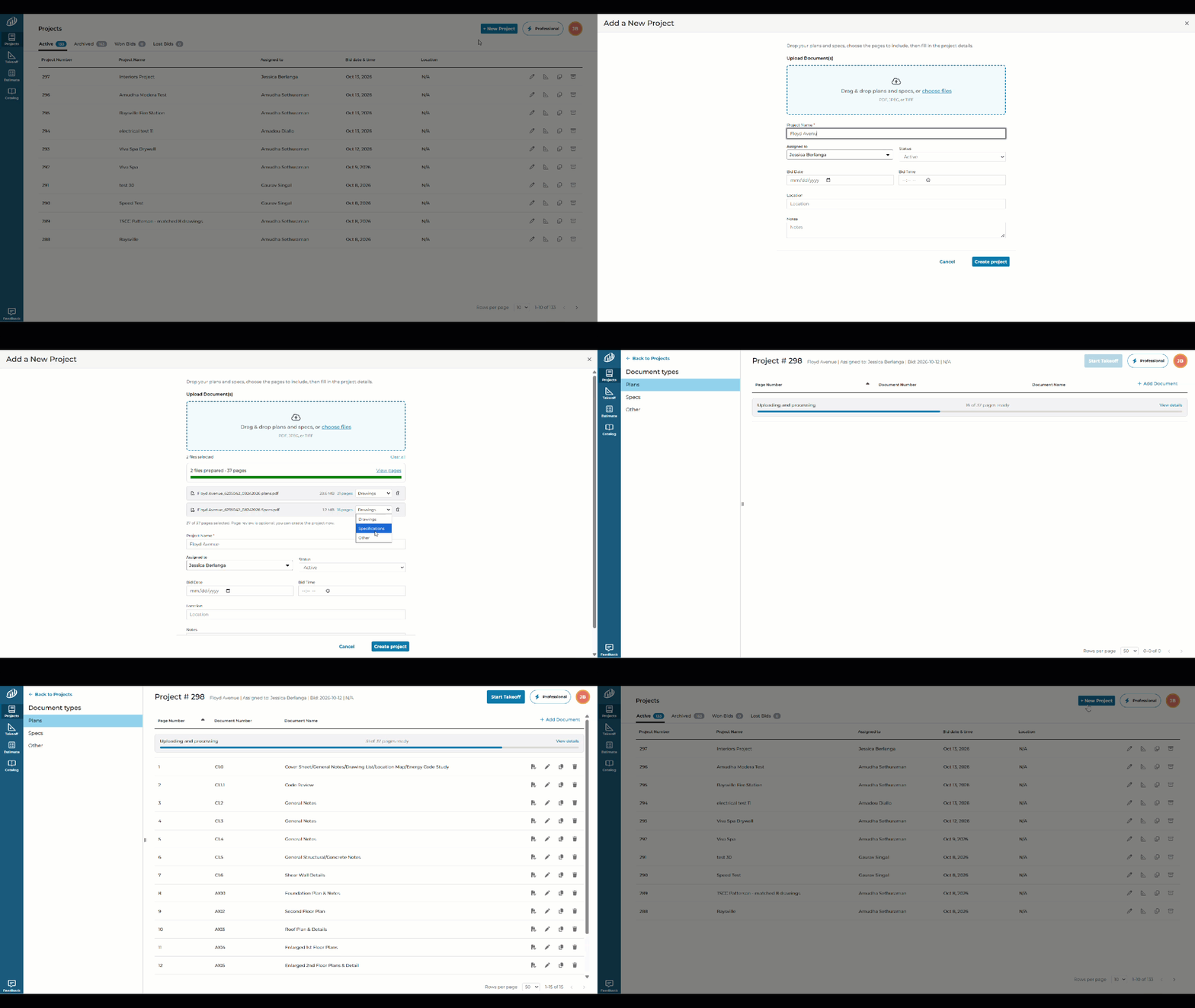
- Add plans and specs from one place
When you create a project, you now add plans and specs from a single screen, then choose which files go to Plans and which go to Specs. Automatic sorting of files into plans and specs is planned for a future update.
- Uploads continue after you close the browser: documents keep processing after you close the browser window.
- Consistent document order: documents now appear in the same order in CCTO and in exports to On-Screen Takeoff and PlanSwift.
Bug Fixes
-
On-Screen Takeoff export: standard scale notation, such as 1/8" = 1', now stays correct when you export a CCTO takeoff to On-Screen Takeoff. It was previously written inverted.
-
PlanSwift export: the export no longer fails to download, and the error message now stays on screen long enough to read.
-
Count totals: count measurements now apply depth correctly. Totals were previously wrong because depth was not factored in.
-
Count shapes: count conditions created by Auto Takeoff no longer disappear from the plan after you edit their width. When depth is 0, the shape is drawn as a square based on its width, and a warning appears.
-
Takeoff Assist: it no longer stalls when it finds that a document does not match.
-
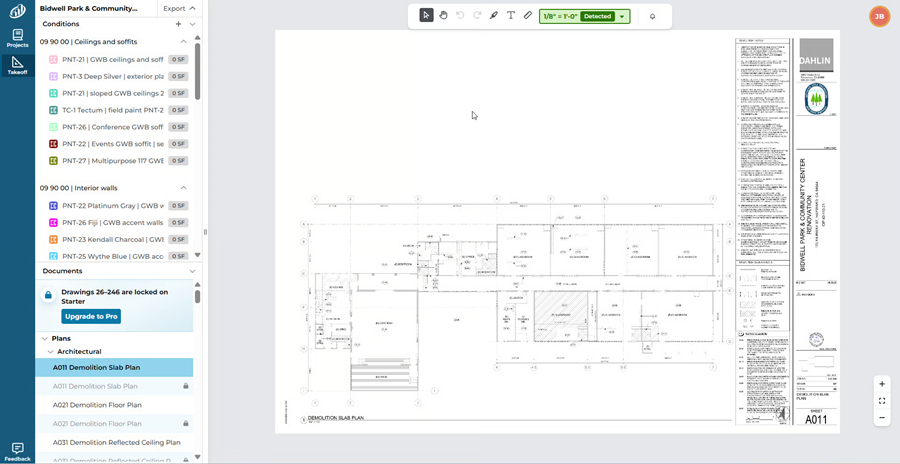
CCTO Starter page order and locked pages: in Starter projects over 25 pages, the page order now matches between the document list and the canvas, locked pages show a lock indicator, and the 403 error no longer appears. In Starter projects with more than 25 pages, locked pages show a lock icon in the document list. The banner in this screenshot says Drawings. It will say Plans in the next release.
-
PlanSwift export reopened in PlanSwift: item and page data is no longer missing when you reopen a CCTO export in PlanSwift.
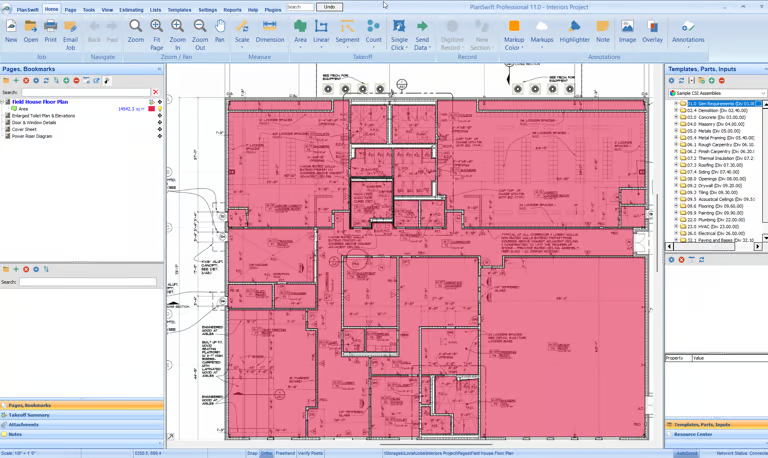
A ConstructConnect Takeoff export opened in PlanSwift now shows the pages and takeoff items from the project.
Improved Project Creation/Document Loading Workflow and Export to On-Screen Takeoff (released: 20261006)
Creating a project is faster and more controlled with the improved setup and document-upload workflow. Estimators can now select only the pages they actually need to process after dropping documents into a project, making it much easier to work with large PDFs without processing an entire plan set unnecessarily. For example, a 1,000-page document can be narrowed to the 20 pages relevant to the bid. Improved upload status indicators also make it clear what is happening, while processing and upload times are faster overall. Estimators can even close the upload window and continue working while documents finish processing in the background—reducing wait time, simplifying project setup, and helping teams get to takeoff sooner. Also, if you use On-Screen Takeoff in your current Takeoff and Estimating workflow, you can now export your takeoff project to an OSP File that you can import into On-Screen Takeoff to finish your estimate.
What’s New
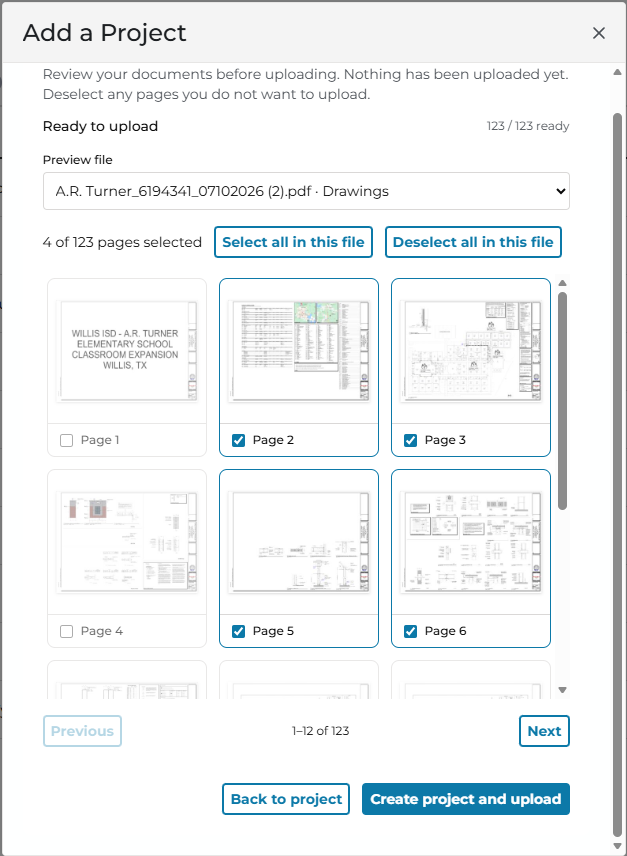
Creating a new project is one of the most common activities you’ll do in ConstructConnect Takeoff. We want to make the process as easy and intuitive as possible. We also want to give you more control in how you are importing files, especially when you drop a multi-page document into the Project.
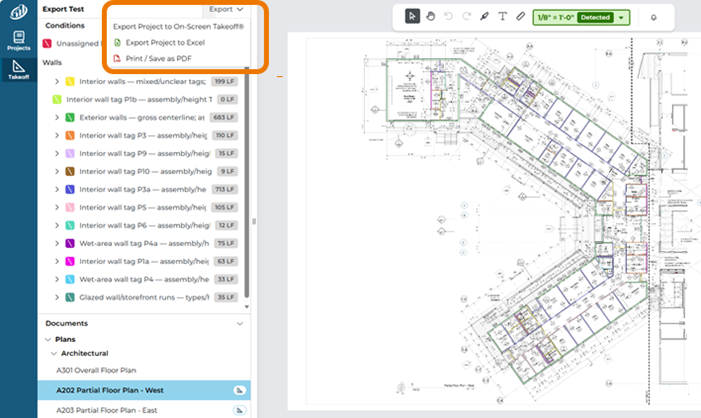
You can also export your project, including Pages, Conditions and takeoff.
- Export to On-Screen Takeoff - you can now export your Pages, Conditions, and Takeoff to an OSP Bid Package that you can import into On-Screen Takeoff.
- Project setup/create and Document Upload has an improved workflow
- After you drop your documents into the appropriate box, you’ll be presented with a screen where you can select which pages to actually process and upload. This is a great improvement if you receive, say, a 1000 page PDF, but only need 20 of the pages for your project.
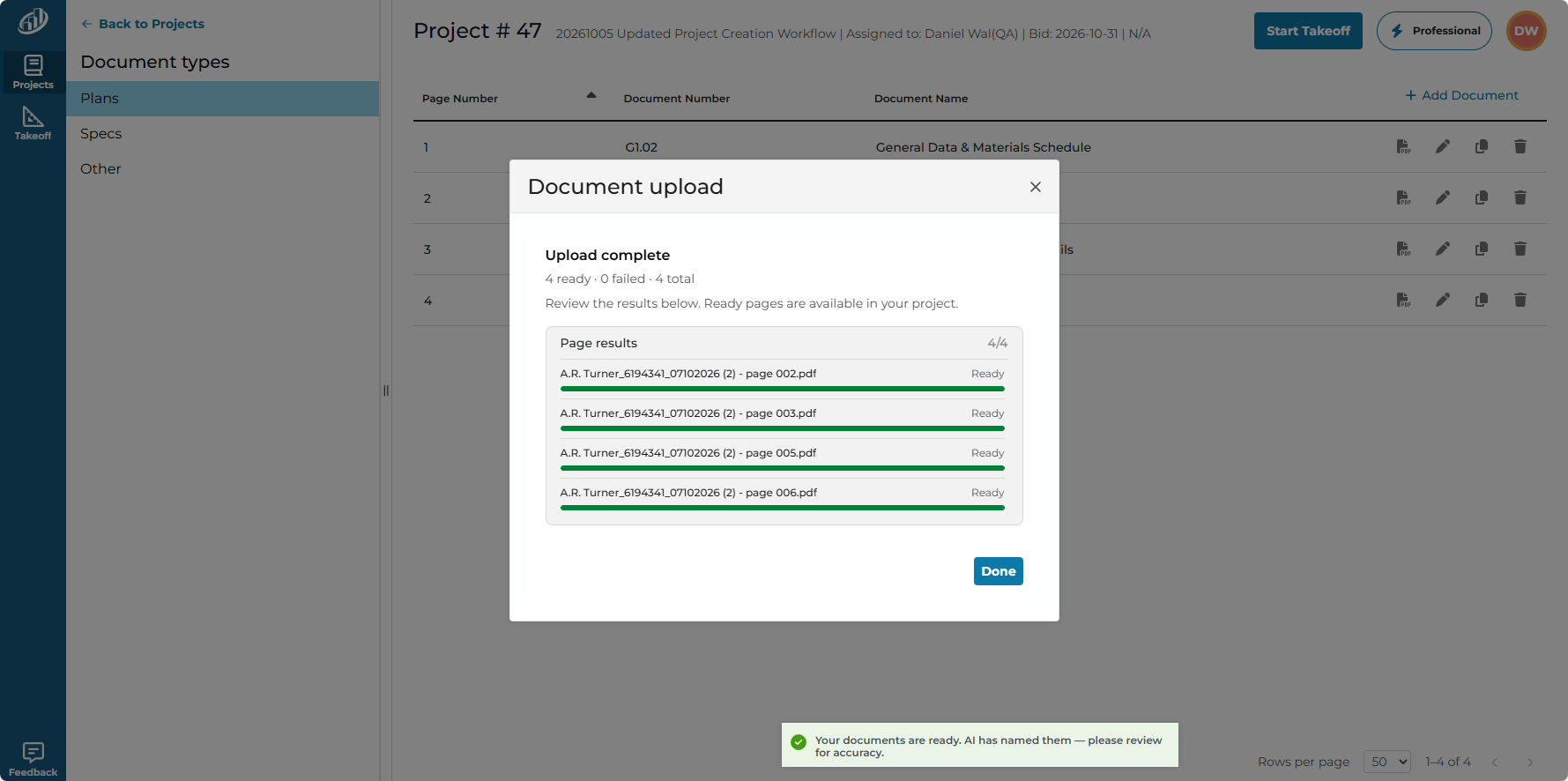
- There is also an improved status indicator so you can see what’s happening. Feel free to close this Document Upload if you want, your documents will continue processing and uploading.
Changes/Improvements
- Document processing and upload times are improved.
Document Grouping by Type/Discipline or Trade/Section (Released: 20260928)
Grouping Plans and Specs during project setup gives estimators a clearer starting point when organizing a new job. Instead of sorting through one combined document list, users can quickly distinguish drawing plans from written specifications and confirm that both have been added to the correct project area. This reduces setup friction, makes missing documents easier to spot, and creates a more orderly foundation for the takeoff. For estimators handling large plan sets or multiple document types, the improved organization means less time managing files and more time reviewing the information that affects quantities, scope, and bid accuracy.
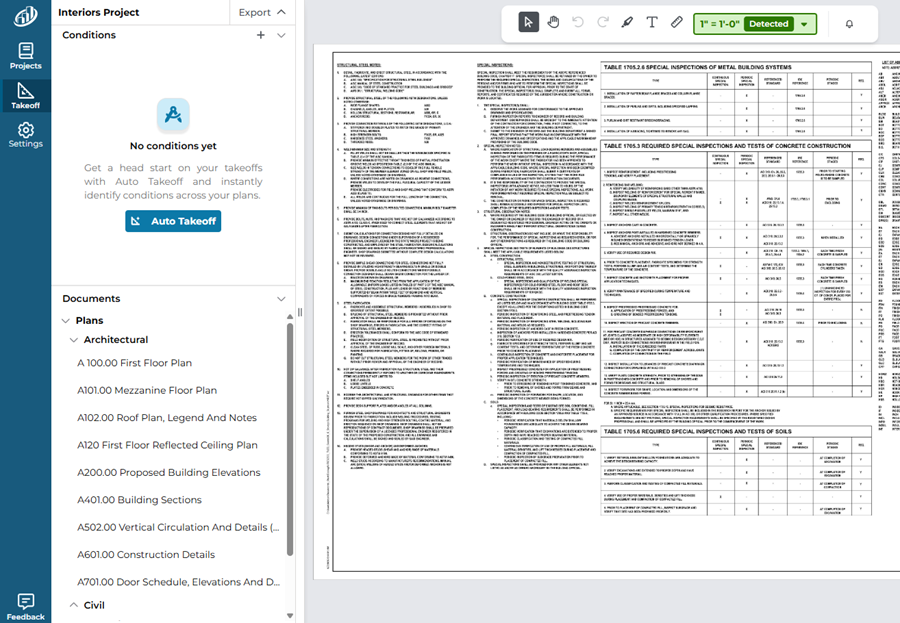
On the Takeoff Tab, Plans are now grouped by discipline, such as Architectural, Structural, and Civil, and Specs are organized by trade based on specification sections. This structure mirrors how estimators typically review construction documents, making it faster to locate the drawings and specifications relevant to a specific scope of work. Estimators can move between related information with less searching, reduce context switching, and focus more quickly on the quantities and requirements that shape their bid. The result is a cleaner takeoff workspace, easier document navigation, and greater confidence that trade-specific details have not been overlooked.
What's New
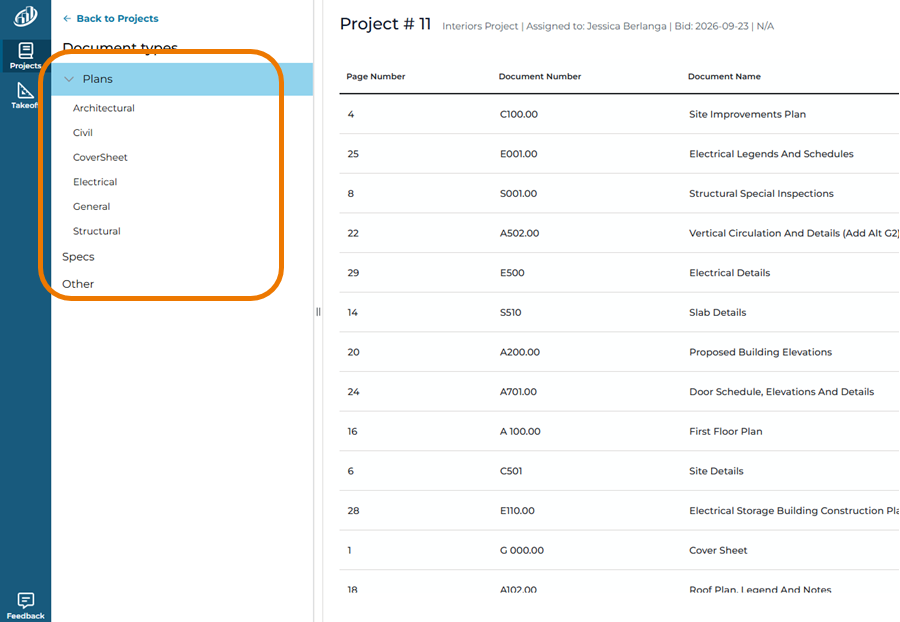
- On the Documents Tab (Project setup screens), Plans and Specs are grouped:
- On the Takeoff Tab, the Documents list now groups Plans by type/discipline (Architectural, Structural, Civil, etc.)
- And Specs are Separated/Grouped by Trade (based on Sections)
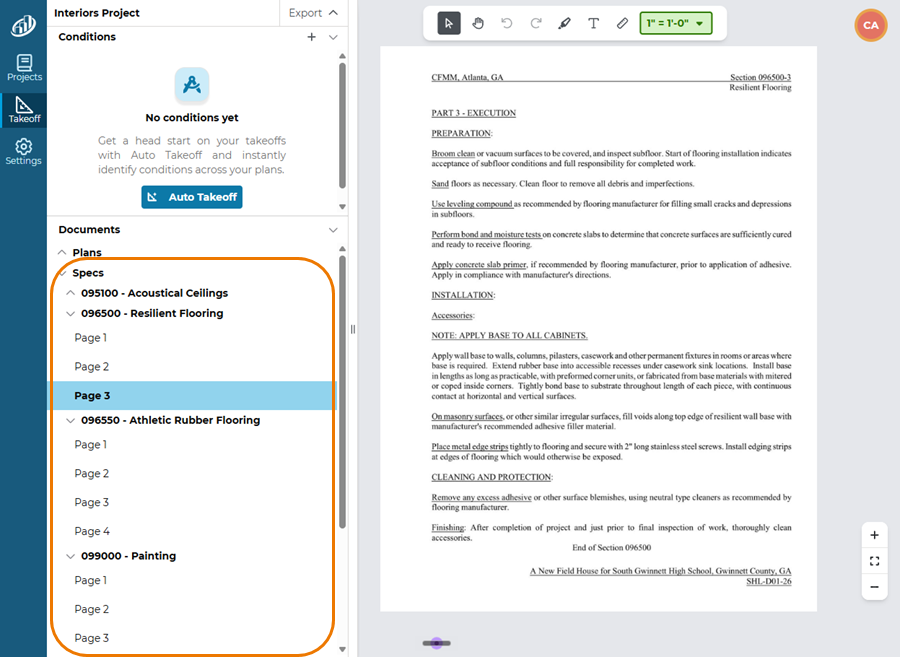
Auto Takeoff Feedback and Reliability (Released: 20260908)
This release begins adding thumbs-up and thumbs-down feedback for Auto Takeoff results, giving estimators a direct way to communicate whether the generated takeoff was useful or incorrect. The document list also now reliably shows whether documents contain takeoff or annotation work, even before they are opened, and updates that status across multiple open tabs in real time. A fix prevents estimators from drawing immediately after creating a condition before it is ready, avoiding errors and failed saves. Practically, this improves visibility, reduces uncertainty, and makes early takeoff work more dependable.
What’s New
- Auto Takeoff thumbs up/down (in progress). Tell us your impression of Auto Takeoff’s results.

- If you click “Thumbs Down”, you’ll be asked what was wrong:

Bug Fixes
- Document list now reliably shows whether a document has takeoff or annotation work on it, even for documents that haven’t opened yet, and updates in real time across multiple open tabs.
- Fixed an issue where drawing right after creating a new condition could show an error and fail to save takeoff; the app now waits until the condition is ready before you can start drawing.
Condition Visibility and Document Organization (Released: 20260831)
Estimators can now expand each condition to see all objects drawn with it on the current page, whether the condition is linear, area-based, or count-based. This makes it easier to review what has been measured, identify individual objects, and verify quantities before moving forward with an estimate. The Documents panel is also organized into collapsible Plans and Specs folders, helping users find the right source material faster. Finally, the Auto Takeoff Quick Start Guide link now works correctly, making it easier for new users to learn the automated workflow.
What's New
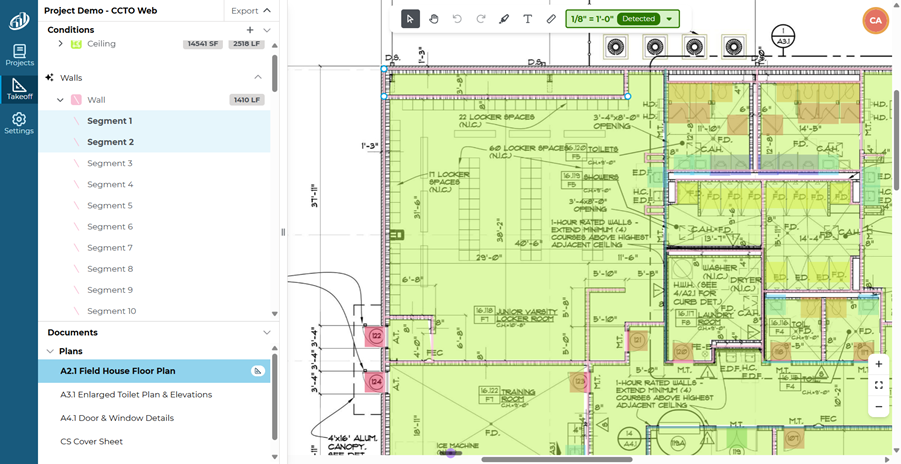
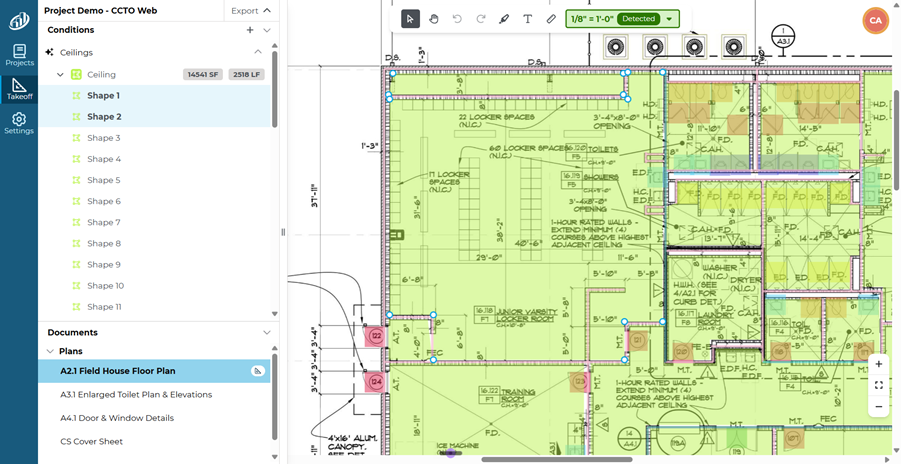
- Each Condition can be expanded to show you all the objects drawn with it on the current Page.
Linear Condition
Area Condition
Count Condition

- The Documents panel is now separated into collapsible folders named Plans and Specs

Changes/Improvements
- N/A
Bug Fixes
- The link to the Quick Start Guide for Auto Takeoff works correctly.
Concrete Takeoff, Volumes, and Review Controls (20260824)
This release expands Auto Takeoff to detect concrete spread footings, linear foundations, and slab foundations. It also provides more detailed condition names and notes for walls and concrete, giving estimators better context when reviewing automated results. Concrete and excavation estimators can work directly in cubic yards through the new Volume quantity type, while depth dimensions support rectangular calculations. Individual backout controls, persistent panel sizing, condition notes, and stacked-object selection make it easier to refine results. Fixes also prevent duplicate conditions and disappearing count takeoff from inflating or undermining quantities.
What's New
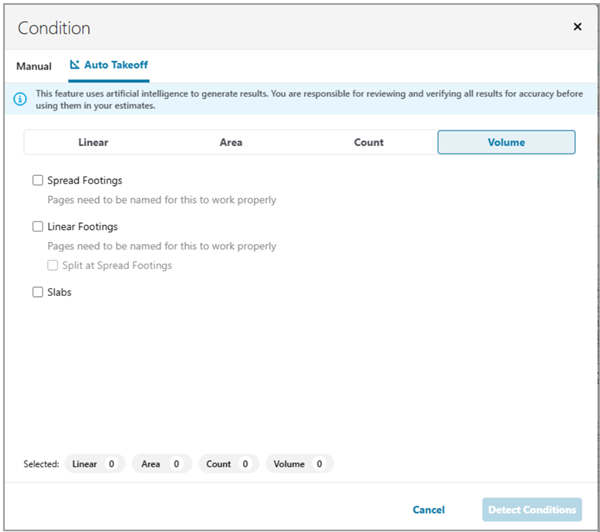
- Auto Takeoff detects Concrete spread footings, linear foundations, and slab foundation.
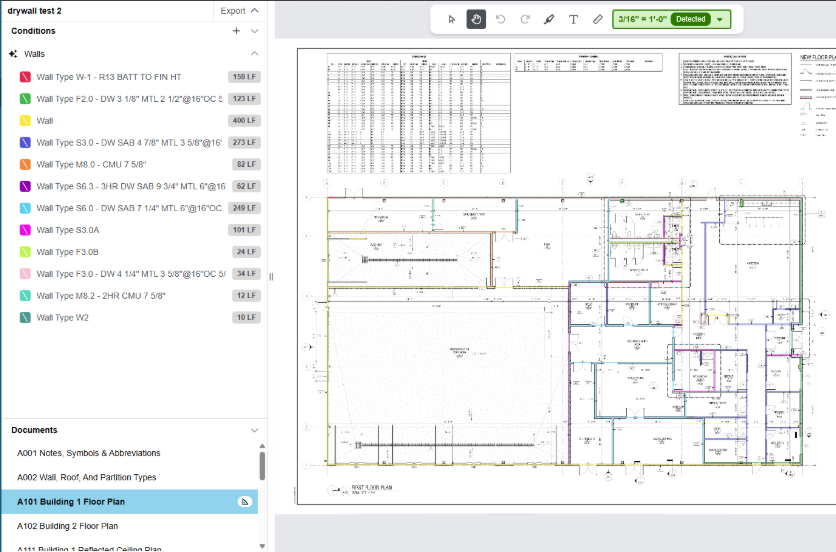
- Auto Takeoff returns more detailed Condition Names for walls (and concrete)
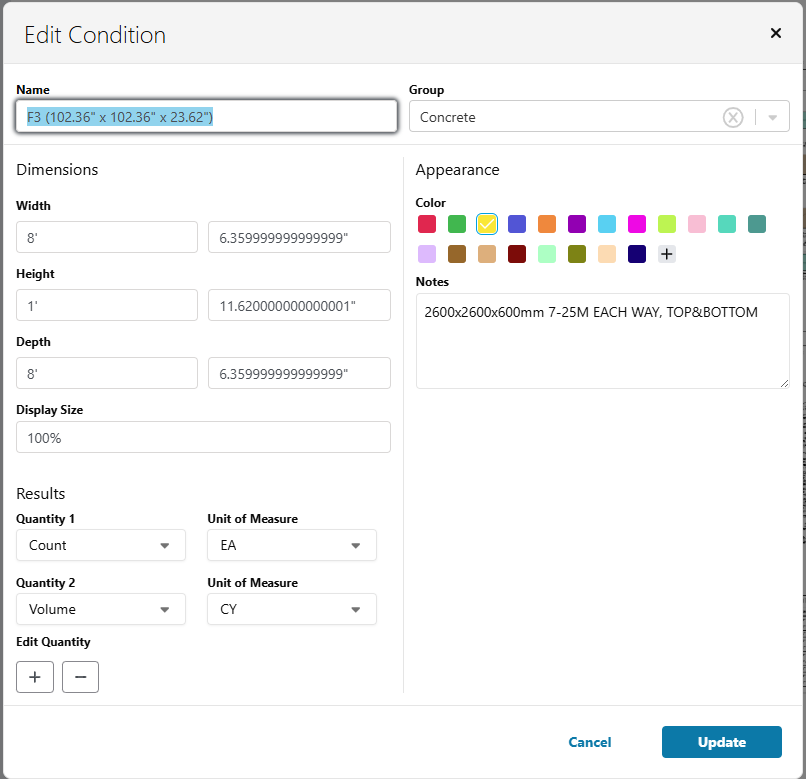
- Auto Takeoff returns detailed Condition Notes (an addition to the Condition Properties window, mentioned below) for walls and concrete.
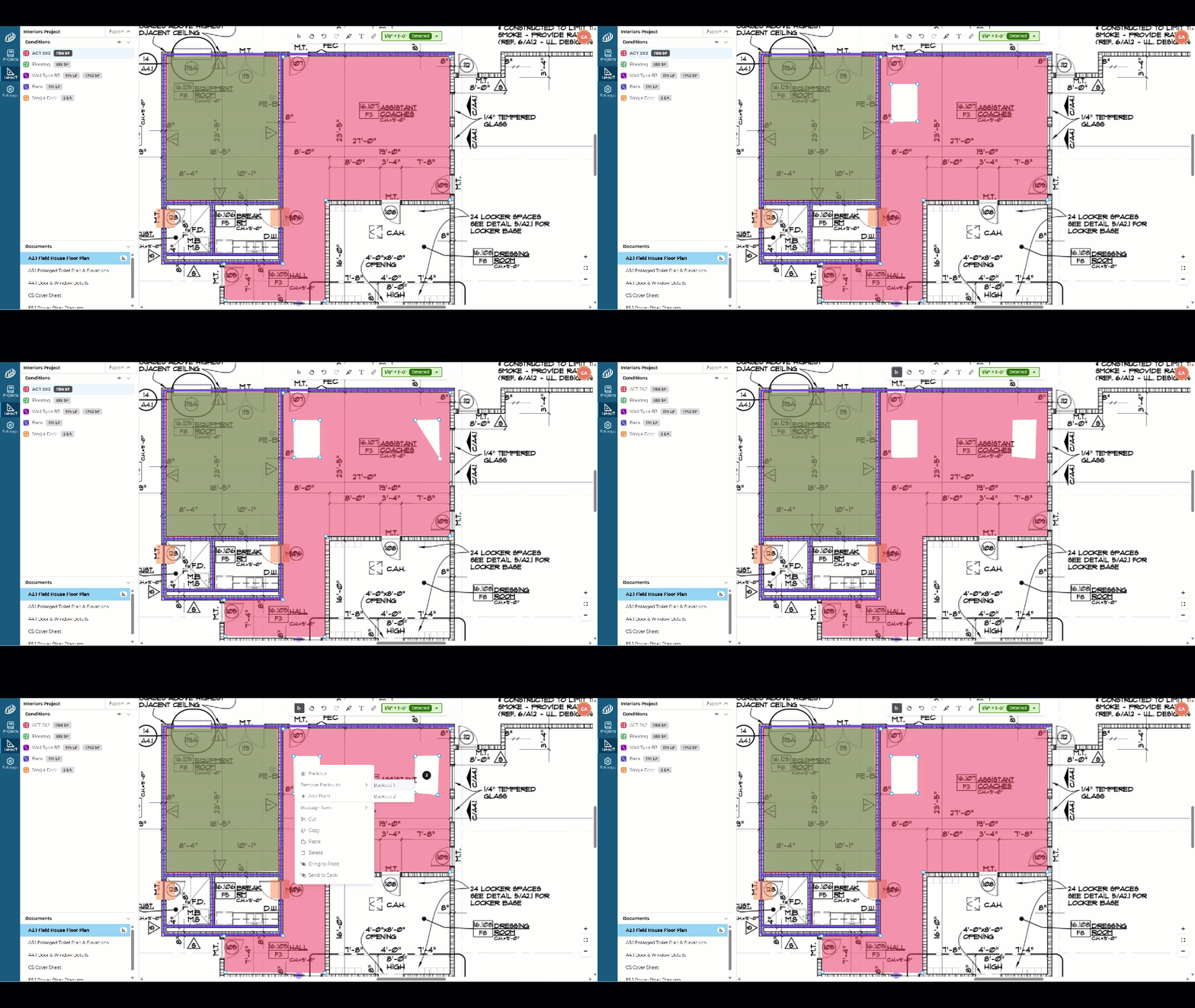
- Individual options to select stacked objects: estimators can modify backout settings per individual object and click into stacked takeoff objects. Darker segments improve drawing visibility.
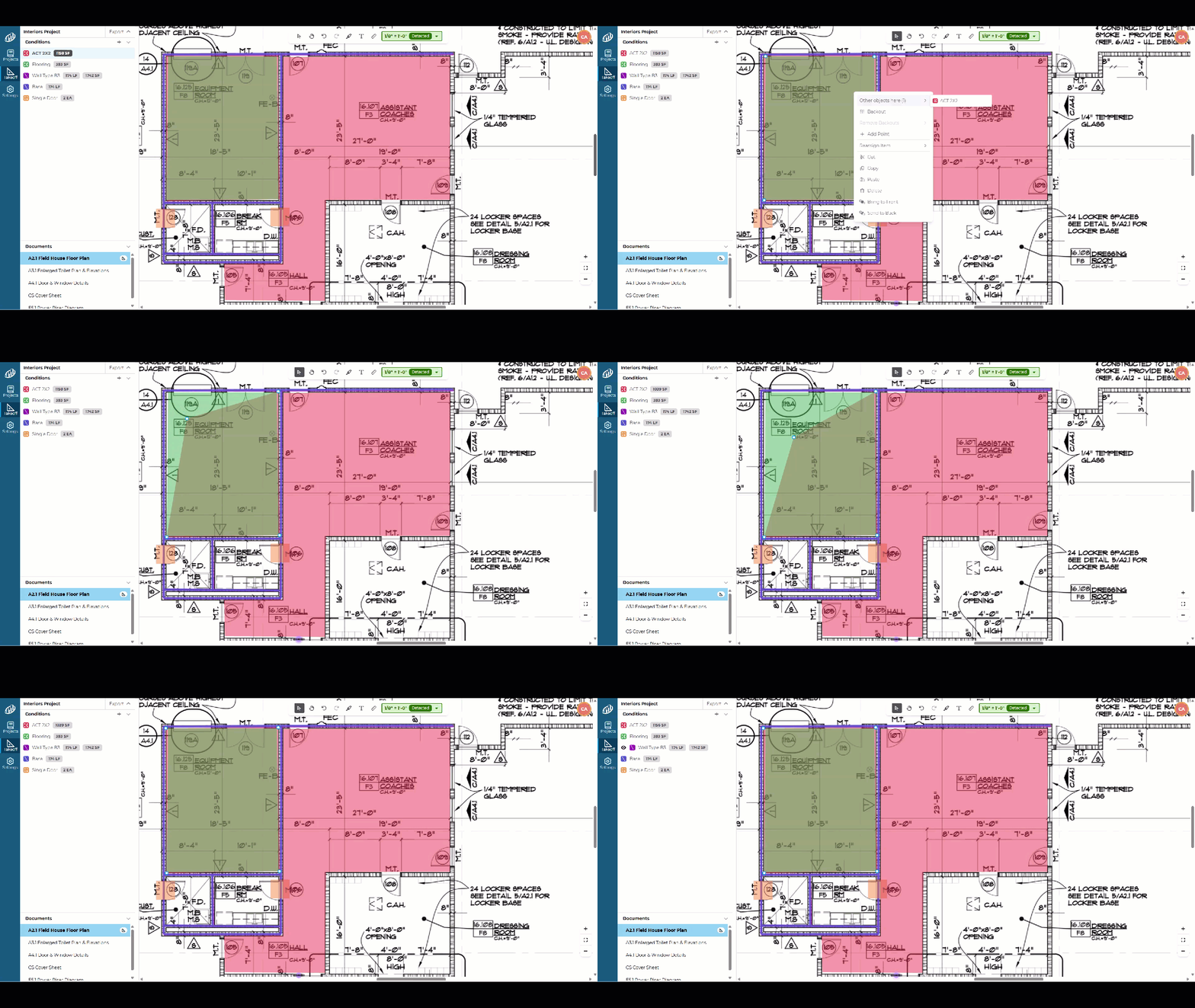
- Individual backout options: estimators can modify backout settings per individual object selected
- Takeoff window panel resize persists per project: Estimators set their workspace layout once and return to it every session.
Changes/Improvements
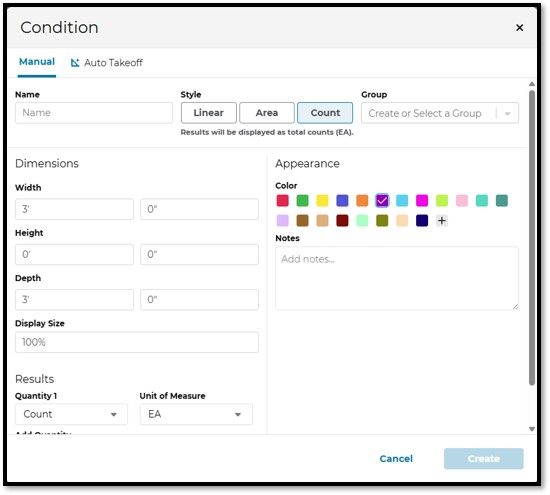
- New Manual Condition Properties UX
- Depth— count objects enable Depth dimensions to calculate rectangular shapes
- Volume (CY) quantity type — Cubic yards will be available natively for linear, area, and count conditions. Concrete and excavation estimators measure volume directly without manual conversion.
- Notes field on Conditions — Free-text notes available on individual conditions to keep alongside measurements. Notes to be available on Export.
Bug Fixes
- Uploaded files now appear automatically. Documents uploaded to a project now show immediately after processing completes. No manual refresh required.
- All CC Platform user roles can access documents. Project Managers, Bid Coordinators, PQ Analysts, and Interns were receiving access errors on documents. All company-wide roles now work correctly.
- Auto Takeoff no longer creates duplicate conditions mid-run. Editing a project while Auto Takeoff was running could create duplicate conditions, inflating quantities and pricing. Fixed.
- Count takeoff is saved correctly. Performing count takeoff after duplicating Count Conditions can cause takeoff to disappear when document is changed.
Core Takeoff Improvements (Release: 20260805)
This release focuses on removing friction from the workflows contractors touch most: the ability to undo and redo actions without fear of losing work, clearer visibility into project counts by status, and a round of usability and reliability fixes across common takeoff tasks.
What’s New
- Project count on every project status — the project count is now visible across all project status views, so you always have an at-a-glance summary.
- Undo/Redo buttons — added to the toolbar for quicker corrections.
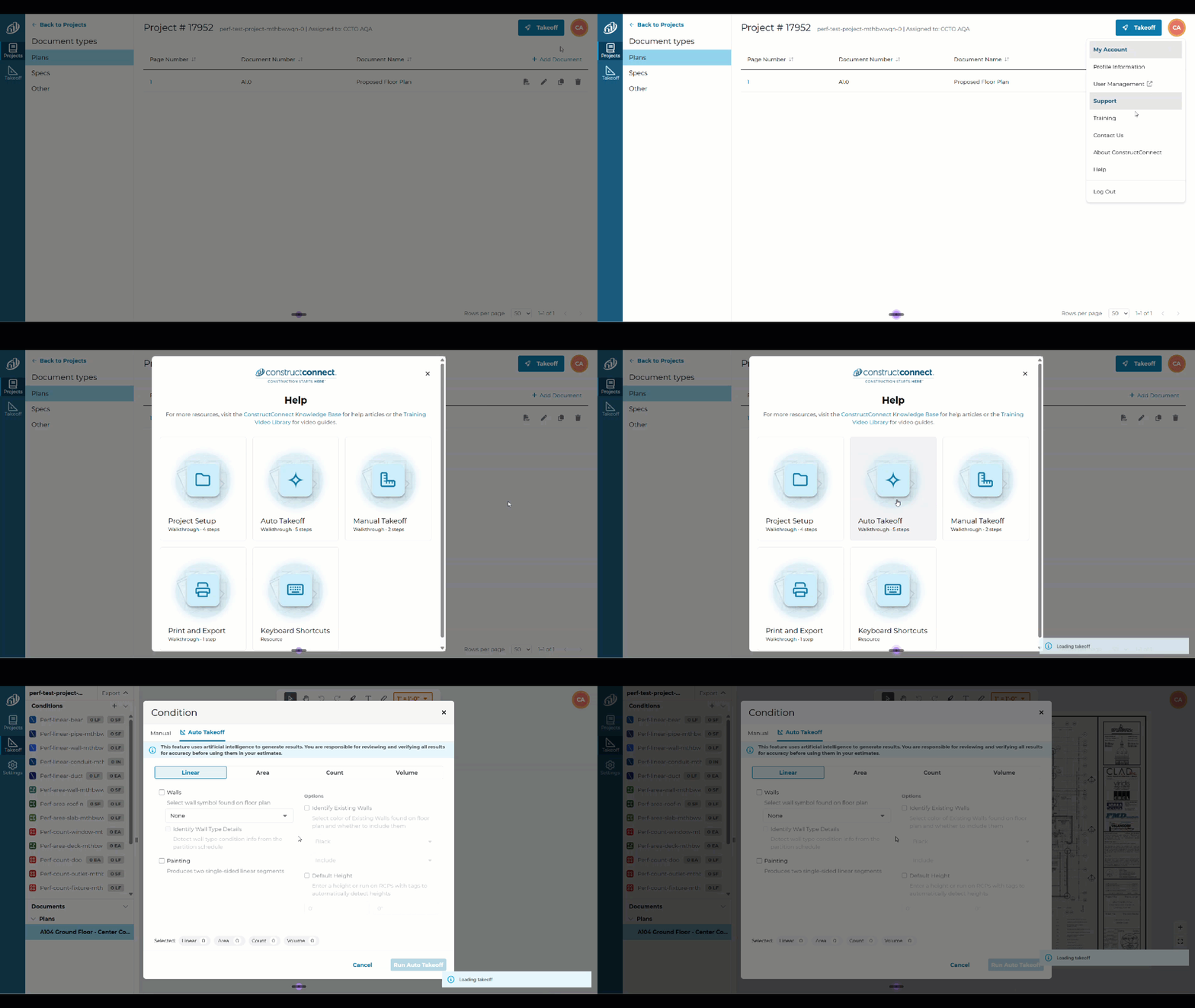
- New in-app Help menu — kbase, Training Library links, and Any Pendo getting started available from the Profile-Help menu.
Improvements/Changes
- Clearer Set Scale screen — now includes a legal message when AI detected the scale, prompting users to verify before proceeding.
- Support contact info updated — support contact information has been updated to ensure any requests go to our takeoff experts directly.
- Assigned To — the “Assigned To” field now displays real names and auto-selects the project creator from the organization’s user list.
- Document hover highlight — documents in the documents panel now highlight on hover for easier selection.
Bugs Fixed
- Fixed curved walls causing a quantity calculation error.
- Fixed copying a document throwing an error.
- Fixed the profile menu disappearing and project list vanishing after a refresh.
- Fixed Bid Date and Time column to show the actual time, not just the date.
Navigation, Editing, and Workspace Improvements (Release: 20260722/20260723)
This release window adds project status counts, mouse-based Undo and Redo, a clearer Set Scale dialog, real-name assignment fields, and document hover highlighting. Estimators can also select and move multiple takeoff objects together, use visible zoom and fit-to-page controls, switch tools with the Spacebar, and keep their preferred takeoff-panel size. A redesigned profile menu and Resource Panel make support, training, announcements, and account options easier to find. Additional fixes improve upload reliability and the display of linear and count results in TIFF files
What's New
-
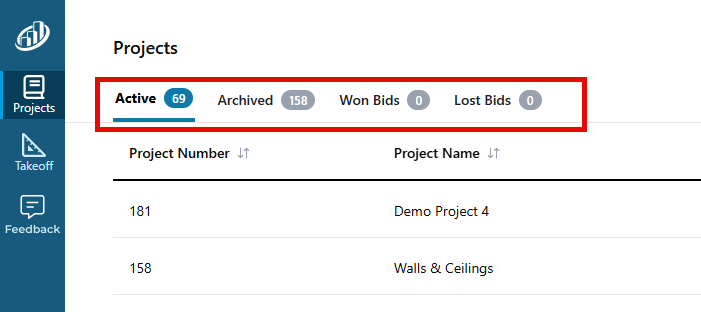
Project status counts: you can see how many Projects are in each status, right on the Projects lists.
-
Undo/Redo Buttons on main toolbar: Now you can use your mouse to undo and redo actions on the Takeoff Tab.

-
Updated Set Scale dialog box: easier to use and with a reminder to double-check scale set by AI.

Changes/Improvements
-
The “Assigned To” field now displays real names and auto-selects the Project creator from the organization’s user list
-
Document hover highlight: when you are moving through the Documents list on the Takeoff Tab, there is a highlight to make it clear which Page will be selected
-
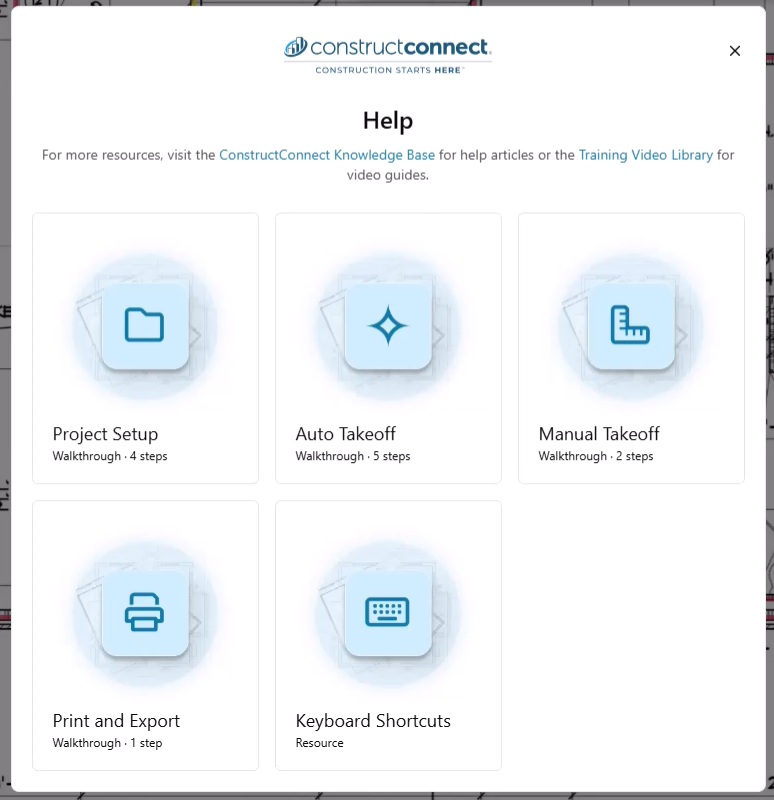
New in-app Help menu:
20260722/20260723 (Continued)
What's New
-
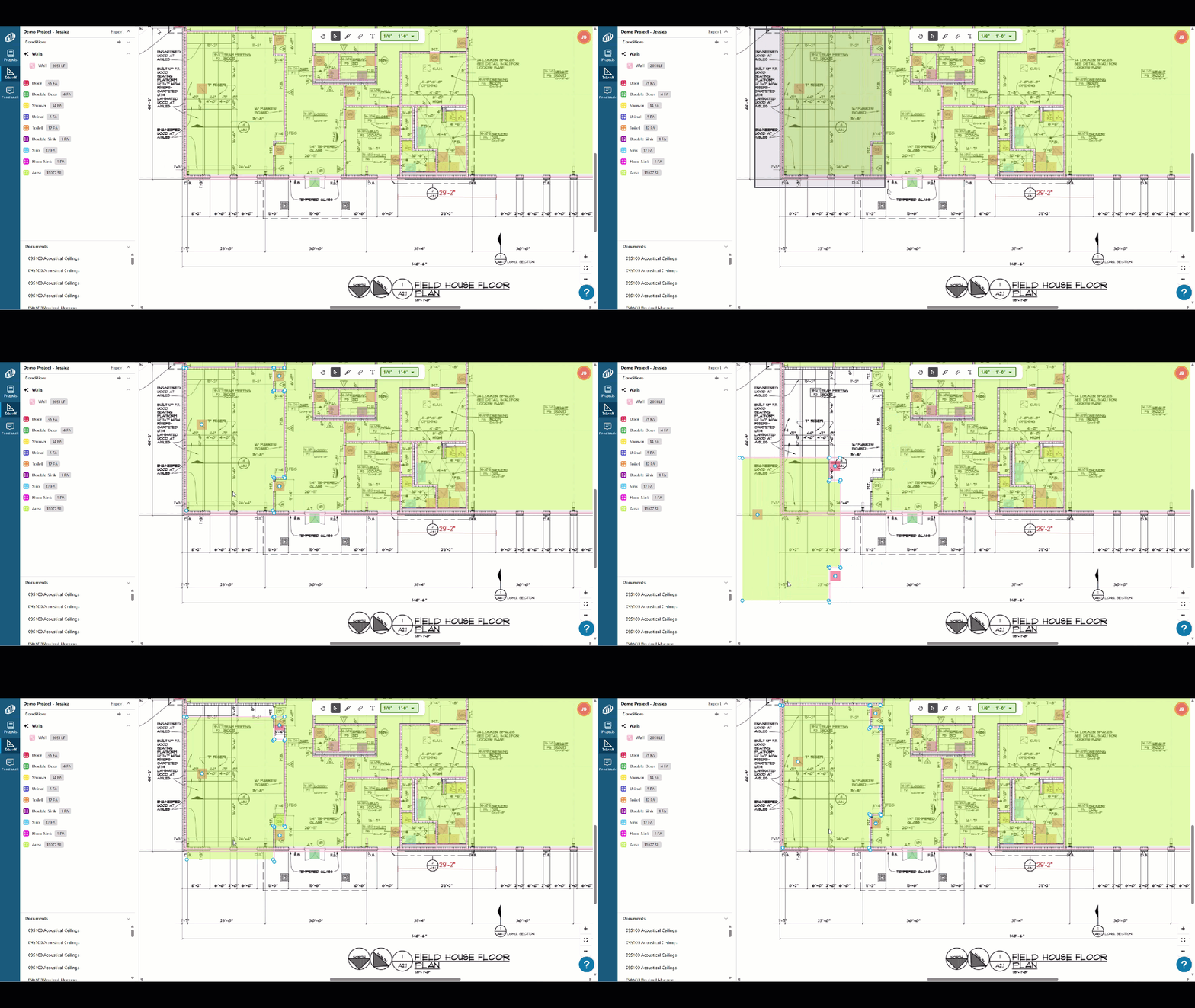
Move multiple objects at once: Select multiple takeoff items and move them together on the canvas.
-
Profile menu redesigned: Key support and account options are now easy to find in the profile menu.
-
On-screen zoom controls: Zoom in and out buttons, fit to page are now visible directly on the takeoff canvas (YAY!).
-
Resource Panel: Find Announcements, Product Walkthroughs, Training Videos, and a link to this Online Help Center.

-
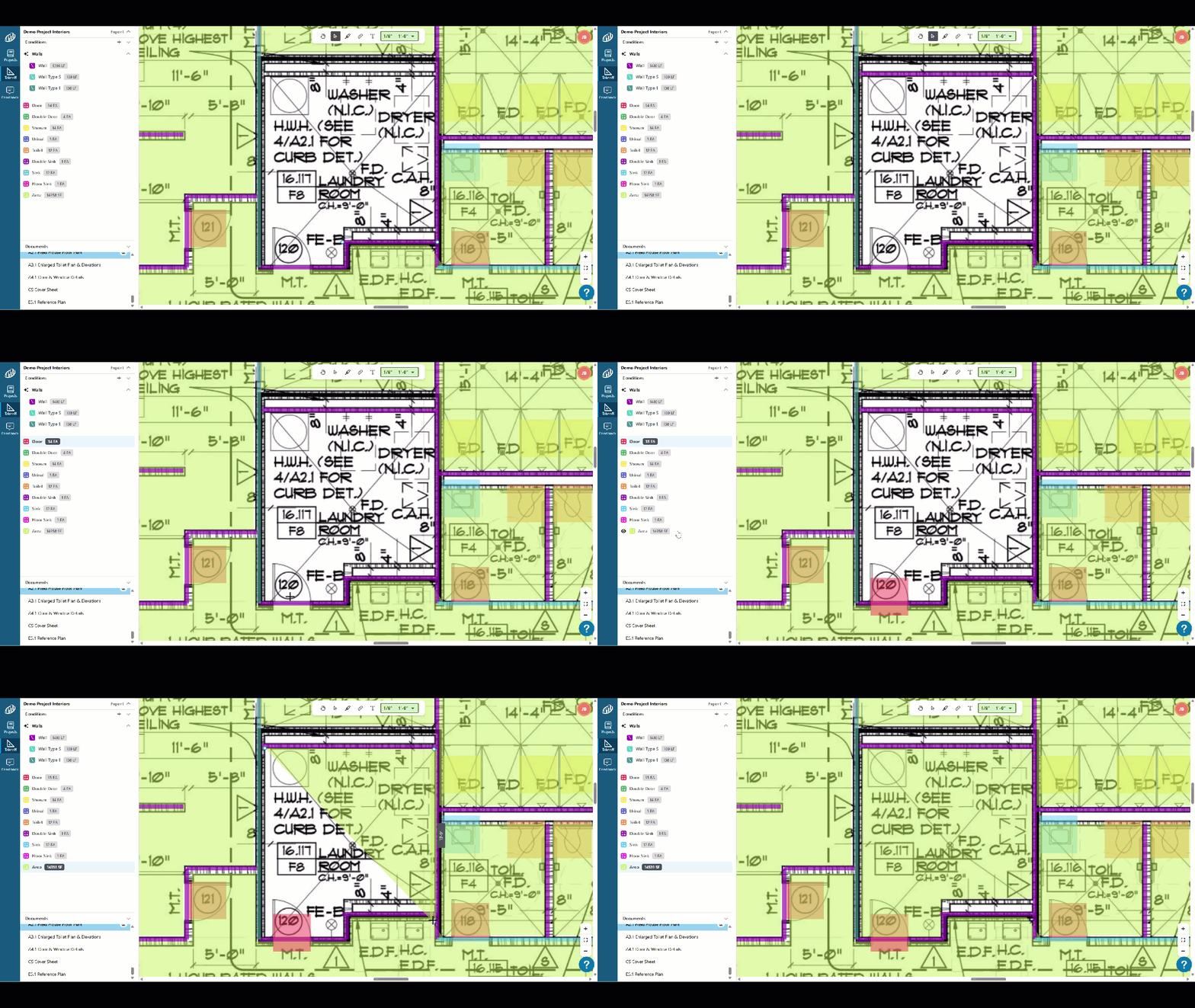
The Spacebar toggles between the Select Tool and the last used Condition for takeoff.
Changes/Improvements
-
Takeoff preview lines match your condition: Preview lines now render in your condition style as you draw, so what you see is what you get.
-
Text annotation dialogs close on click-away: No extra click needed to dismiss the dialog.
Bug Fixes
- TIFF file fix: Linear and count condition results now display correctly in TIFF files.
- Upload reliability fix: Resolved intermittent failures during document upload.
Initial Public Release (Released: 20260715)
The initial release introduced ConstructConnect Takeoff as a web-based takeoff product accessible through a web browser on any computer. For estimators, the practical benefit is a more flexible way to access takeoff work without being tied to a particular desktop installation or workstation. The browser-based model can make it easier to move between office computers and support broader team access, while the product’s online help and getting-started resources provide guidance for creating projects, adding documents, and beginning takeoff. As the foundation release, it establishes the platform for the subsequent automation, collaboration, and workflow improvements.
What’s New
All new takeoff product you can access from any web browser, on any computer.
Visit: https://takeoff.app.constructconnect.com/ to log in.
Known Issues
New product.
