

What is Material Quantities?
Starting October 1st, eligible Project Intelligence Pro and Premium users can find projects by the materials they list. Material Quantities uses AI to extract materials, quantities, and manufacturers from project plans and schedules, so you can see what a project includes without digging through the documents yourself.
What's New
This release adds three ways to work with material data in Project Intelligence:
-
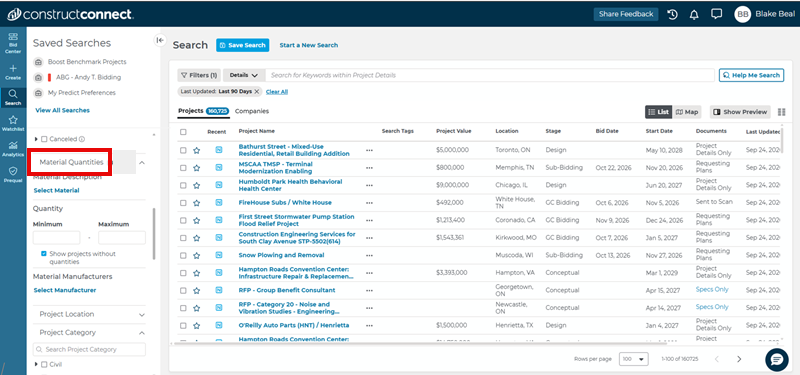
Material Quantities filters – Narrow your project search by material (by name or CSI code), a quantity range, and the manufacturers listed in project schedules.
-
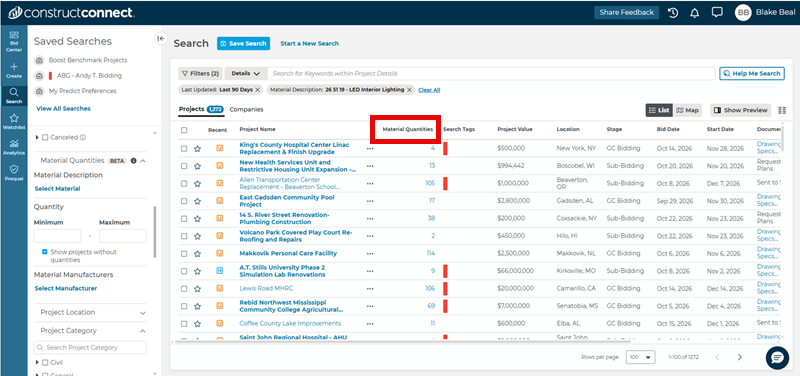
Material Quantities column – After you apply a filter, the results grid shows the total count of matching material for each project.
-
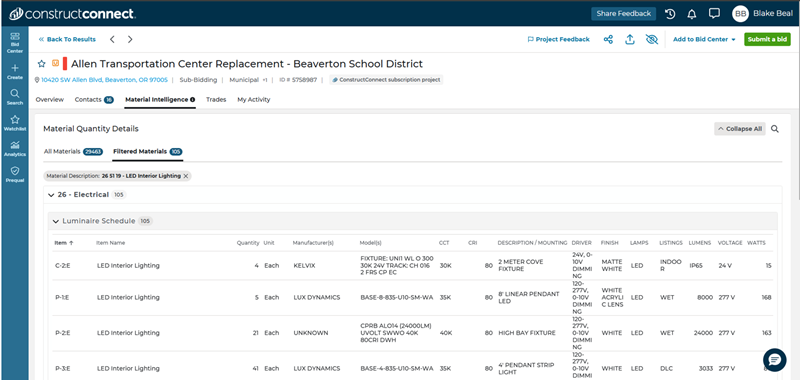
Material Intelligence tab – On the Project Details Page, review the item, quantity, manufacturer, and model (when available), organized by CSI division.
How It Works
-
Open a project search and expand the Material Quantities section in the filter panel.
-
Select a material, set a quantity range, and choose one or more manufacturers. The filters work together, so you can search for projects that include a specific material, meet a quantity threshold, and list a selected manufacturer.
-
Review the Material Quantities column in the results grid
-
Open a project and select the Material Intelligence tab to expand a CSI division and review the details
Good to Know
-
Material Quantities is not a takeoff. It does not measure drawings, price materials, or produce bid-ready quantity surveys.
-
Counts come from project plans and schedules, not specifications.
-
Material Quantities currently focuses on doors, mechanical, electrical, and plumbing materials. Additional trade coverage may be added in future updates.
-
Review the project plans and schedules before using the information for estimating, bidding, or other project decisions. Use the Documents button on the Project Details Page to verify details.
Availability
Material Quantities is being introduced as a research preview. During the preview period, it is available to eligible Project Intelligence Pro and Premium customers. Access and subscription requirements may change as the preview progresses.
Learn More
To learn more about Material Quantities, visit Using Material Quantities in ConstructConnect Project Intelligence.
