

These are the numerous variables you can use in a Custom Formulas. You probably will never use most of these but they are available, in case you do.
Please note, some variables may mean more than one thing depending on what Style (linear, area, count, or attachment) of Takeoff Item the Formula it is used to calculate against. For example, "W" can mean diameter (in formulas for circular Count/Attachment Results) or width (in most other formulas).
Also, remember that 'Length' refers only to Linear takeoff - how long the object is that you draw on the Takeoff Window. When you write a formula for use in an Area, Count, or Attachment, use the Dimensions "Width" and "Depth".
Just because a variable is marked as "Lineal" (as an example), does not mean you cannot use it in a Volume or Area Formula, it is just an indicator that the UOM is considered a Lineal measurement. Keep in mind the possible UOMs for a Variable when you build formulas. Mathematically, for example, you just cannot add a SF and LF result (you cannot add a linear foot to a square foot, you know). You would have to introduce another step in your formula to convert the SF to a LF - usually by dividing by 1LF). Some variables, of course, are simply not usable in some Takeoff Item Types (Linear, Area, Count), the grids below show you in what Type of Takeoff Item each variable may be used.
Non-Dimensional Variables
(Countable, not associated specifically with linear, area, or volume measurements)
| Formula Property | Variable | Linears | Areas | Counts & Attachments | |||||
|---|---|---|---|---|---|---|---|---|---|
| Triangle | Square | Circle | Rectangle | Custom | Linear Attachment (Doors, Windows, etc) | ||||
| Tile Count Visible | VTC | X | |||||||
| Tile Count Rounded | TCR | X | |||||||
| Exact Tile Count Visible | ETC | X | |||||||
| Perimeter Intersection Count | PIC | X | |||||||
| Field Intersection Count | FIC | X | |||||||
| Slope | S | X | X | ||||||
| Count | C | X | X | X | X | X | X | X | X |
Lineal Results Variables
Includes lineal results from all Takeoff Item Types (Linear, Area, Count, Attachment).
| Formula Property | Variable | Linears | Areas | Counts & Attachments | |||||
|---|---|---|---|---|---|---|---|---|---|
| Triangle | Square | Circle | Rectangle | Custom | Linear Attachment (Doors, Windows, etc) | ||||
| Length | L | X | |||||||
| Inner Curve Length | ICL | X | |||||||
| Outer Curve Length | OCL | X | |||||||
| Perimeter | P | X | X | X | X | X | X | X | X |
| Height | H | X | X | X | X | X | X | X | |
| Diameter | W | X | |||||||
| Width | W | X | X | X | X | X | X | ||
| Depth | D | X | X | ||||||
| Thickness | T | X | |||||||
| Gap Width | GW | X | |||||||
| Tile Height | TH | X | |||||||
| Tile Width | TW | X | |||||||
| Grid Length* | GL | X | |||||||
| Backout Perimeter | BP | X | |||||||
| Attachment Perimeter | AP | X | X | ||||||
| Attachment Width | AW | X | X |
*There is a known issue with Grid Length multiplied by Weight per Length. Do not use the GL variable with the WL variable. Create a custom formula for the specific Weight of an object, for example:
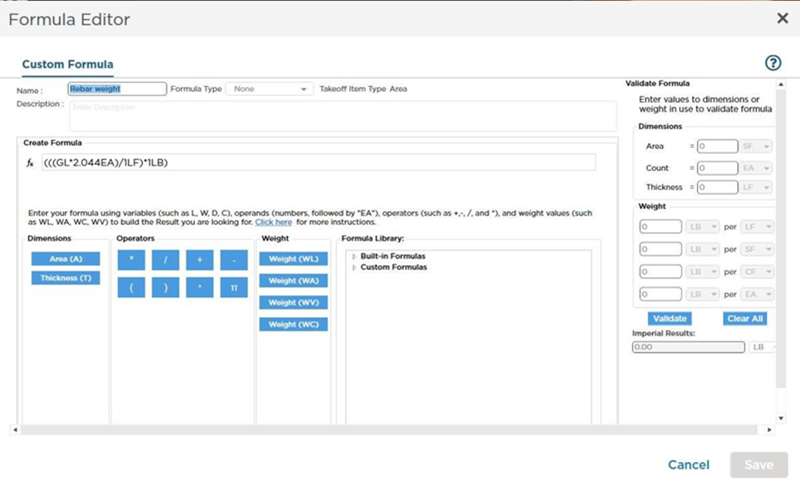
This Custom Formula would result in a calculation of 2.04 LBs per Linear Foot of grid (such as rebar).
Area Results Variables
Includes area results from any Takeoff Item Type (Linear, Area, Count, Attachment)
| Formula Property | Variable | Linears | Areas | Counts & Attachments | |||||
|---|---|---|---|---|---|---|---|---|---|
| Triangle | Square | Circle | Rectangle | Custom | Linear Attachment (Doors, Windows, etc) | ||||
| Area | A | X | X | X | X | X | X | X | |
| Attachment Area | AA | X | X | ||||||
| Backout Area | BA | X | |||||||
| TileCountAreaVisible | TAV | X | |||||||
| TileCountAreaRounded | TAR | X |
Volume Variables
Includes volume results from any Takeoff Item Type (Linear, Area, Count, Attachment)
| Formula Property | Variable | Linears | Areas | Counts & Attachments | |||||
|---|---|---|---|---|---|---|---|---|---|
| Triangle | Square | Circle | Rectangle | Custom | Linear Attachment (Doors, Windows, etc) | ||||
| Backout Volume | BV | X | |||||||
| Attachment Volume | AV | X | X |
 Custom Formula Example - Counts Custom Formula Example - Counts | Masters: Bid Statuses  |
Related Articles
