

In the previous article, we showed you how to click on objects to select one or two objects easily. However if you need to select a lot of takeoff or you want to select a takeoff object and its attachments easily you use Roping.
Selecting Takeoff with Attachments
- If you select an object that has Attachments on it you can select the parent object the Attachments or both depending on your needs. Roping is the easiest way to select multiple objects that are near each other.
- You cannot copy an Attachment unless you select (and copy) its Parent object at the same time (Attachments cannot be copied and pasted to other parents).
- If you select an object that has Attachments on it but do not select the Attachments when you copy and paste only the Parent object is copy and pasted.
- You can select an Attachment(s) without selecting the parent object if you want to move the Attachment(s) within the confines of the Parent takeoff object or delete the Attachment(s).
- If you delete an object that has Attachments on it the Parent object and all Attachments are deleted.
To select objects using Roping:
Using the Select tool ( ) you draw a box around or through the takeoff objects you want to select depending on your Roping Method setting. You can set your Roping Method to "Touching" or "Inclusive" - "Touching" is the default.
- Touching - takeoff objects that are inside the select box you draw or even just touching the box are selected
- Inclusive - only takeoff objects that are completely inside the select box your draw are selected
You can adjust your Roping Method in Settings see Related Articles below for more information.
Touching (default)
By default if you draw a selection box and a takeoff object touches (or is inside) the select box that takeoff object is 'selected'.
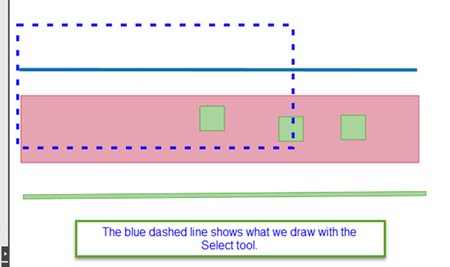
Box drawn over takeoff objects.
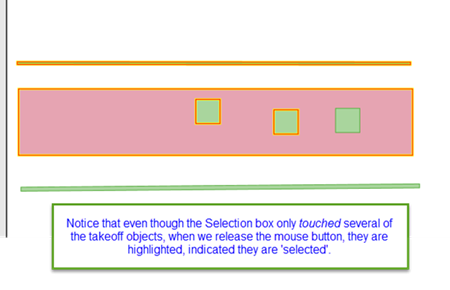
All objects within the box or touching the box are selected.
Notice that one Attachment object is not selected? Just because a parent object is selected does not necessarily mean that its Attachments are selected.
Inclusive
If you prefer you can require objects be entirely encompassed by the Selection box to be considered 'selected'. This is called "Inclusive" Roping.
For example...
The same Select Box drawn over the same takeoff objects
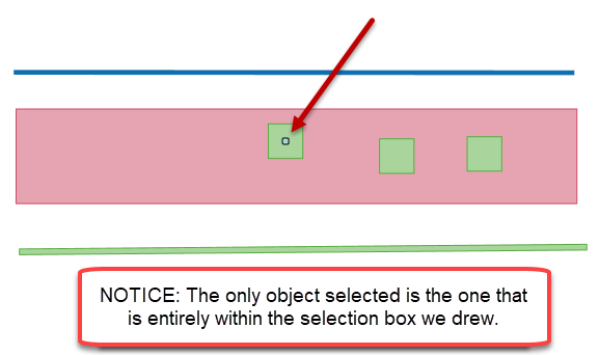
Only objects entirely within the box the box are selected
Once selected the takeoff objects can be manipulated however you like.
Sometimes you may want to use a broader sword when selecting objects use the Context Menu and Keyboard Shortcuts explained in the next article to select takeoff.
 Selecting Objects by Clicking on Them Selecting Objects by Clicking on Them | Selecting Objects Using the Context Menu and Keyboard Shortcuts  |
Related Articles
