

There are two times you may want to set the length of a linear segment manually:
- You draw a segment and it is close but you want it to be an exact length (previous article)
- You set up a Takeoff Item and choose "Manual Length" (meaning you have to tell the program how long each segment drawn with this Takeoff Item is)
We cover "Manual Length" Takeoff Items in this article; see the Previous Articles for how to set a Calculated-length linear segment to a specific length.
Manual Length Linear Takeoff Items (not to scale segments)
There is a big difference between a "Manual Length" Linear and manually setting the length of a calculated segment (previous article). A calculated segment will always be "to Scale" - changes to its measurement value affect its visual length. Sometimes you just don't care about the visual representation of a piece of takeoff you just need it to "be" a certain length for your Results.
When you create a Linear Takeoff Item in the Takeoff Item Properties dialog box you can check the option for "Manual Length".
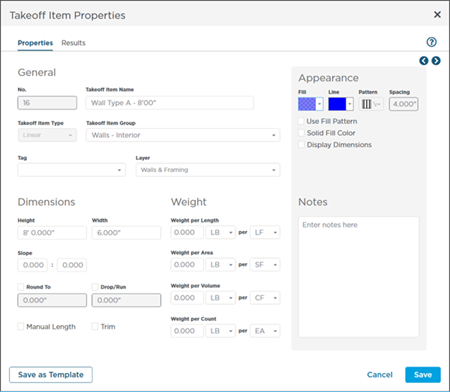
Linear Takeoff Item Properties - click "Manual Length" to set the length of every segment drawn with it
When you set up a Linear Takeoff Object as "Manual Length" you must set the length of every piece of takeoff you draw with this Takeoff Item. If you don't set the length on each object you could draw a hundred linear segments with this Takeoff Item and your Results would be "0".
When checked as you use that Takeoff Item to draw takeoff the program adds a small a measurement box to every segment.
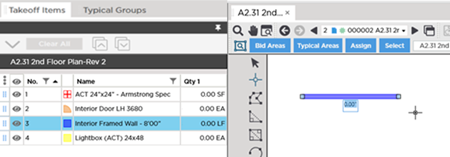
The default value of the linear segment is 0'00" - you must enter a value if you want this segment quantified.
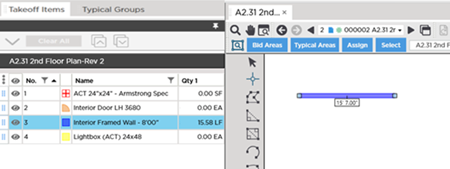
Enter a value in the measurement box (remember the last two digits are always considered inches so we entered 1507 for 15'7").
Manual Length Takeoff is Not to Scale
One thing to remember is that manual-length Linear takeoff is not to scale.
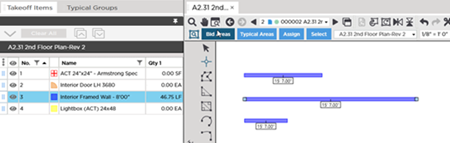
Notice in the screenshots below we drew three segments but they are not the same.
In the first example we draw all three segments of the same visual length and enter different measurements for each:
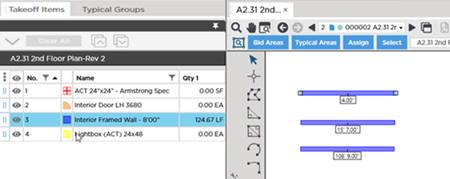
In the second example we draw three lines that are visually different lengths but are equal measurements:
 Manually Setting the Length of a Linear Takeoff (to Scale) Manually Setting the Length of a Linear Takeoff (to Scale) | Auto-Filling a (Closed) Linear Polygon with Area Takeoff  |
Related Articles
