
The Typical Groups Pane Toolbar is located along the bottom of the Typical Groups Pane and includes buttons for adding editing and deleting Typical Groups along with a selecting all Typical Group Markers for the selected Typical Group(s).

There are other Keyboard shortcuts that do not have an equivalent button also detailed in the grid below.
| Button | Description | Shortcut Key | What it does/How it is used... |
|---|---|---|---|
 | Add Typical Group | Insert or Ins | Opens a new blank Typical Groups Properties window so you can configure a new Typical Group. |
 | Edit | Enter | Opens the Typical Group Properties window for the selected Typical Group (you can also double-click on a Typical Group in the Pane to open its Properties). |
 | Delete | Delete or Del | Deletes the selected Typical Group(s). This permanently deletes the Typical Group(s) and all Typical Group Frames and Markers from the current Bid. |
 | Select Objects | Ctrl + T | Selects all Typical Group Markers for the selected Typical Group(s) on the current/active Takeoff Window. |
| Go To Frame | Ctrl + G | Opens the Page on which the Typical Group Frame exists selects it then zooms to fit the Typical Group Frame. |
Typical Groups Context Menu
The Context Menu provides access to two options that are not available on the Toolbar.
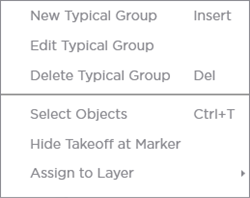
| Option | What it does/How it is used... |
|---|---|
| Hide Takeoff at Marker | When you place a Typical Group Marker in the Takeoff Window the program typically adds a representation of the takeoff inside the Typical Group Frame where the Marker is placed. This has no effect on calculations or results just what you see at the point where you are placing Typical Group Markers. |
| Assign to Layer > | Assigns the Markers to a custom Layer. The Typical Group Frame is always assigned to the Typical Groups Layer (that cannot be changed) and the takeoff inside the Typical Group Frame can be assigned to any number of Layers. Hiding the Layer on which the Typical Group (the Markers...) is assigned hides everything at the point where a Marker is placed including the takeoff. |
 Typical Groups Pane Typical Groups Pane | The Layers Pane  |
Related Articles
