
You can now apply Project and Company Filters together in Project Intelligence. This update lets you connect projects and companies in a single search, making it easier to find the right opportunities and build relationships with the right partners.
What you can do
- Filter projects using company criteria such as Company Role or Company Location.
- Filter companies using project criteria such as Project Type, Project Value, or Project Location.
- Build focused lists of companies based on specific project types or markets to support more strategic outreach and relationship-building
What's new
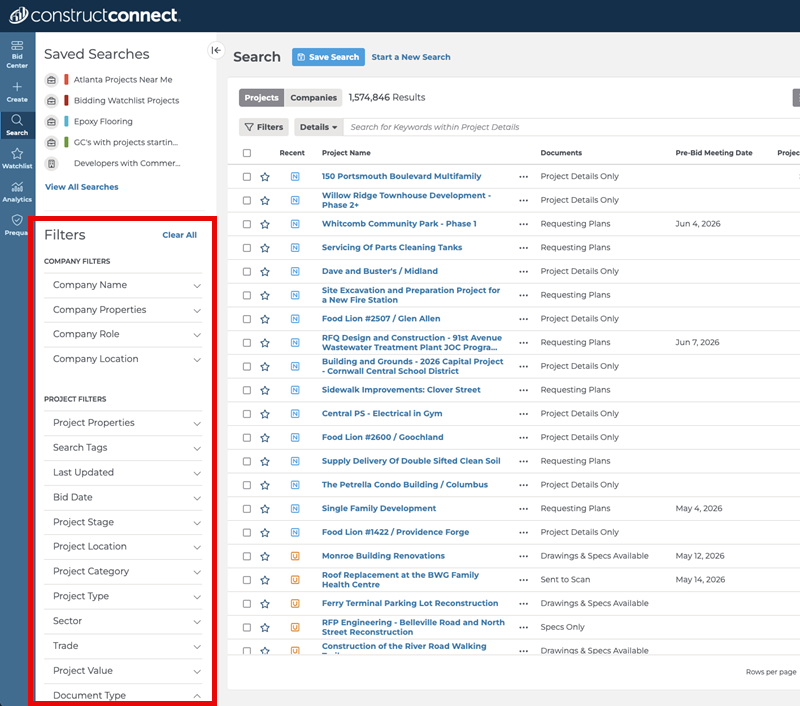
This release makes Company Filters and Project Filters available in both Results views, whether you are looking at Projects Results or Company Results. You can now apply filters across both record types to better understand how projects and companies are connected.
Highlights and key capabilities
- Cross-record visibility – See how projects and companies are connected without switching Results views or starting over.
- Flexible search workflow – Start with Projects or Companies and move between them while keeping your filters in place.
- Saved search support – Build on existing searches or create new ones with both filter types applied.
- Improved filter access – Company Filters appear above Project Filters in both views for easier navigation.
You can find more detailed guidance on searching across Project and Company Filters in the following article: Using Project and Company Filters Together in Project Intelligence.
Related Articles
Adding Filters to Your Search in Project Intelligence
