

This article includes Latest Release Notes and all Historical Release Notes for the Takeoff BOOST™ AI-Powered automated takeoff and setup Service. Review your app’s Release Notes for product-specific Release Notes, this articles covers changes to the Service only. Not all updates to Takeoff BOOST are pushed to every product at the same time.
LATEST VERSION
2026-08-03 - Wall Types Detection Improvement
Auto Takeoff now identifies partition types from a Partition Details on plans and automatically creates separate drywall conditions based on what it finds.
Your Sheet Names and Numbers must match the plans before running Auto Takeoff. We recommend using Auto Name to make quick work of this task.
What's New
Partition Types Detection for Drywall
Auto Takeoff now reads the wall type tag on the plan, compares it against the partition types elsewhere in the plan set, and updates each wall type Condition to bring over the detailed assembly information including a more descriptive Condition Name.
Here is an example of a partition details sheet (or schedule) that interiors contractors traditionally see.
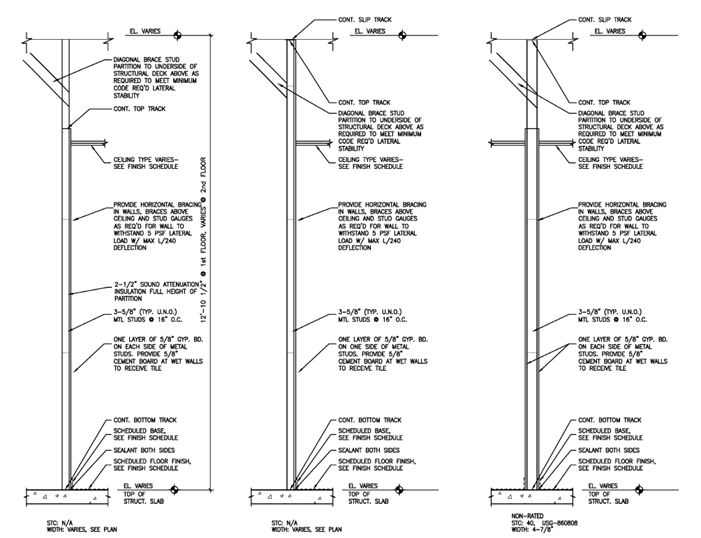
Auto Takeoff pulls the following from the partition details for each tagged wall:
-
Number of drywall layers — single or double layer board on each side of the wall
-
Board type — e.g., regular, moisture-resistant, fire-rated, acoustic/smoke
-
Gauge/thickness — stud gauge and overall wall thickness
-
STC Rating — sound transmission class
This information gets added to the Condition Notes section so when it comes time to add pricing information in your estimating solution (Quick Bid, for example), the details are already there so you don’t have to review the plans again.
It also puts any detailed assembly information that is found in the partition type into the Condition Notes.
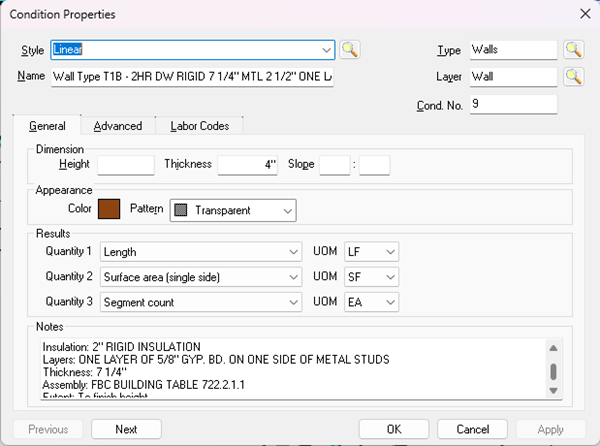
The Condition Name now includes more information.
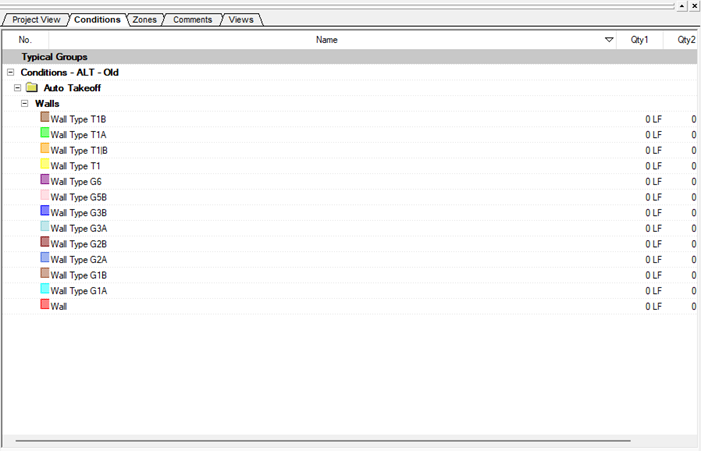 |  |
| Before, the Type was indicated. | After, the Type is still indicated, but so are the basic details of what makes each Type unique including:
|
Example of what completed takeoff and Conditions look like after this update:

Enabling Wall Type Details
To enable this detection, in the Auto Takeoff dialog box:
- Check Walls
- Set the appropriate Wall Type tag shape
- Check “Identify wall type details”
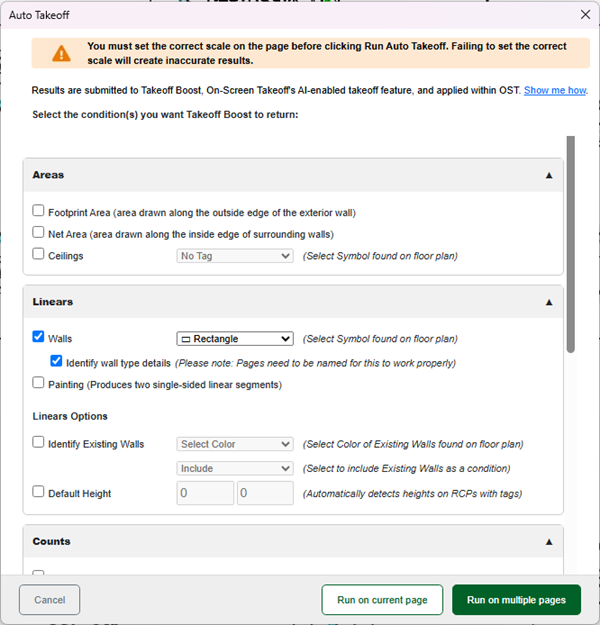
For two-sided walls, you need to update the surface area quantity Result in the Condition to “Surface Area - Both Sides”, Auto Takeoff sets it to “Single Side” by default.
Why Partition Type Detection Matters
Partition types on a plan are usually just a tag (e.g., "A1", "B2") that references a partition detail elsewhere in the drawing set with the actual wall assembly. Previously, Auto Takeoff (fka Takeoff Boost) didn't differentiate between partition types, so estimators had to manually cross-reference every tag against the partition details. This is tedious and error-prone on jobs with dozens of partition types.
Auto Takeoff now identifies partition types automatically, giving estimators immediate visibility into each wall assembly.
PREVIOUS VERSIONS/RELEASES
2026-07-29 - Finish Schedule Detection
Auto Takeoff now identifies wall finish tags from a Finish Schedule on renovation and addition plans.
This update is available to users who log into On-Screen Takeoff with an email address and password only and is not available to legacy (license key/server code) users.
What's New
Wall Finish Schedule Detection
When running a painting takeoff, Auto Takeoff now identifies wall finishes from a Finish Schedule, and creates a separate condition for them. This happens automatically with no additional setup required.
| Before | After |
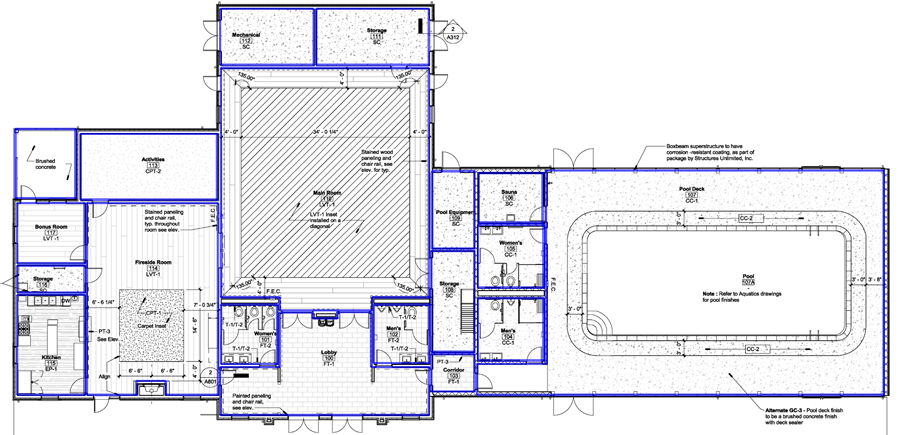 | 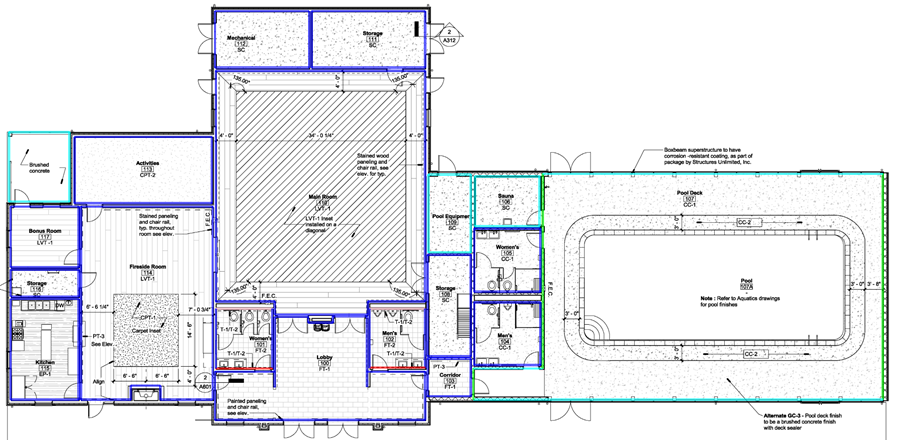 |
| Notice, Auto Takeoff took off all the walls with a single Condition. | After the update, Auto Takeoff identifies each different finish and takes it off with a separate Condition. |
Example of a finish schedule:
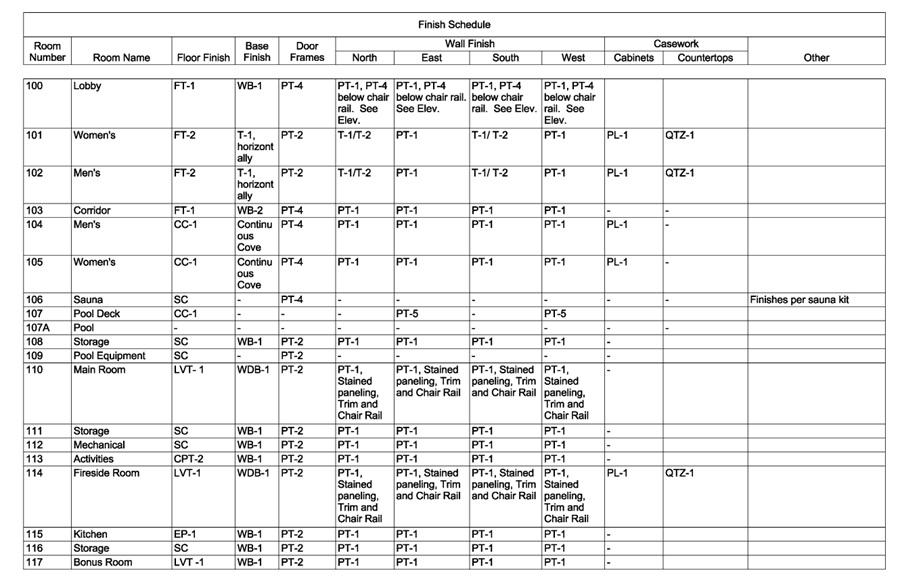
This detection currently only works if the schedule is on the same PDF page as the plan. Future versions may also allow it to detect if there is a schedule on a different plan page.
Plan North indicator
Occasionally, architects will choose to orient the plan in a certain direction to fit on the page. You can also choose which direction of the page is Plan North to make sure the finishes apply to the correct wall.

New boost dialog with plan north option
Supported Scenarios
| Feature | Plan Type | Takeoff Option |
|---|---|---|
| Finish tag detection | Finish Plans | Painting |
Why Finish Schedule Detection Matters
Finishes and floor plans often have the finish details in a separate schedule, with each wall designated by North South East West. This is often used to identify if a wall is an accent wall or has wall covering or tile.
Previously, Auto Takeoff didn’t differentiate these walls and the estimator would need to manually do that themselves. This could mean dozens of rooms and walls to reassign.
Now, Auto Takeoff separates these different wall finishes into different conditions. This way, estimators will always be able to find split finish schedules.
Getting Started
Auto Takeoff categorizes varying wall finishes into separate conditions, giving estimators immediate visibility into split finish schedules. These improvements are included automatically - nothing you need to do.
2026-07-10 - Concrete Slabs and Linear Footings
This Takeoff Boost service update includes Concrete Slabs and Linear Footings.
As of the Release Date, this update is only available to On-Screen Takeoff users on the current version.
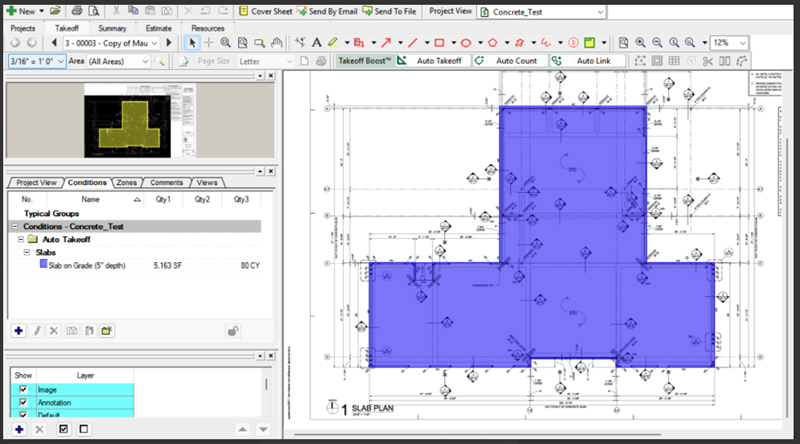
Concrete Slabs
Example:
Linear Footings
Example:
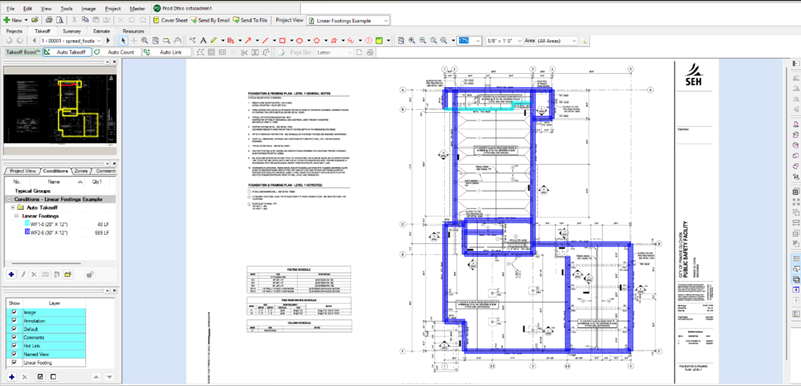
Why this Matters?
ConstructConnect continues to expand and improve Takeoff Boost/Auto Takeoff. This latest update helps Concrete and Site contractors by further reducing manual work.
2026-05-20 - Paint Types and Ceiling Accuracy Improvements
This Takeoff Boost service update includes two great improvements: Paint Types and Ceiling identification improvements.
Paint Types
Detection of Paint Types only works with PDFs at this time.
Example:
 |  |
| Before: Takeoff Boost/Auto Takeoff returned a single Condition for Paint. | After: Takeoff Boost/Auto Takeoff returns several unique Conditions, based on the objects’ tag and the finish schedule - all automatically done for you. |
Why this Matters?
Automating your finish schedules just got easier. Instead of returning a single generic condition for paint, Auto Takeoff now automatically reads object tags and finish schedules to generate unique conditions for you.
-
Why it matters: You no longer have to manually assign finish tags to differentiate paint or wall coverings room by room. Takeoff Boost does the heavy lifting by mapping paint tags directly to the correct wall surface conditions.
Accent walls are not yet automatically assigned distinct tags; Auto Takeoff currently applies the primary paint tag designated for the room.
Mixed Ceilings
We’ve heard your feedback regarding Acoustic Ceiling Tile (ACT) and Gypsum Wallboard (GWB) detection. This update introduces significant improvements to better capture complex ceiling scenarios.
-
What’s changed: Ceilings Auto Takeoff now identifies ACT and GWB with much higher accuracy, specifically improving how the system handles tricky soffits and bulkheads.
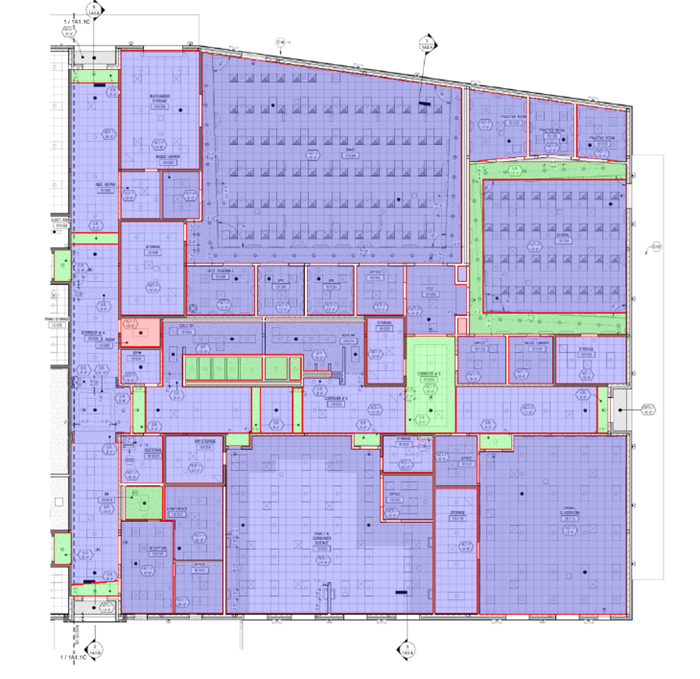 | 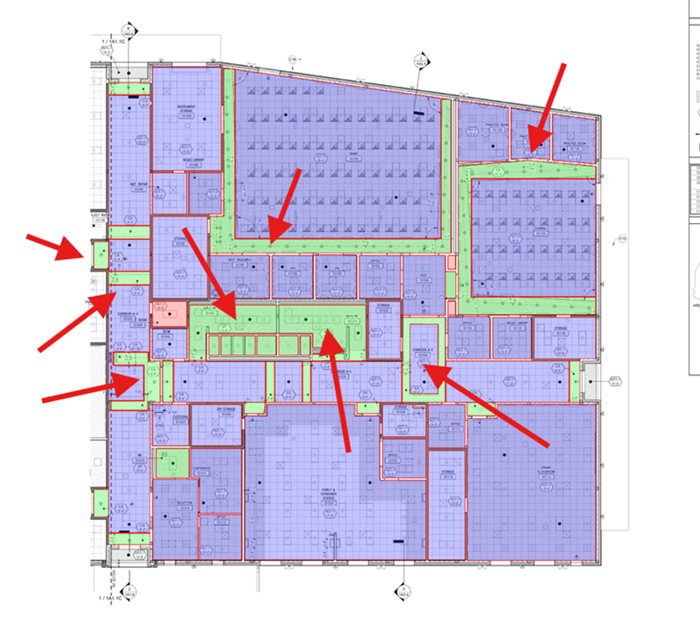 |
| Before: Takeoff Boost/Auto Takeoff missed a few changes in ceiling type. | After: Takeoff Boost/Auto Takeoff identifies ACT/Gypsum Board ceilings more accurately. |
Why this Matters?
Fewer corrections getting you to “completed takeoff” faster and more accurately than ever.
2026-05-06 - Concrete Spread Footings
This update is tied to the On-Screen Takeoff May 06, 2026 release.
Improvements
Concrete Spread Footings
As part of our continuing development of Takeoff Boost, we are delighted to roll-out the first option to support Concrete contractors.
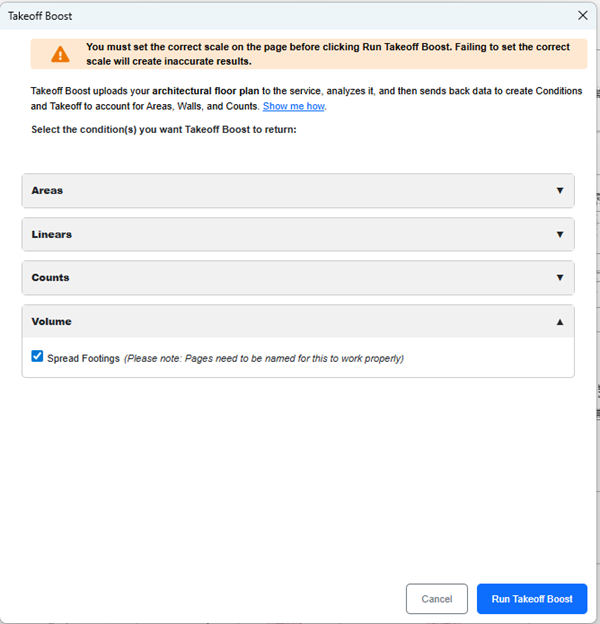
Example:

Concrete spread footings are identified by type.
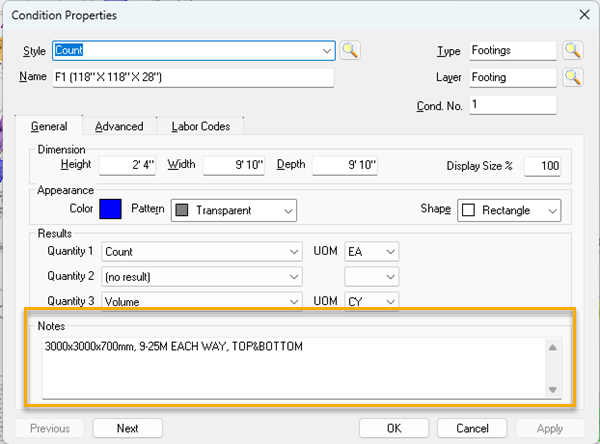
Condition Notes include details about each type of spread footing.
Why this Matters?
ConstructConnect is committed to expanding Takeoff Boost’s trade coverage and Concrete is next on our list.
Key Benefits
-
Volume measurements - you’ll know in seconds how much concrete is needed for your spread footings
-
Condition Notes - filled in automatically
-
Reduces manual takeoff - get to bidding faster with fewer clicks
2026-03-19 Existing Walls Improved Detection
Improvements
Existing Walls Improvement
A few updates ago, we rolled-out support for Takeoff Boost to identify existing walls. However, we have noticed that some plans format existing and new walls the same - as white, outlined in black. We have updated Takeoff Boost to support that workflow now.

Why this Matters?
Previously, when both existing walls and new walls appeared in white on a plan, Takeoff Boost struggled to distinguish between them. This led to inaccurate results and required significant manual corrections.
Now, when you select "Existing Walls" and choose "White" from the color dropdown, you'll see a new prompt: "Are new walls also white?" with Yes/No options. This allows you to quickly tell Boost about your plan's wall colors so it can deliver more accurate results.
 |  |
| Prior to this update, Takeoff Boost did not separate new and existing white walls but returned them as a single Condition. | After this update, new and existing white walls are detected and individual Conditions are created for each. |
Key Benefits
-
More accurate results - By knowing upfront whether new walls are white, Takeoff Boost can better differentiate between existing and new construction
-
Works on any page - Does not require a legend on the page for accurate white wall detection
-
Reduces manual corrections - Better detection means fewer walls to fix after Takeoff Boost runs
-
Handles the most challenging existing walls scenario - White-on-white walls are one of the toughest detection challenges in automated takeoffs
2026-02-26 Default Height and Automatic Height Detection on RCPs
Improvements
Takeoff Boost now supports default wall heights, automatically applying a user-specified height to all wall conditions when running Walls or Painting takeoff. Painters using reflected ceiling plans (RCPs) get an added bonus: Boost reads height callouts from the plan and uses the detected height, only falling back to the default for rooms where a height isn't found.
Default Wall Height
A new Default Wall Height option appears in the Takeoff Boost dialog under Linears Options. Check the box, enter your desired height, and Boost applies it to all wall conditions. The height is applied both as a field on the condition and in the condition name (e.g., "Wall Type A, 8' High").
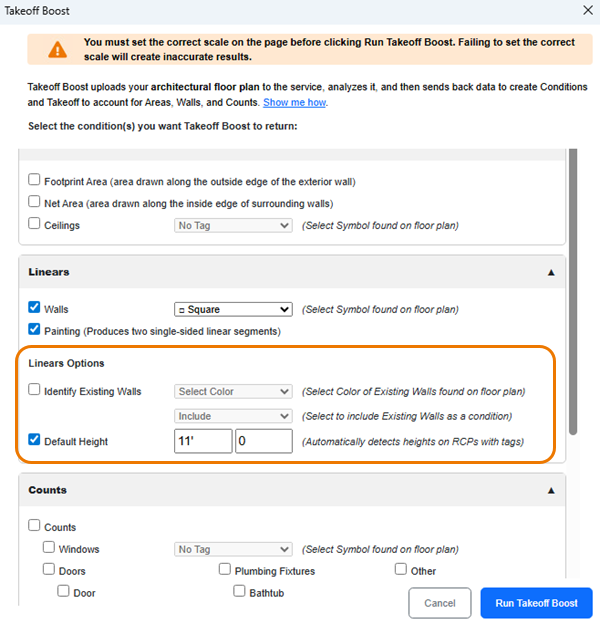
This option is available when using either the Walls or Painting linear takeoff options.
Why Default Wall Heights Matter
When estimators run Boost for walls, every wall condition comes back without a height. That means manually entering the wall height on each condition after the takeoff runs. For a plan with dozens of wall types, that's a lot of repetitive data entry.
Now, estimators can check the Default Wall Height option and enter their desired height (e.g., 8') before running Boost. The height gets applied to every wall condition automatically and shows up in the condition name itself, so you can see it at a glance without opening each condition.
This has been one of the most requested features from contractors using Boost for wall takeoff.
Automatic Height Detection (Painting on RCPs)
When using the Painting option on a reflected ceiling plan with Default Wall Height enabled, Boost reads height callouts from the plan. Detected heights override the default, giving painters accurate per-room heights automatically.
For example, if a painter sets a default height of 8' and a room on the RCP shows 10', Boost will use the 10' height for that room. The 8' default only applies to rooms where Boost can't find a labeled height.
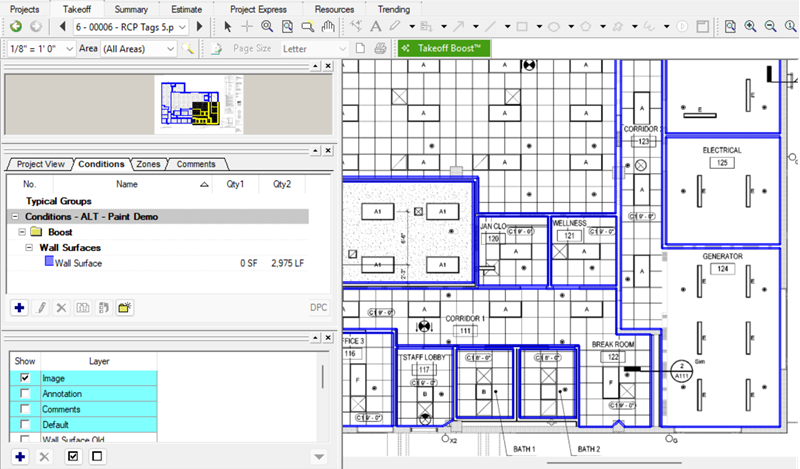 | 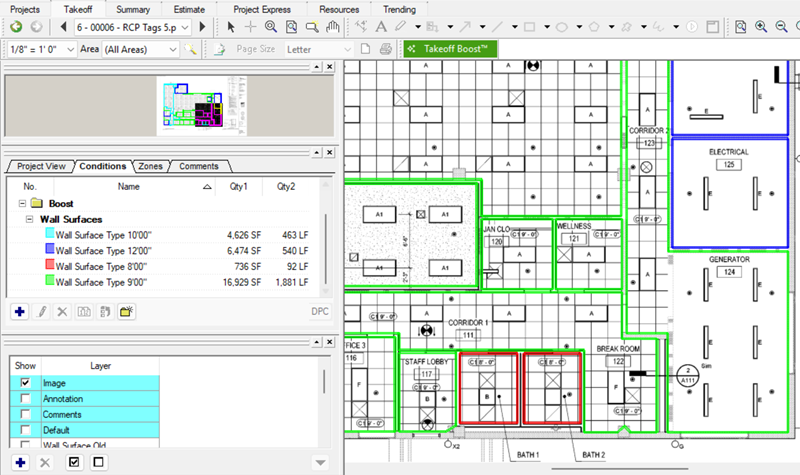 |
| Prior to this update, Takeoff Boost did not assign a height to wall takeoff and all walls on the RCP were returned as a single Condition. | After this update, heights are detected and individual Conditions are created for each different wall height. |
Why Automatic Height Detection Is a Game-Changer for Painters
For painters doing wall takeoff on reflected ceiling plans, Boost now goes a step further. RCPs often include room heights labeled directly on the plan. When using the Painting option on an RCP with a default height set:
- Takeoff Boost detects room heights from the plan and uses them automatically
- Where heights aren't detected, Boost uses the default height specified
This means painters get accurate heights broken out by room without any manual work. The automatic detection only applies when using the Painting option on a reflected ceiling plan. For drywallers using the Walls option on a floor plan, only the default height is applied (no automatic detection).
If you are a painting contractor and perform your wall takeoff somewhere other than the RCP (e.g., the finish plan), we encourage you to try doing performing your takeoff on the Reflected Ceiling Plan instead. The automatic height detection is a significant time-saver and gives you height breakouts not found on the finish or floor plans.
2026-02-18 Out of Scope and Double-Wall Detection
Improvements
Out of Scope Area Detection
When running Net Area or Ceilings takeoff, Boost now identifies hatched areas and creates a separate condition for them. Active work areas remain in their own conditions as usual. This happens automatically with no additional setup required.
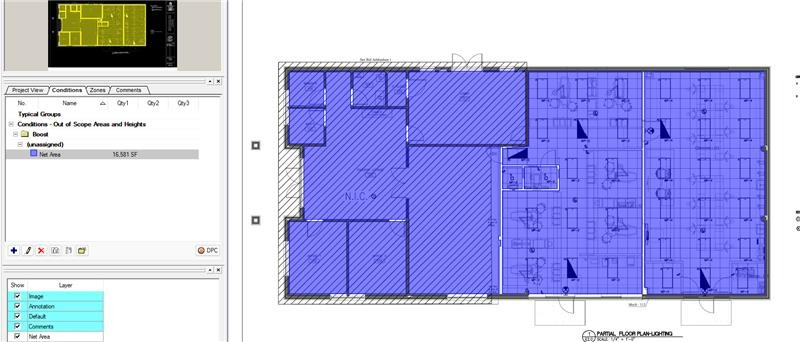 |  |
| Prior to this update, Takeoff Boost took off out of scope areas with the same Condition as in-scope areas | After this update, out of scope areas use a unique Condition that can be deleted easily if not needed. |
Out of scope area detection is not supported on finish plans at this time.
Why Out of Scope Area Detection Matters
On renovation and addition projects, the floor plan shows the entire building, but work is only being done in part of it. Areas where no work is being done (typically existing structures) are usually hatched out on the plan to indicate they are out of scope.
Previously, Boost didn't differentiate between these hatched areas and active work areas. Everything was included in the same conditions, forcing estimators to manually sort through and delete each out of scope area. On a large renovation plan, that could mean dozens of areas to find and remove.
Now, Boost identifies hatch patterns on the plan and automatically separates out of scope areas into their own condition. The takeoff is still performed on those areas, but they're grouped together in a separate condition, making it easy to select and delete them all at once.
Double Wall Detection
In construction, "Double walls" refer to a method where two parallel stud walls are built next to each other, forming a wide wall cavity that can be filled with insulation. This construction technique is known for its ability to provide better insulation and soundproofing compared to single wall construction. Example: two walls that are made of different materials that are next to each other.
 |  |
| Prior to this update, Takeoff Boost took off one wall in the highlighted section | After this update, both wall types are identified and taken off. |
Why Double Wall Detection Matters
This saves the estimator time.
Improved takeoff results. Less time to complete takeoffs. Time back in your schedule.
2026-01-26 - Net Area Accuracy Improvements
Improvements
- Takeoff Boost™ now delivers more accurate net areas on complex plans and splits up rooms/hallways better.
Why is this Accuracy Improvement a Big Deal?
Net area accuracy continues to be one of the most important factors in Takeoff Boost's value to our customers. Over the holidays we made some improvements to our AI tech that addresses two specific pain points:
-
Missing areas on complex plans
-
On large, detailed plans with many rooms, Takeoff Boost was frequently missing corridors, hallways, and even entire rooms. This forced customers to manually add these areas, reducing the time savings Takeoff Boost provides.
-
The new model does a much better job identifying and drawing areas in these complex layouts.
-
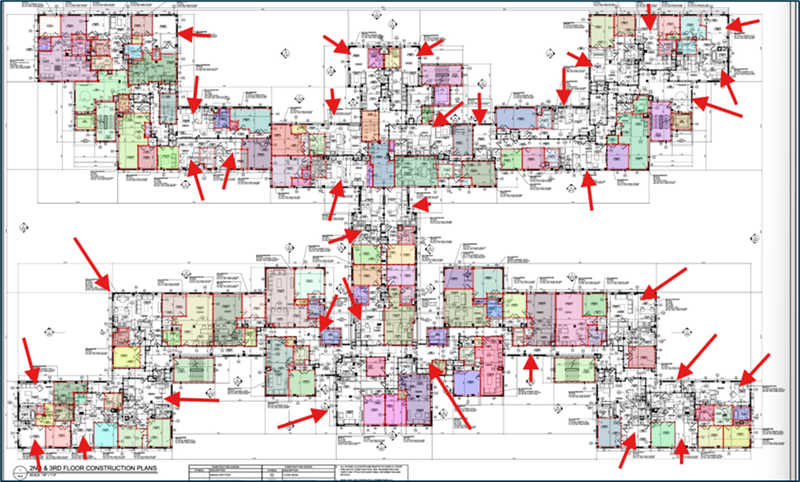 | 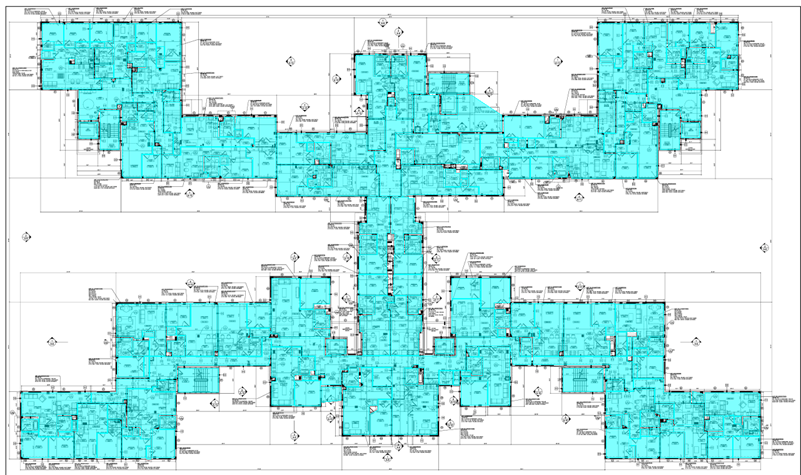 |
| Prior to this update, Takeoff Boost missed several rooms on this complex plan | After this update, all the rooms have been taken off, as expected. |
-
Rooms being fused together
-
On plans where walls are drawn with thinner lines, Takeoff Boost would sometimes combine multiple rooms and hallways into one large area. Instead of getting square footage for each individual room, customers would get one giant “fused” area they couldn't use. They’d have to delete large sections of takeoff and redraw them manually.
-
The new model now properly separates these rooms, giving customers accurate individual area measurements.
-
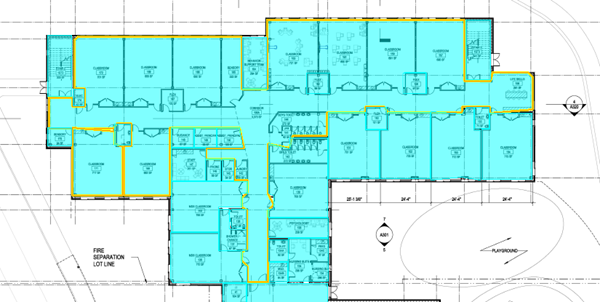 |  |
| Prior to this update, Takeoff Boost combined several rooms and hallways into one net area | After this update, all the rooms and hallways are taken off as individual net areas, as expected. |
As you can see in these examples, this drastically reduces the amount of manual rework you need to do after Takeoff Boost runs.
Improved takeoff results. Less time to complete takeoffs. Time back in your schedule.
2025-12-18 Existing Walls, Updated Options Dialog Box
Improvements
- Takeoff Boost now identifies existing walls - you can opt to include or exclude them from the results Takeoff Boost returns
- New, more intuitive and easier-on-the-eyes Takeoff Boost Options dialog box
Why is “Existing Walls” a big deal?
Before this update, Takeoff Boost™ included everything it identified as a wall, this meant the estimator (you) had to circle back and manually delete existing walls in a renovation job. Now, you select an option to exclude these walls, based on the color or pattern you set in the Takeoff Boost Options dialog box. If you like, you can have Takeoff Boost return them and assign them to their own Condition.
Example
Let’s walk through an example plan.
When we run Takeoff Boost, we get back two Conditions: one for new walls and another for existing walls.
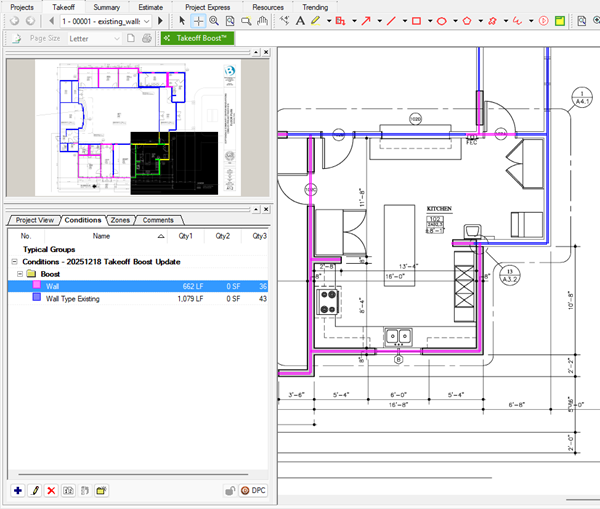
There are three options for existing walls: Include, Exclude, Only Existing Walls.
New dialog box
As you can see above, the updated dialog box is organized into Areas, Linears, and Counts and each section can be collapses if you don’t use it regularly.
Like before, your selections are saved for the next time you run Takeoff Boost.
2025-11-13 - Native PDF Processing, Ceiling Types, Painting/Wallcovering (Two Sided Walls)
This Release coincides with the On-Screen Takeoff 4.0 release, please see: On-Screen Takeoff 4.0 Release Notes
Improvements
- Takeoff Boost™ now processes PDFs in their native format. PDFs render higher resolution images for the Takeoff Boost service to analyze resulting in greater accuracy.
| Before | After |
|---|---|
|
|
|
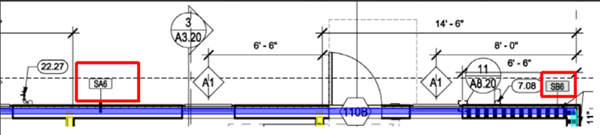
| Previously On-Screen Takeoff converted PDF files to jpeg before uploading to Takeoff Boost. When the results came back, the blue segment was not split into two Wall Types, as it should have been. This requires manual adjustment of takeoff and possibly creating another Condition. | After this update, On-Screen Takeoff uploads native PDFs at higher resolutions to the Takeoff Boost Service for processing. Results are returned faster, and as you can see, the segment is taken off correctly using two Conditions. |

- Takeoff Boost now identifies Ceilings on Ceiling plans.
- Always broken into “ACT” and “Ceiling” Conditions
- If you specify a “Tag” from the Plan, are broken out by Ceiling Type
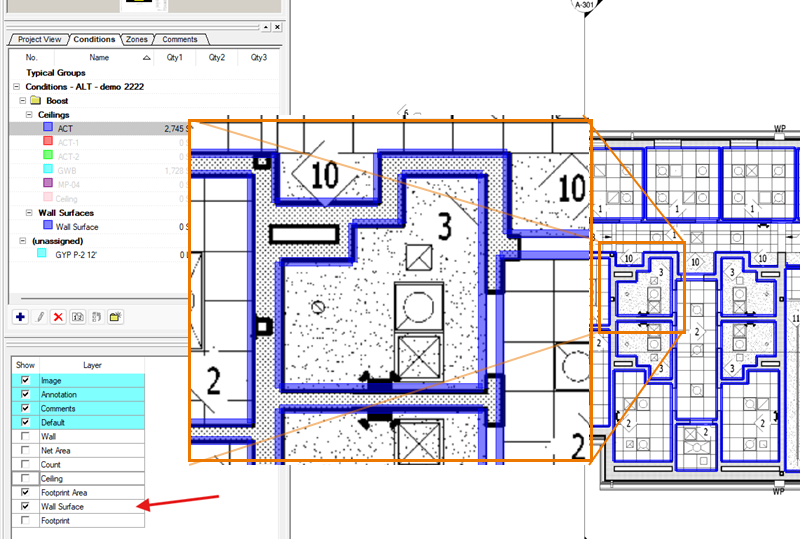
- Takeoff Boost can now takeoff both sides of interior walls to support Painting Contractors (coming Nov 14)
- When returning Walls and Paint Conditions, Takeoff Boost sets three appropriate takeoff Results
As the estimator, you still need to double-check the takeoff results. Results vary based on the quality and complexity of your particular plans.
Ceiling Takeoff Examples
When your Plan does not include Ceiling Type Tags, Takeoff Boost identifies GWB, ACT, and then the generic "Ceiling" takeoff and creates separate Conditions for each:

When your Plan does include Ceiling Type Tags, Takeoff Boost identifies each Tagged Ceiling Type and creates separate Conditions for each. Untagged ceilings, and are still identified as GWB, ACT, or generic Ceilings:

Painting/Wall Covering Examples
2025-06-25 - Accuracy Improvements on Column Walls
Improvements
- Takeoff Boost™ now more accurately draws:
- Column walls
Why is this a big deal?
Before this update, Takeoff Boost™ did not take off the short walls surrounding structural columns, this meant the estimator (you) had to circle back and manually take off all these short walls. Now, you won't have to go back and takeoff all these short segments yourself - saving you time and frustration.
2025-03-21 - Accuracy Improvements: Short Wall Segments and Connecting Walls
Improvements
- Takeoff Boost™ now more accurately draws:
- Short walls segments (think the sidewalls of closets)
- Connecting Walls
Why is this a big deal?
Before this update, Takeoff Boost™ often missed short walls that connected two longer wall segments. Now, you won't have to go back and takeoff all these short segments yourself - saving you time and frustration.
2025-03-04 Accuracy Improvements
Improvements
- Takeoff Boost™ now more accurately draws:
- Drawing takeoff on the center of walls
- Removing extraneous net areas outside of buildings
Why is this a big deal?
Takeoff Boost™ previously was not doing a great job at aligning walls to what was shown on the drawing. Even if the measurement of the wall was correct, estimators noticed this issue and sometimes lost confidence in the results. Because Takeoff Boost wasn’t meeting our customer’s expectation in how estimators draw their walls, we knew we had to retrain the models to improve this.
This update also eliminates the amount of times net areas are drawn erroneously outside of the building.
2025-01-31 Accuracy Improvements
Improvements
- Takeoff Boost™ is now more accurately drawing splitting wall types at room intersections.
Why is this a big deal?
Sometimes, buildings will use different wall materials between rooms. When Takeoff Boost doesn’t accurately split the different wall types between these rooms, it is a very laborious mistake for our customers to correct. It can be so time consuming that sometimes customers would rather just toss the Boost results altogether and do it manually. While the differences in length may seem small in the examples below, it can make a big impact on customer’s estimate if they are shorting some materials and going over on others.
This update aims to fix that and ensure that walls split more accurately where rooms intersect.
2024-06 Accuracy and Performance Improvements for Wall Types
Improvements
- Wall Type processing speed improvements
- Wall Type accuracy improvements
-
Before After 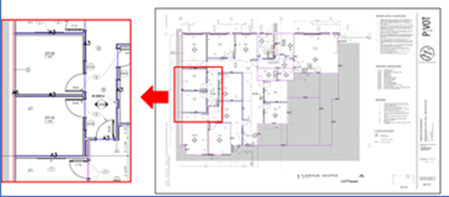

-
- Net Area improvements on Rotated Plans
-
Before After 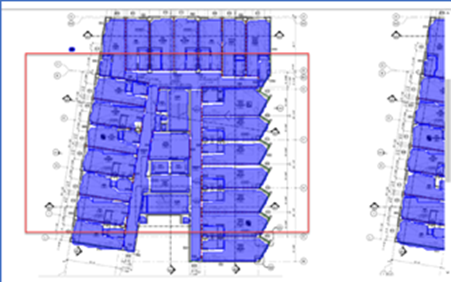

-
