

This article includes Latest Release Notes, all Previous Version Release Notes for all Supported versions of On-Screen Takeoff, and all deprecated/unsupported versions that use a License Key or Server Code to apply licensing.
On-Screen Takeoff is getting sharper. An update brings a simpler way to sign in, AI tools that measure, count, and organize your plans for you, and easier ways to keep your whole team working from the same projects and standards. Your existing projects, settings, and workflows stay exactly as they are, and the update is included at no extra cost if you're on a maintenance or subscription plan.
See: On-Screen Takeoff® (login with email address) Product Information and Download and On-Screen Takeoff (email and password licensing versions) Release Notes for more information and check out Related Articles at the bottom of this page for important information on migrating to the new platform.
Current Release
2026-02-13 v.4.0.0.405 (Maintenance Release)
4.00.0.405 20260215 is a maintenance release to fix two issues introduced in the original release of 4.0 affecting bid management and printed takeoff deliverables. It prevents Bid Package imports from creating duplicate bids with zero or duplicated bid numbers. It also fixes Print Preview behavior when a page contains 32 or more conditions, preventing the Image Legend from moving from the estimator’s chosen position to the upper-left corner. For estimators, the practical benefit is greater confidence that imported bid information remains organized and that printed plans preserve the intended layout. This is a maintenance-focused update rather than a feature release, so users should expect improved reliability rather than new takeoff capabilities.
Download from the On-Screen Takeoff Product Information and Download Page.
Fixes
- Bid Package import will sometimes fail creating multiple bids in the database of the same bid with either a 0 bid number or duplicated bid number. (TE-2454)
- If a project has 32 conditions or more in use on the Page, Print preview repositions the Image Legend from the user’s set position to top left corner.(TE-2583)
Known Issues
Carried over from previous versions
- Removing annotations in the Image window when the Annotation and View window and View window are open does not update properly (Ref# ART3-4308)
- If you CUT and paste takeoff from one Page to another, the blue "takeoff" indicator does not get updated in the Page Navigator until you leave the Image Tab and return (Case 02230614, (Ref# TE-4400 (replaces ART3-4400 and ON-4728)))
- (Ref# ART3-4400/ON-4728 was fixed in 3.98.14, however it was determined that fix caused unforeseen issues with the Page Navigator so that fix has been reverted in later versions)
Previous Versions
2025-11-13 v4.0.0.288 (Takeoff BOOST™ improvements and new Reassign Takeoff Workflow)
This release makes Takeoff BOOST more useful across several estimating disciplines. It identifies ACT and gypsum board ceilings, supports painting takeoff on both sides of interior walls, detects unlabeled windows based on exterior-wall openings, and processes native PDFs at higher resolution for greater accuracy. The update also improves default results for wall and paint conditions, reducing manual setup and cleanup. Estimators can reassign selected takeoff objects to another condition through the right-click menu, making corrections faster. Together, these changes help produce more accurate first-pass quantities with fewer repetitive edits.
Abstract: Stress Less, Win More Bids, and Get Your Weekends Back!
When it comes to construction estimating, speed and accuracy is crucial to winning more work. Time spent fixing mistakes or doing things by hand is time you’re not spending on the next bid. That’s why we’re excited to share this update with you to make your estimating faster, easier, and more accurate than ever before.
With On-Screen Takeoff 4.0, you get smarter tools to help handle the time-consuming, repetitive tasks. That means you’ll finish takeoffs in less time, make fewer errors, and submit stronger bids.
Key Highlights
On-Screen Takeoff 4.0 accelerates your estimating with smarter automation:
- Improvements to Takeoff BOOST including:
- For Wall and Ceiling Contractors, Takeoff BOOST oost now identifies ACT and gypsum board ceilings
- Painting contractors - Takeoff BOOST now takes off both sides of interior walls
- Takeoff BOOST now detects unlabeled Windows
- Takeoff BOOST now uses native PDFs for greater accuracy
- Takeoff BOOST sets Default Condition Results for Wall and Paint takeoff
- Workflow Improvement that benefit all On-Screen Takeoff users:
- A more intuitive method of reassigning takeoff from one Condition to another using the Context Menu (right-click menu)
- Increased the number of characters in Condition Names from 75 to 255
These changes mean less manual cleanup, faster turnarounds, and more winning bids—giving you the competitive edge you need in today's market.
New to On-Screen Takeoff or just want a refresh? See Getting Started with On-Screen Takeoff for a wealth of resources to help you install, license, and get to know the application.
Let’s look at how this version helps you crush your competition.
New Features
Takeoff BOOST Enhancements
See On-Screen Takeoff - 06.02.01 - Takeoff BOOST - Overview and Requirements for details on using Takeoff BOOST.
- Takeoff BOOST now identifies gypsum board (GWB) and Acoustical Ceiling Tile (ACT) ceilings.
- Optionally, if your ceilings are tagged with a ceiling type, like the example below, a separate Condition for each type is created and takeoff drawn with it.
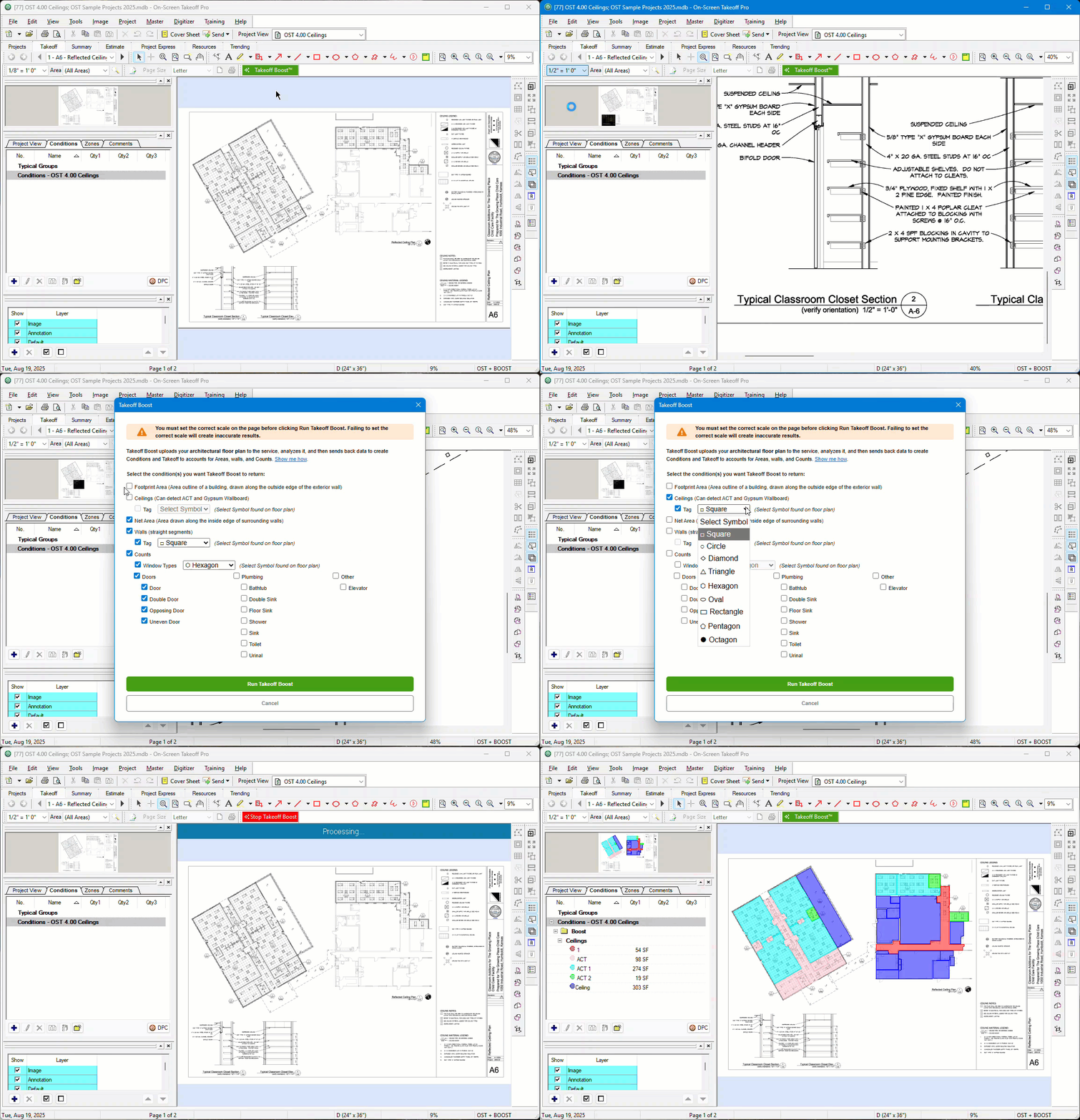
- When Takeoff BOOST is done, you can edit your Conditions to account for additional ceiling types or grids. See 06.05.01 Drawing Gridded Area Takeoff and Aligning It to your Plans (ACT, Tiles, etc.) for more information on Area Conditions and Gridded Area Takeoff.
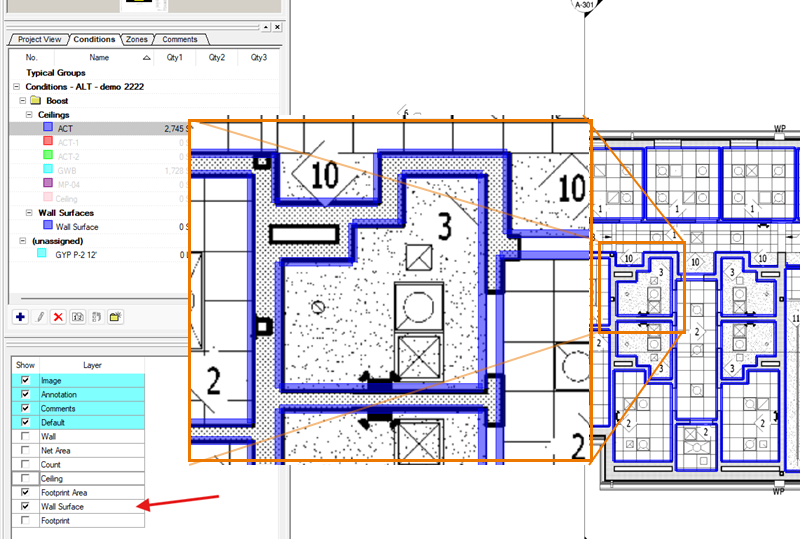
- Takeoff BOOST now supports Painting contractors by taking off both sides of interior walls. Use the improved re-assign workflow (below) to make quick work of assigning this takeoff to appropriate Paint Conditions you create.
- Takeoff Boost now identifies Windows even if they are not labeled by using the openings in exterior walls.

- Updated Default Condition Results for Takeoff BOOST Conditions, based on user feedback:
- When Takeoff Boost creates “Wall” Condition(s), it selects LF, SF, and Segment Count as the default results.
- When Takeoff Boost creates “Wall Surface Area” (Paint) Condition(s), it selects SF, LF, and Segment Count as the default results (even though it is a Linear Condition and Linear takeoff, painting contractors are most interested in SF).
- Takeoff BOOST now supports processing native PDFs, instead of converting them to lower resolution files, for greater accuracy!
- If you converted PDFs to TIFFs using On-Screen Takeoff, Takeoff BOOST locates the original PDFs and uploads them, if they are still accessible.
| Before OST 4.0 (PDFs converted to jpeg files) | After (Native PDFs uploaded to Takeoff BOOST) |
|---|---|
|
|
|
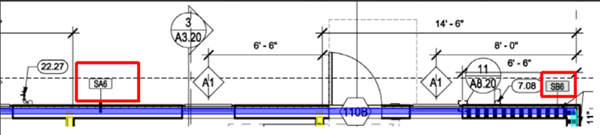
| Previously On-Screen Takeoff converted PDF files to jpeg before uploading to Takeoff BOOST. When the results came back, the blue segment was not split into two Wall Types, as it should have been. This required manual adjustment of takeoff and possibly creating another Condition. | After this update, On-Screen Takeoff uploads native PDFs at higher resolutions to the Takeoff BOOST Service for processing. As you can see, the segment is taken off correctly using two Conditions. |

On-Screen Takeoff 4.0 includes an updated Sample Projects database with an updated Takeoff BOOST project that showcases the changes above. If you are upgrading from a previous version of On-Screen Takeoff, your database will not be overwritten, but you can get that updated project here:
On-Screen Takeoff - Getting Started with Features Bid Packages
Changes
Workflow Improvements
- Condition Names can now contain up to 255 alpha-numeric characters, up from 75 - this matches Quick Bid’s Condition Name field.
- It’s easier than ever to Reassign Takeoff from one Condition to another! Just right-click on one or more selected takeoff objects and choose the Condition to which you want to move it:
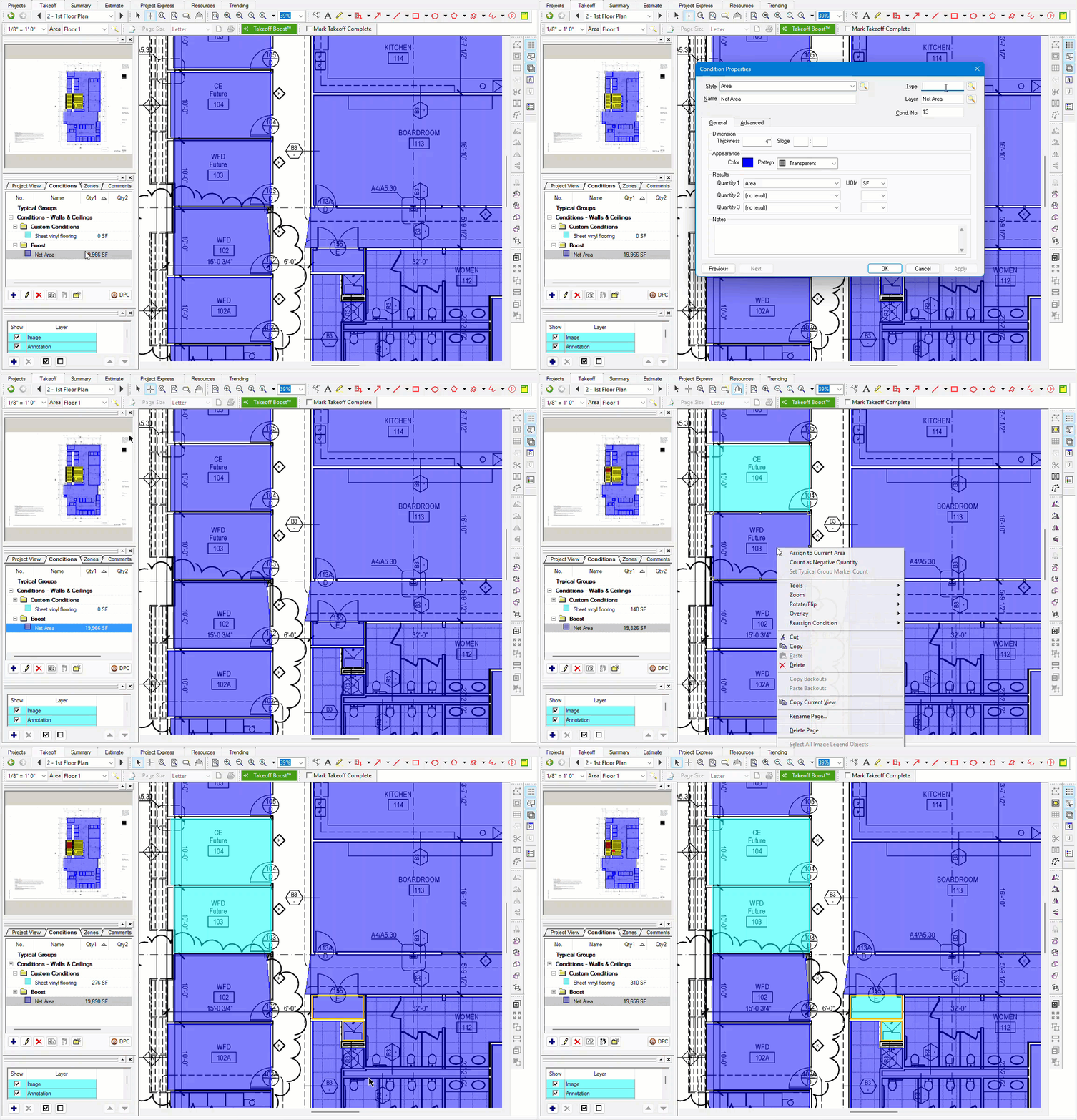
See: Reassigning Takeoff from One Condition to Another Existing Condition for more information
Known Issues
Upgrading from On-Screen Takeoff 3?
- Before you upgrade:
- Return your license
- Upgrade On-Screen Takeoff to v.4
- Open OST and Activate your License Key or Server Code again to update your product license (see Related Articles)
- Your Access database will be upgraded to support v.4 automatically
- If you are using an SQL database in a shared-access environment, do not install any updates until your IT department tells you to do so.
- If you are using a remote desktop/distributed app environment running on Windows Server 2019 or earlier, do not install this version - we have received reports that 4.0 does not launch properly in these environments. You must install the latest release above.
New in this version
- We have identified an issue with importing OSP Bid Packages, we are working to release a fix ASAP. (TE-2454)
- Bid Package import will sometimes fail creating multiple bids in the database of the same bid with either a 0 bid number or duplicated bid number
- If a project has 32 conditions or more in use on the Page, Print preview repositions the Image Legend from the user’s set position to top left corner. (TE-2583)
Carried over from previous versions
- Removing annotations in the Image window when the Annotation and View window and View window are open does not update properly (Ref# ART3-4308)
- If you CUT and paste takeoff from one Page to another, the blue "takeoff" indicator does not get updated in the Page Navigator until you leave the Image Tab and return (Case 02230614, (Ref# TE-4400 (replaces ART3-4400 and ON-4728)))
- (Ref# ART3-4400/ON-4728 was fixed in 3.98.14, however it was determined that fix caused unforeseen issues with the Page Navigator so that fix has been reverted in later versions)
Released 2025-06-24 v3.98.18.03
This release improves Takeoff BOOST by allowing it to identify windows based on their shape and assign generated takeoff to the active Bid Area. It also reorganizes program tabs so their names better match their functions, including moving takeoff work to the Takeoff Tab and cumulative results to the Summary Tab. The release adds embedded online help, customer feedback prompts, and improved segment movement through the Connect option. For estimators, the practical benefit is easier navigation, more flexible automated takeoff, faster plan adjustments, and continued compatibility with newer Windows versions.
This is the only version of On-Screen Takeoff 3 that ConstructConnect distributes or supports.
This is not the Current Release of On-Screen Takeoff. If you are under updated Maintenance Subscription, we recommend downloading On-Screen Takeoff 4.0, available on the On-Screen Takeoff® 4.0 Product Information and Download page.
On-Screen Takeoff v.3.98.18.03 includes improvements to Takeoff BOOST™ including support for searching for Window Types based on shape (just like Wall Types) and Bid Area assignment, renamed and repositioned program Tabs so they are more aligned with their functionality, a form so you can register for future Customer Feedback sessions, an embedded, all-new Online Help experience, and several bug fixes. These features and fixes are designed to help you get your takeoff projects done faster with greater accuracy than ever.
We also updated the technology on which On-Screen Takeoff is built to ensure it remains compatible with newer versions of Windows - so you don't have worry about a Windows Update breaking your beloved takeoff software.
New to On-Screen Takeoff or just want a refresh? See Getting Started with On-Screen Takeoff for a wealth of resources to help you install, license, and get to know the application.
Please see previous Release Notes History (at the bottom of this article) for more recently added Features and Improvements.
New Features
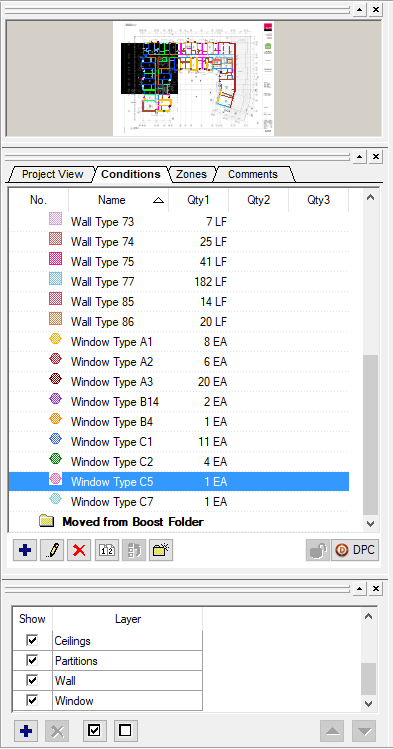
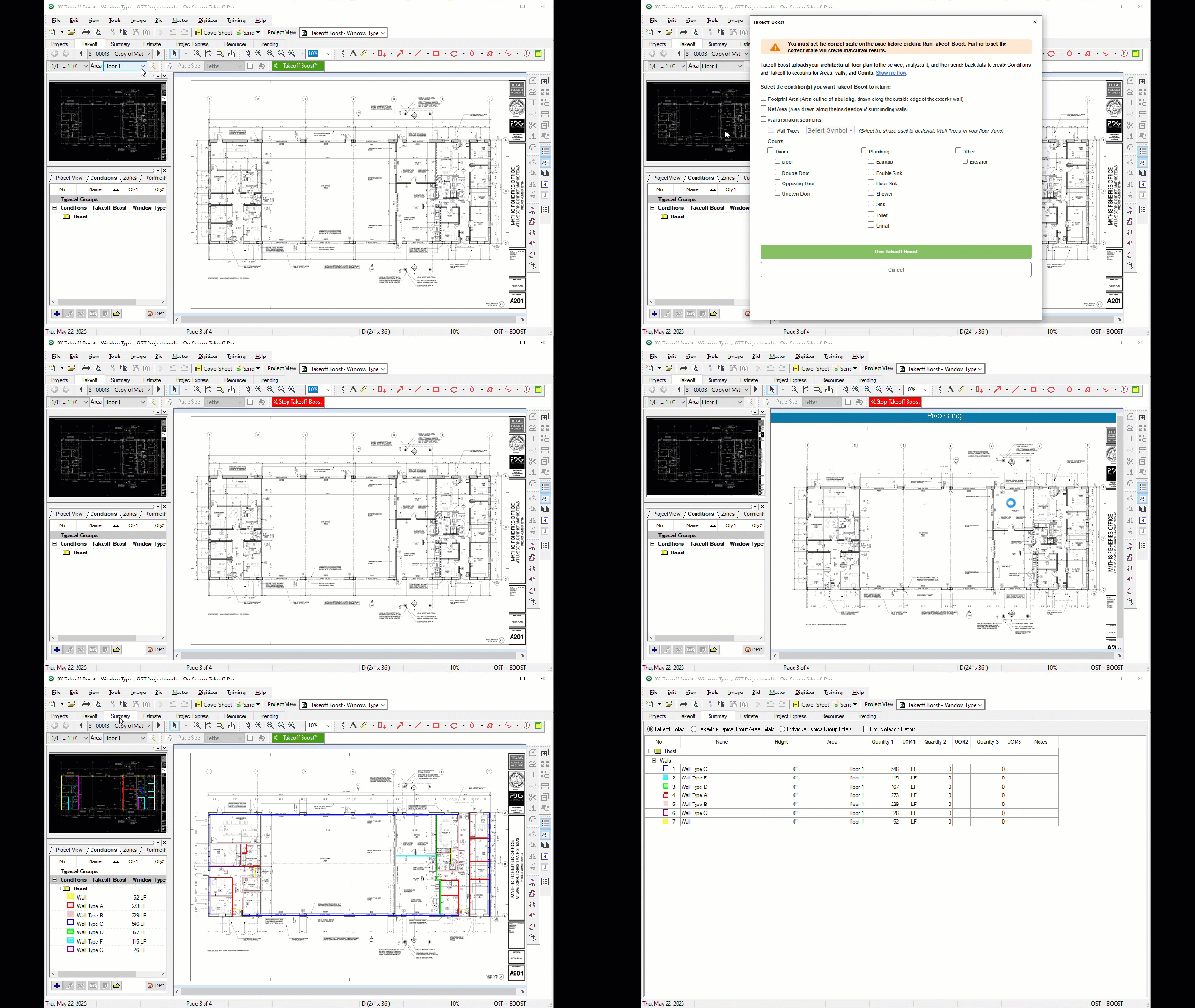
- Takeoff BOOST can now search for windows based on the Window Type symbol on your plans (see Running Takeoff BOOST for details).
-
- Added a pop-up that shows after you activate a license so you can register for future Customer Feedback sessions.
-
- An all new (this site) Online Help experience embedded in the new Resources Tab (see “Changes, below for more on renamed Tabs).
-
-
Takeoff BOOST now assigns the takeoff it generates to the “Active” Bid Area (think floors, buildings, rooms, etc.), see Bid Areas for more information.
-
-
Lastly, Takeoff BOOST now prompts you for your opinion on its results after you run the utility twice.
-


Changes
- We renamed the Program Tabs so their names match their function better (see Working with OST - the Program Tabs for more information). Many users were confused because you did your takeoff on the Image Tab and reviewed your summarized takeoff results on the Takeoff Tab. So now, you do your takeoff on the Takeoff Tab, and you see your cumulative results on the Summary Tab. We also changed Bids Tab to Projects Tab and Worksheet Tab to Estimate Tab.
-

-

-
Lastly, we “did away” with the MyOnCenter Tab and created two new Tabs, at the far right: in-app access to this knowledgebase on the Resources (you can always open this site in your default browser by pressing F1), and ConstructConnect news, upcoming events, release information and other great Trending content.
-
- When Takeoff BOOST creates a Linear Condition, its “Connect” option will be checked in Advanced Properties making it easier for to adjust takeoff that includes adjacent/connecting segments. Previously, the Connect option was not checked, so that all segments moved independently - this is not entirely desirable because it forced the users to adjust three or more segments when moving one. Now, with Connect checked, when you move one segment, any segments that are connected to it (both ends) will move along with it.
- We upgraded On-Screen's Takeoff codebase to support newer versions of Microsoft Windows - your software should continue to work fine for years to come.
Fixes
- TE-4307 - Drawing Named Views on both the Image Window and Annotations and View Window and then attempting to duplicate a Named View throws an error message and saves the Named View without name
- TE-6502 - In DPC Mode, the Budget Tab was not updating correctly (affected 3.98.17.03 and 3.98.18.02)
- TE-6430 - Takeoff Conditions were not retaining their Advanced Properties when the program is closed, this also affected Saved Styles. (affected 3.98.17.03 and 3.98.18.02)
- TE-6491 - Removing the "Lock" option from a Job Status was not saved (affected 3.98.17.03 and 3.98.18.02)
- TE-6509 - Default Layers were not persisting (affected 3.98.17.03 and 3.98.18.02)
- TE-5800 - Using Hotlinks on a page with an overlay shown pointing to another page with overlay shown can re-scale the image
- TE-6843 - Attachment Advanced Property - "Backout Quantities from Parent" does not persist
UnSupported/Not Distributed
Unsupported versions are no longer distributed and cannot be licensed/activated.
| Version | Release Date | Notes/Highlights |
|---|---|---|
| 3.98.17.03 | 03/04/2025 | Bug fix and maintenance update |
| 3.98.16.11 | 02/06/2025 | Improvements to Takeoff BOOST; New Getting Started database |
| 3.98.15.04 | 12/17/2024 | Automated Takeoff BOOST Trials to make it easier to test-drive AI-Assisted takeoff. |
| 3.98.14.04 | 6/10/2024 | Change linear takeoff object's endpoint (angle), split area takeoff objects that include backouts, "simplify" area takeoff object's perimeter segments, updates to General Option defaults to improve new-user onboarding experience. |
| 3.98.13.03 | 4/25/2024 | Ability to Select which Condition Results you want returned by Takeoff BOOST™. |
| 3.98.12.04 | 3/25/2024 | Split Linear Segment and Split Area tools, Takeoff BOOST™ now identifies Wall Types and allows processing 5 pages at a time. (for technical reasons, we skipped v.3.98.11.xx) |
| 3.98.10.49 | 2/5/2024 | All-new Auto Name utility, All-new ConstructConnect-built Takeoff BOOST™ service. |
| 3.98.09.07 | 10/24/2023 | Update notification and improvements to update announcements, improved MyOnCenter Tab content, and several bug fixes. |
| 3.98.08.52 | 3/23/2023 | Improvements to Takeoff BOOST™ feature/service including support for multi-page PDFs, stopping a running Takeoff BOOST process, and improvements to pop-up messages to make them more user-friendly and easier to understand. |
| 3.98.08.26 | 3/6/2023 | Fix to Takeoff BOOST™ entitlements not always enabling Takeoff BOOST functionality. |
| 3.98.08.24 | 2/15/2023 | Introducing Takeoff BOOST™, a revolutionary, artificial intelligence-powered automated takeoff service. |
| 3.98.07.58 | 12/14/2022 | Introducing Project Comments, fixed AutoNaming service, fixed Overlay preview window. |
| 3.98.06.19 | 8/24/2022 | Certification of SQL 2019 and Windows 11 Pro and Enterprise. |
| 3.98.05.57 | 1/10/2021 | Named Views and Hot Links in 2nd Window. 3rd "View" window. Option to Opt-in to data gathering. Rebranding 2nd View Window as Annotation and View Window. |
| 3.98.04.05 | 6/10/2021 | Hot fix to address performance issues with the Page Navigator control. |
| 3.98.03.33 | 3/2/2021 | Improvements to AutoNaming and PDF rendering/conversion. Fixes for new Count Shapes. Improved OSP Bid Package import. |
| 3.98.02.39 | 11/19/2020 | New AutoNaming workflow. Improvements to the MyOnCenter Tab. |
| 3.98.01.06 | 10/15/2020 | Various hot fixes to correct issues related to release 3.98.00.07 including Auto Count, Typical Groups, and Copy/Paste performance, and improved the MyOnCenter Tab workflow. |
| 3.98.00.07 | 8/17/2020 | Draw Annotations in View Window, Improvements to Auto Naming workflow and accuracy, bug fixes. |
| 3.97.02.02 | 3/16/2020 | Re-release of 3.97.00 to fix issues related to curved linears. Replaces previously withdrawn versions (build 14 and 13). |
| 3.97.00.14 | 2/14/2020 | WITHDRAWN! Hotfix to address issue with curved linears identified in build 13. |
| 3.97.00.13 | 2/07/2020 | WITHDRAWN! 3-point curves, lots of new shapes for Counts and Attachments, and ability to mark a page as "Takeoff Complete. |
| 3.96.00.23 | 9/23/2019 | Hotfix to 3.96.00.18 to fix: License codes dropping from drop-down, fixing database upgrades from 3.94, and updating the internal components of Auto Naming. |
| 3.96.00.18 | 8/14/2019 | Customizable crosshairs, Sheet No. field, Button to Convert to TIFF on Image window. |
| 3.95.03.02 | 5/09/2019 | Removed Registration screen for trials. |
| 3.95.03.01 | 4/25/2019 | Maintenance release; Auto Naming interrupt button. |
| 3.95.02.54 | 9/16/2018 | Bug fix for licensing issue |
| 3.95.02.51 | 7/19/2018 | Bug fixes and support for mixed-mode and multiple key licensing. |
| 3.95.0.50 | 3/22/2018 | Auto Naming, New Licensing |
| 3.94.03.01 | 4/25/2019 | Update to new licensing system |
| 3.94.02.21 | 4/7/2017 | New, improved Project Express (no longer powered by Hightail.com); new MyOnCenter Tab |
| 3.94.0.15 | 11/17/2016 | Improved Bids Tab, Enhanced Takeoff tools |
| 3.93.2.1 | 5/10/2016 | Patch to fix intermittent activation issues on Windows 10 |
| 3.93.1.1 | 11/4/2015 | Patch to address issues identified in 3.93.0.115 |
| 3.93.0.115 | 8/6/2015 | Support Windows 10, copy and paste backouts and zones |
| 3.92.01.01 | 4/25/2019 | Update to new licensing system. |
| 3.92.0.52 | 2/16/2015 | Patch to allow licensing on Surface Pro 3 |
| 3.92.0.51 | 2/6/2015 | Patch to add AutoNotifier. Replaced by 3.92.0.52 |
| 3.92.0.44 | 11/17/2014 | Options to disable automatic takeoff tools, Additional Count shapes, Group Worksheet by Page, Additional Options for Image Legend, bug fixes and improvements. |
| 3.91.0.184 | 2/25/2015 | Patch to include AutoNotifier |
| 3.91.0.183 | 5/19/2014 | Fixed several bugs in original 3.91.0 release |
| 3.91.0.144 | 1/20/2014 | Additional Annotations, Intelligent Pasting, Next and Previous buttons in Rename Page dialog, and many more features. |
| 3.9.0.11 | 2/15/2015 | Patch to include AutoNotifier |
| 3.9.0.06 | 8/5/2013 | Windows 8, Multi-Condition Takeoff, Single Clickand Drag Area Takeoff, Dongle-less licensing, MAC support, and many other features. |
| 3.8.2.03 | 2/15/2015 | Patch to dongle-less licensing and add AutoNotifier |
| 3.8.1.36 | 10/14/2010 | Allow user to select which pages to include in Bid Packages, Prompt to Convert PDFs when added to project, many bug fixes. |
| 3.8.0.61 | 7/1/2010 | Resizable Overlays, Sortable Open Databases dialog box, Several OST and DPC Bug fixes. |
| 3.7.2.29 | 2/15/2015 | Patch to include AutoNotifier |
| 3.7.2.25 | 6/7/2013 | Patch to dongle-less licensing. Replaced by 3.7.2.29 |
| 3.7.0.12 | 3/26/2010 | Fixed issue with licensing dropping. Replaced by 3.7.2.25 |
| 3.7.0.11 | 12/28/2009 | Maintenance Release to fix outstanding bugs. |
| 3.7.0.06 | 11/4/2009 | Fixed two bugs introduced in 3.7.0.5 |
| 3.7.0.05 | 10/22/2009 | Windows 7 Support, Support DWFx files, Improve PDF viewing speed, Allow user to turn on Color for PDFs and other color images. |
| 3.6.3.23 | 07/22/2009 | |
| 3.5.0.63 | 08/14/2007 | |
| 3.4.1 | 07/16/2007 | |
| 3.3.1 | 04/26/2007 |
Related Articles
- Takeoff BOOST™ Cloud Service Release Notes
- Licensing On-Screen Takeoff
- Upgrading Databases
- Admin FAQ: Make Sure Your Bid Center Users Share Projects with You Before Migration
- Moving your Bid Center projects to your new ConstructConnect organization
- On-Screen Takeoff: New Sign-In Process for Subscription License Users
- Set Up Your ConstructConnect Account to Upgrade On-Screen Takeoff
