

This article includes Latest Release Notes and all Previous Version Release Notes for all versions of On-Screen Takeoff that use an e-mail address and password to apply licensing.
Keep an eye on the Engagements Panel for more details about what’s new in On-Screen Takeoff and ConstructConnect.
Current Release
Increase OSP Export size to 2GB Limit (Released: 20261015, version 4.0.0.1065)
As companies work on larger projects, sharing projects with a large number of pages (500+) could cause the exported OSP file to exceed 1GB which caused the export to fail. We’ve increased the limit to 2GB, which should cover most projects handily. For the estimator, this means you don’t need to create multiple exports for a single project.
Table of Contents
Please see Release Notes for Previous Versions (at the bottom of this article) for more recently added Features and Improvements.
What’s New
- OSP File Size Increased to 2GB - when exporting to an OSP Bid Package, the total file size limit has been increased to 2GB from 1GB.
- See: On-Screen Takeoff - 16.05.03 Exporting to a Bid Package (*.osp file) for more information.
Changes/Improvements
- N/A
Bug Fixes
Known Issues
These are carried over from previous versions:
- ART3-4308 - OST - Removing annotations in the Image window when the Annotation and View window and View window are open does not update properly
- TE-4400 (replaces ART3-4400 and ON-4728) - If you CUT and paste takeoff from one Page to another, the blue "takeoff" indicator does not get updated in the Page Navigator until you leave the Takeoff Tab and return (Case 02230614)
- (ART3-4400/ON-4728 was fixed in 3.98.14, however it was determined that fix caused unforeseen issues with the Page Navigator so that fix has been reverted)
Coming Soon
- TBD
Previous Versions
Find Text on Plans v.4.0.0.1050 (Released: 2026-09-30)
This is big news for existing On-Screen Takeoff users who have been asking for “Find Text” for years. We are finally able to deliver it! Search your entire plan set for a word or phrase, you no longer need to a 3rd party, external app to search plans or specs - do it all quicky and efficiently in On-Screen Takeoff and spend less time app switching and more time on important stuff like making sure your numbers are correct.
What’s New
- Find Text on Plans.
- On the Takeoff Tab, you can access Find Text three ways:

On the Tools toolbar, next to the Pan button.
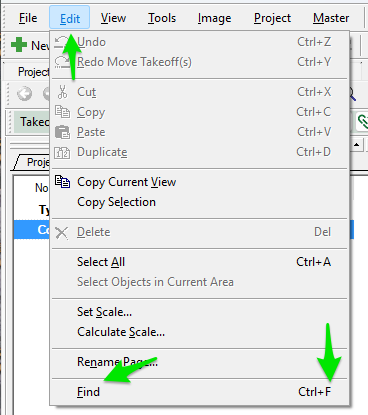
On the Edit menu, or press CTRL+F on your keyboard.
See On-Screen Takeoff - 01.11 Using Find Text on The Takeoff Tab for details.
2026-09-14; 4.0.0.1015 (Masters CloudSync)
This release allows administrators to sync Master tables to CloudSync while other users can sync from the shared database. For estimators, this can make shared company standards - such as assemblies, templates, or other master data - more consistent across projects and team members. Master CloudSync is available across several subscription levels, including Advanced, Premium, Essential, Core, Plus, and Professional. The update also fixes an issue that could make On-Screen Takeoff unresponsive while uploading large plan sets, helping estimators spend less time waiting to begin work.
What’s New
- Master CloudSync now supports syncing your database’s Master tables to the Cloud.
- Admins can sync data TO the CloudSync database

- Non-Admin users can sync FROM the CloudSync Database:
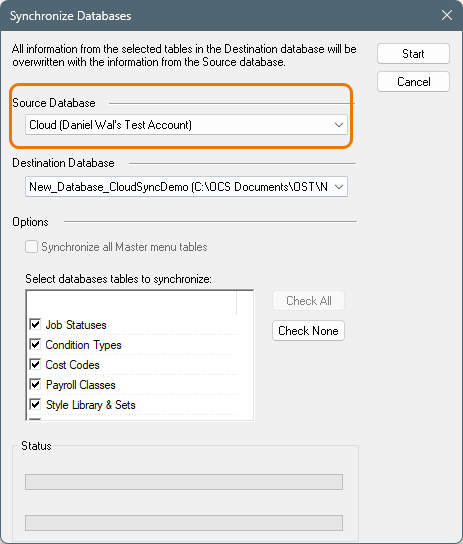
See On-Screen Takeoff - 20.05.03 Synchronizing Databases for details.
Master CloudSync is available to Advanced, Premium maintenance users and Essential, Core, Plus or Professional subscriptions.
Fixes
- On large jobs, Auto Name caused On-Screen Takeoff to become unresponsive while uploading the plan set.
2026-09-08 4.0.0.1006 (Auto Scale and AI-Powered Auto Name)
On-Screen Takeoff v.4.0.0.1006 introduces an all new Auto Scale utility to the Takeoff BOOST™ suite of takeoff and project setup tool. This update also includes and all new replacement for Auto Name that handles detecting the Sheet Name and Number automatically, no user setup required. These changes can save an estimator hours of work on a single project - imagine the time savings across many projects or for a large estimating team.
What’s New
- Takeoff BOOST Auto Scale
- Using the power of AI, Auto Scale can detect and set the scale on every Page in your plan set in minutes.
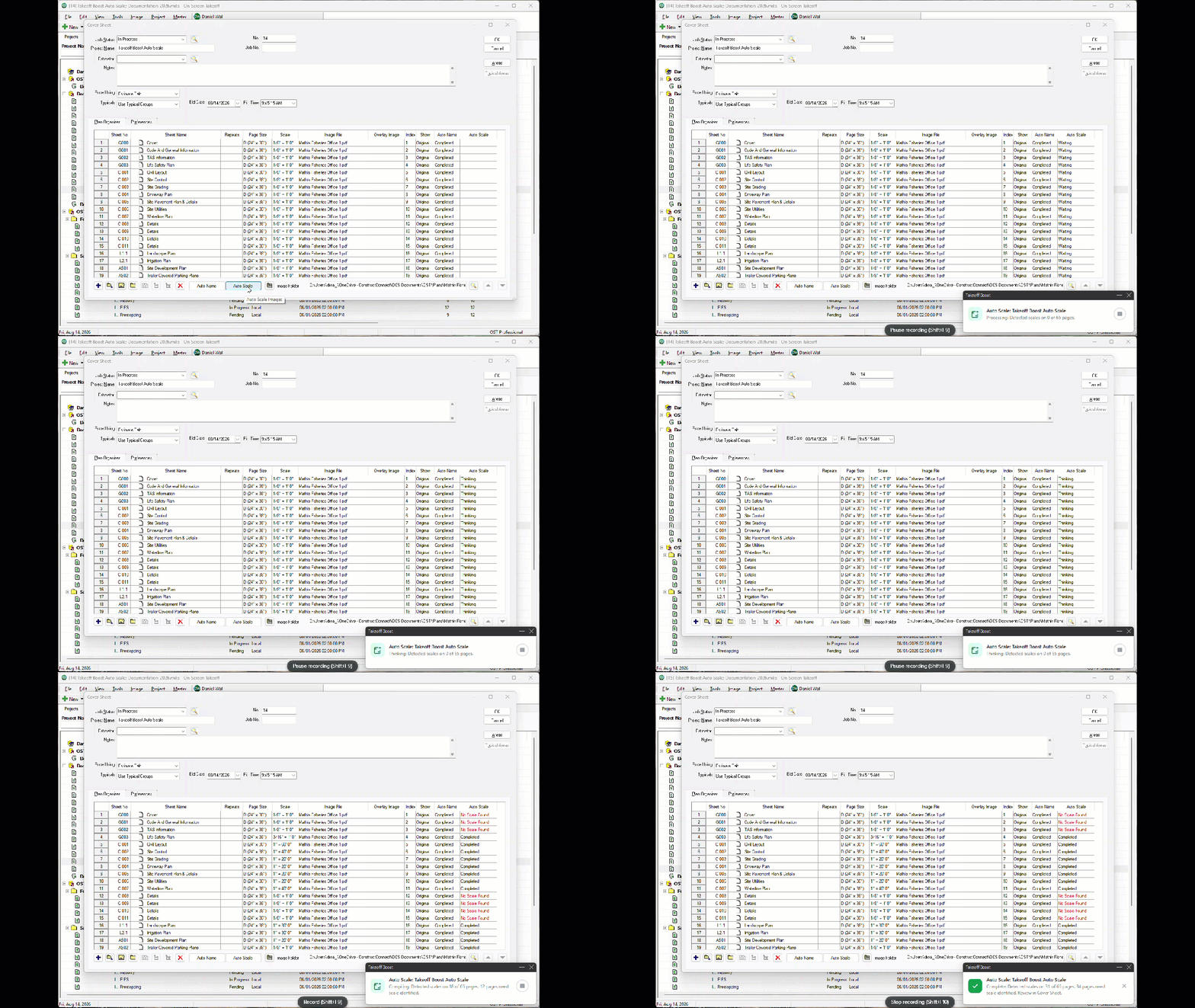
On-Screen Takeoff’s new Auto Scale feature
- Takeoff BOOST Auto Name (replaces the current Auto Name)
- Takeoff BOOST’s Auto Name tool replaces the old one, so you no longer have to define the location of the Sheet Number and Sheet Name. AI can detect and set Sheet Number and Name on every Page in your plan set in minutes.
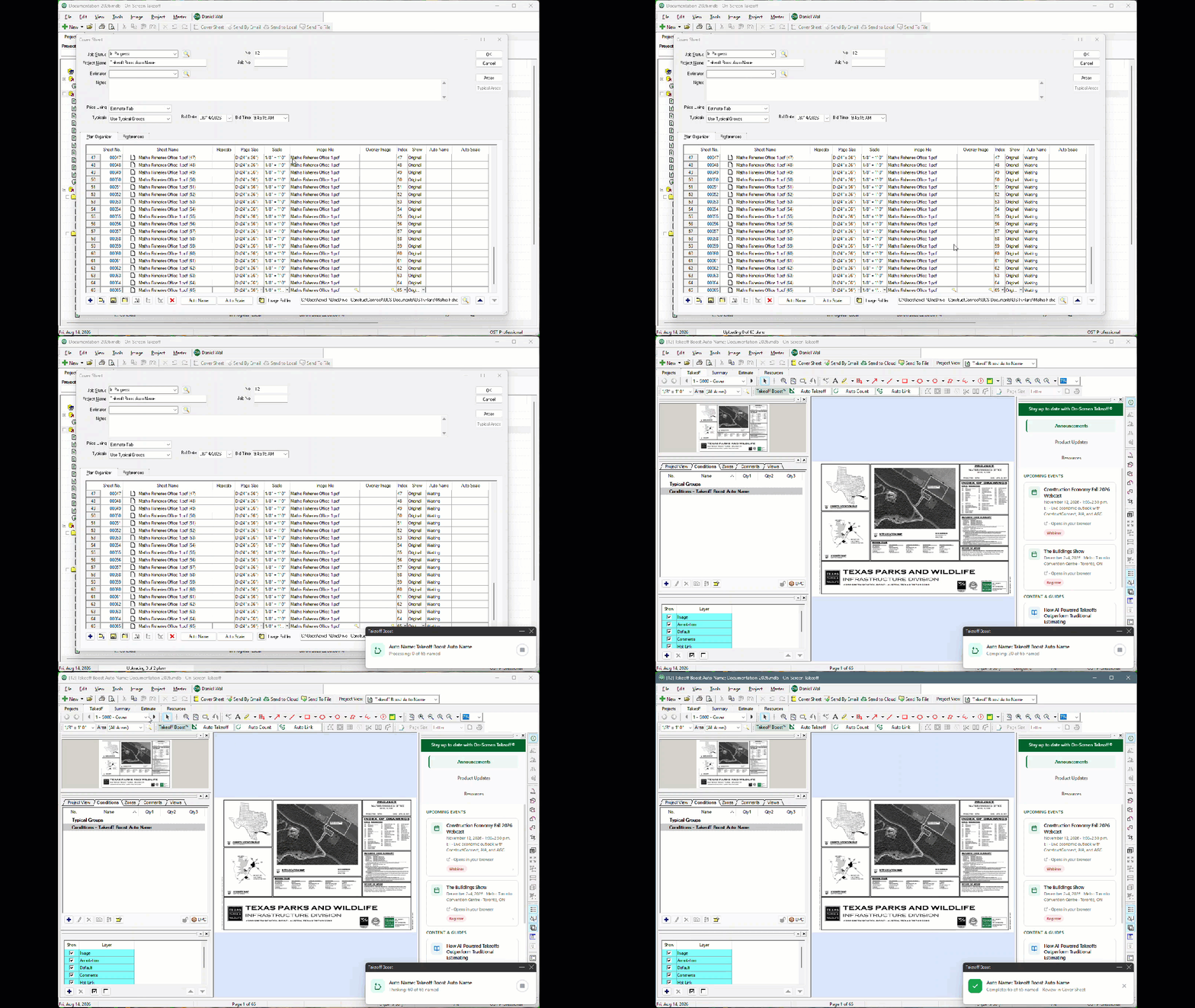
On-Screen Takeoff’s updated Auto Name feature
Takeoff BOOST™’s tools use Artificial Intelligence to provide results. It is your responsibility to verify results to ensure accuracy.
Use of Auto Scale and Auto Name requires uploading of some or all of your project plans. Ensure you have the legal right to do so. Please see the End User License Agreement and Master Service Agreement for more information.
What’s Changed
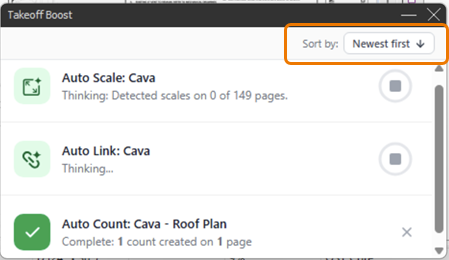
- In the Takeoff BOOST processing pop-up, you can now sort by Newest First or Completed First.
2026-08-21 4.0.0.954 (Performance Improvements and rebrand of Takeoff BOOST™)
This release primarily improves reliability rather than adding new estimating capabilities. Takeoff Boost was rebranded as Takeoff BOOST, with no functionality changes. The update also resolves slowness and occasional crashes when editing Conditions in Bids containing many Typical Groups. For estimators who reuse detailed assemblies or repetitive bid structures, that means a smoother experience when organizing and modifying complex estimates. The release also adds an in-app banner when a Core subscription expires, making renewal issues easier to identify before they interrupt estimating work.
What’s Changed
- Takeoff Boost has been rebranded as Takeoff BOOST.
- There are no functionality changes, this is simply a rebranding.

The Takeoff BOOST toolbar in On-Screen Takeoff
Fixes
- Resolved slowness and occasional crashes when editing Conditions in Bids with a large number of Typical Groups.
- On-Screen Takeoff now correctly shows an in app banner when a Core subscription expires, so users know their subscription needs renewal.
2026-08-03 4.0.0.931 (Maintenance Update)
This update makes CloudSync’s connection status easier to understand through plain-language messages. An Offline Mode banner tells estimators when On-Screen Takeoff has lost its cloud connection, while a Back Online banner confirms that the connection has returned and synchronization has resumed. Pending “Send to Cloud” uploads resume after connectivity is restored. Practically, estimators can tell whether a project is current, temporarily offline, or actively catching up, reducing uncertainty when working from a jobsite, home office, or unreliable connection.
What’s Changed
For Project CloudSync:
- Plain-language messages across all connection states so users always know what Project CloudSync is doing.
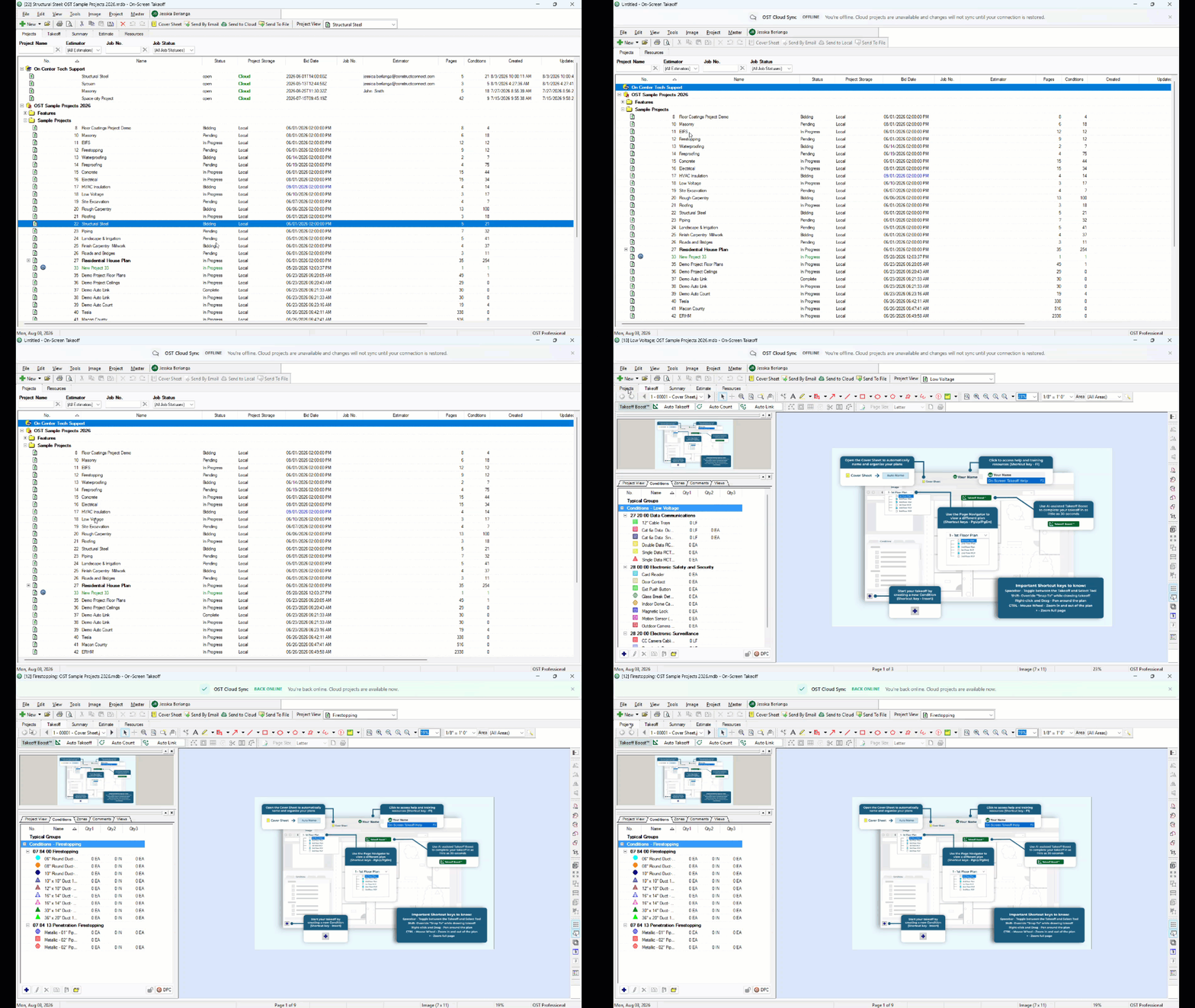
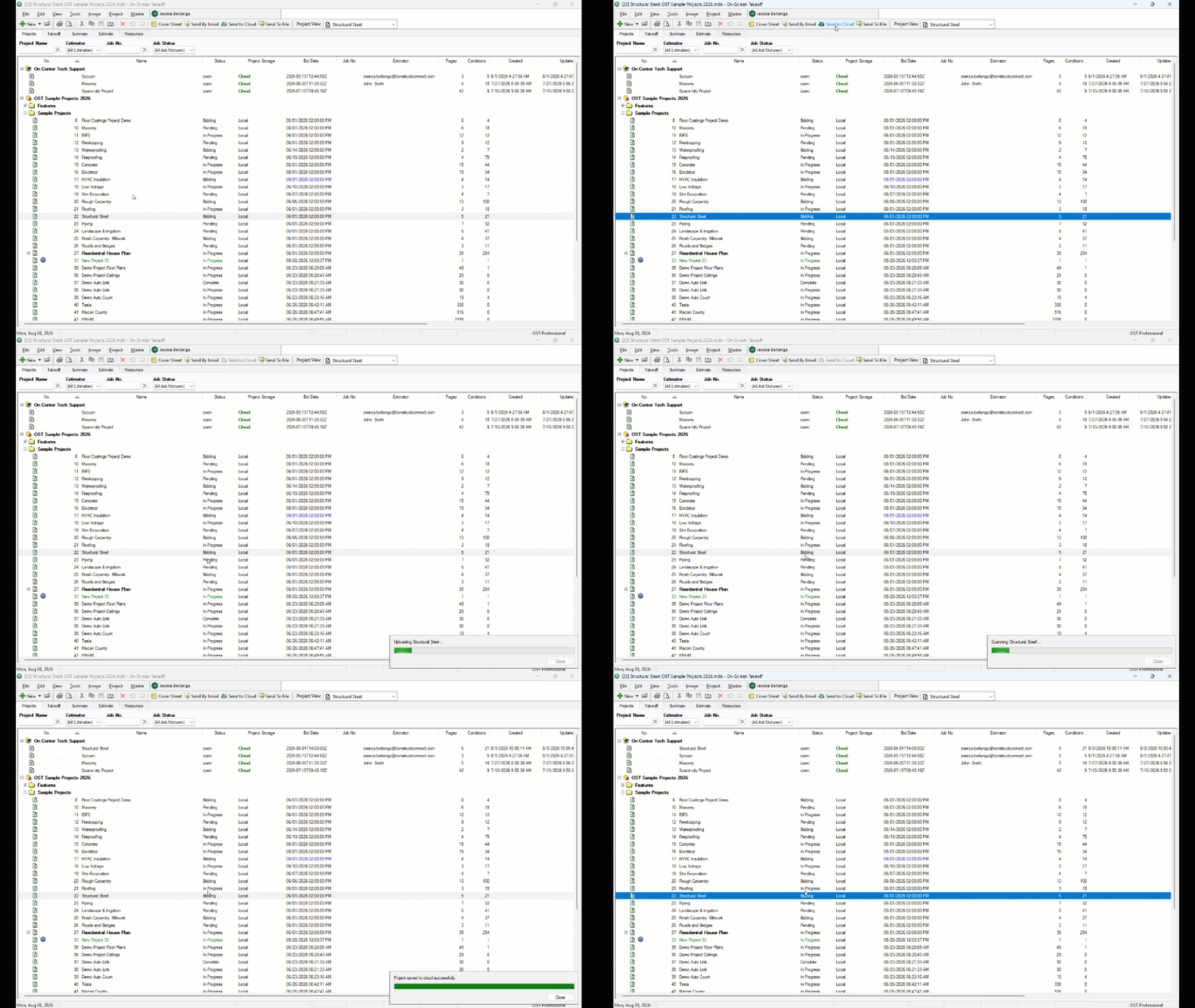
- Offline Mode Banner: notifies users when On-Screen Takeoff has lost its cloud connection entirely and is operating offline, any pending “Send to Cloud” uploads will resume when your internet connection is restored.
- Back Online Banner: confirms when the connection is restored and syncing has resumed, so users know their Projects List is up-to-date.
Example of new banners showing your connection state:
Example of new progress messages:
2026-07-21 4.0.0.881 (Project CloudSync)
This release adds CloudSync as a project storage and sharing tool designed to help estimating teams collaborate more effectively. Projects can be stored in the cloud and shared with others in the organization, and users can access them through their existing ConstructConnect login without additional setup. Shared projects are available to authorized users at any time. For the average estimator, this simplifies project handoffs, makes it easier for teammates to work from the same files, and reduces the need to exchange project copies manually.
v.4.0.0.881 is an update to On-Screen Takeoff that includes Project CloudSync, ConstructConnect’s new project storage/sharing tool to help you and your team collaborate better.
Download today on the On-Screen Takeoff Product Information and Download Page.
Here are a few articles for you to check out to get your feet wet with On-Screen Takeoff:
Create Your First Takeoff in On-Screen Takeoff in Under 5 Minutes - yes, in less than 5 minutes, we’ll show you how to go from nothing, to a completed takeoff.
Run Your First Automated Takeoff with Takeoff Boost™ and Get Real Results in Less than a Minute - leverage Takeoff Boost to save up to 95% of the time you normal spend doing takeoff
Getting Started with On-Screen Takeoff: an in-depth collection of resources to help you install, license, and get to know the application.
As always, keep an eye on the Engagements Panel for information and news about On-Screen Takeoff and Takeoff Boost.
What’s New
- Project CloudSync: store your projects in our cloud to share with anyone else in your Organization. Because you’re using your ConstructConnect account to log into On-Screen Takeoff, you don’t need to set-up anything else. All shared Projects are available to all users, anytime.
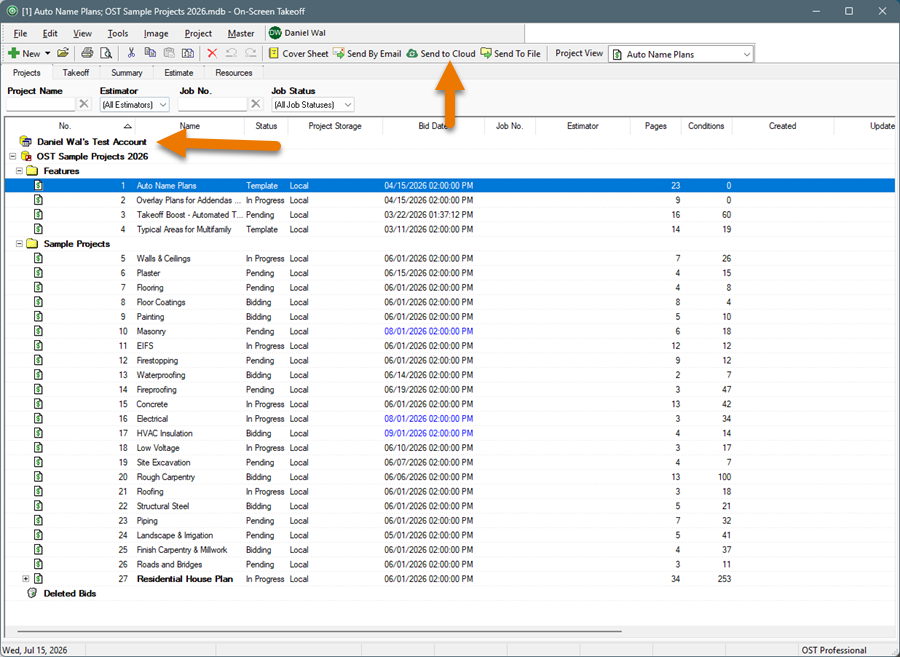
On-Screen Takeoff’s Projects Tab showing the new CloudShare feature
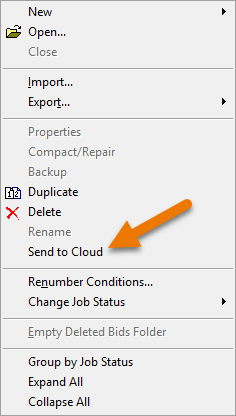
On-Screen Takeoff’s Projects Tab context menu showing the new Send to Cloud option
2026-07-16 v 4.0.0.859 (Split Linear and Area Tool Improvements, Unlimited Boost Pages)
This release improves the Split Linear and Split Area takeoff tools. After splitting a linear object, the tool remains active so estimators can continue working without repeatedly reselecting it. Split Area now supports polygonal splits in addition to a single linear split, providing more flexibility when adjusting irregular quantities. Takeoff BOOST Auto Takeoff can also run across an unlimited number of pages from one setup screen, rather than limiting users to five pages at a time. Together, these changes make revisions and large-plan processing less repetitive.
What’s New
Please see previous Release Notes, below, for more recently added Features and Improvements.
- Split Linear Takeoff Object: the tool remains active after splitting a linear object so you can continue to use it without re-selecting it from the toolbar or selecting a linear object first.
- Split Area Takeoff Object: you can draw polygonal splits in addition to a single linear split.
- See: On-Screen Takeoff - 09.02.01 Splitting Linear Segments and Area Takeoff Objects for more information
- Takeoff Boost’s Auto Takeoff Unlimited Number of Pages: you can now run Auto Takeoff on an unlimited number of Pages from one set up screen. See Running Auto Takeoff for more information.
2026-07-06 v4.0.0.821 (Maintenance Update)
This maintenance release adds banners showing the status of license and maintenance subscriptions. It also fixes several issues affecting estimating workflows, including blank Planroom information after an upgrade, page setup changes not being retained during printing, and missing Estimate Tab totals when columns were moved. Trial subscriptions now also display “Trial” in the subscription name. For estimators, the practical benefit is greater confidence that printed plans, estimate totals, upgraded databases, and subscription status accurately reflect the work being performed.
Changes
- New banners to let you know the status of your license and maintenance subscriptions.
Fixes
- TE-2440 - The Planroom sub tab (in the Takeoff Tab’s Conditions window) was blank after upgrading a database from a previous version of On-Screen Takeoff to 4.0.0.805.
- TE-3707 - Page Setup changes are not retained when printing from the Takeoff Tab.
- TE-4230 - The Total Row for the Labor ($), Mat ($), and Sub ($) columns on the Estimate Tab does not calculate if the column is moved. (This is how the Tab has worked since it was built, not a new bug.)
- TE-8888 - Trial subscriptions are not showing "Trial" in display name
2026-06-24 v4.0.0.805 (First Migration Build for Legacy Users)
This release is the first version made available to legacy On-Screen Takeoff customers who previously used License Keys and Server Codes. It includes several user-interface additions and serves as an important step for customers moving from the older licensing model toward the newer subscription-based experience. For a legacy estimator, the practical value is a clearer path to using current versions of the software instead of remaining on an older licensing system. The release was later replaced by version 4.0.0.821, which addressed additional post-release issues.
2026-06-05 v4.0.0.770 (Auto Count and Auto Link)
This release adds two AI-powered tools. Auto Count lets estimators select an item on a plan and locate every instance across up to five pages at a time. Auto Link creates Hot Links and Named Views between architectural and structural plans and their detail pages, reducing the time spent manually navigating related drawings. The release also introduces Takeoff BOOST Lite, which includes Auto Takeoff on five projects plus unlimited Auto Count and Auto Link usage for eligible Essential and Plus subscribers. The practical benefit is faster repetitive counting and quicker movement between connected plan details.
What’s New
Please see previous Release Notes, below, for more recently added Features and Improvements.
- All-new, AI-Powered Auto Count, select anything on your Plan and Auto Count locates every instance on up to 5 Pages at a time
- AI-Powered Auto Link, create Hot Links and Named Views between Architectural and Structural plans and their detail pages in seconds, not days
- Support for Takeoff Boost Lite - which includes use of Auto Takeoff on 5 Projects and unlimited use of Auto Count and Auto Link.
Takeoff Boost Lite is available to users on an Essential or Plus subscription.
Upgrade to Core or Professional subscription for unlimited use of Auto Takeoff.
Changes
- Takeoff Boost is now the overarching brand name for ConstructConnect’s AI-powered tools. What used to be called “Takeoff Boost” has been renamed “Auto Takeoff”. In On-Screen Takeoff, Takeoff Boost includes: Auto Takeoff, Auto Count, and Auto Link at this time. More features are planned for future updates.
2026-05-29 v.4.0.0737 (DPC Exports, Misc. Fixes)
This release adds the ability to send DPC Bid Package and DPC Change Files from On-Screen Takeoff. For estimators, these exports make it easier to move relevant bid and change information into Digital Production Control workflows, potentially reducing duplicate preparation between estimating and production teams. The update also improves Takeoff BOOST processing for concrete spread footings. Specifically, it fixes an issue where projects containing more than 100 pages could stall and fail to return results when using the Spreader Footings option. That makes large concrete takeoffs more dependable
What’s New
Please see previous Release Notes, below, for more recently added Features and Improvements.
- Ability to send DPC Bid Package and DPC Change Files
- Takeoff Boost update to improve Concrete spread footings processing
Fixes
- When using the new Spreader Footings option in Takeoff Boost, if a Project contained more than 100 Pages, it would stall and not return results.
2026-05-06 v4.0.0.628 (email/password login replaces License Keys/Server Codes)
This release replaces license-key and server-code activation with email-and-password login. For estimators, activation becomes easier because the email address associated with the ConstructConnect account serves as the license credential, eliminating the need to search for stored codes. The release also adds onboarding resources, consolidated menus for Account, Help, and Training, and a Resource Center designed to help users discover time-saving features. The goal is to help users move from reviewing plans to producing bids more quickly and confidently.
What’s New
Please see previous Release Notes, below, for more recently added Features and Improvements.
- Login to activate your takeoff license rather than entering in a license key or server code. No more trying to remember where you stored that e-mail from your manager with your license key/server code to activate On-Screen Takeoff Professional. Your e-mail address is your new license key. You should have received an e-mail from your manager inviting you to activate your account at ConstructConnect. Once you do that, download the new installer from this page and off you go! See Launching and Licensing the Application
- New onboarding resources to get your users up and running faster
- Consolidated menus to make it easier to find Account, Help, and Training resources, see Program Menus for details
- Resource Center Panel on the Takeoff Tab: customer feedback tells many users don’t know about a lot of the time-saving features and tools available to them in On-Screen Takeoff. We want you to get the most value out of your software investment, so we’re going to show you how to make your job easier, how to get takeoff done faster and more accurately than ever, and get from “reviewing plans” to “submitting a bid” in hours, not days or weeks
- Takeoff Boost update to support Concrete spread footings.
Changes
- You can now set the color for Named Views (and related Hot Links) using the color-picker next to the Named View button.

- Project Express has been replaced with CloudSync and is no longer available in On-Screen Takeoff.
